- Strona główna /
- Gry wideo /
- PC /
- Akcesoria /
- Gaming Keyboards /
- VSDINSIDE Macro Keypad, Stream Controller Dec...
0 ratings


Nr produktu:
219575296
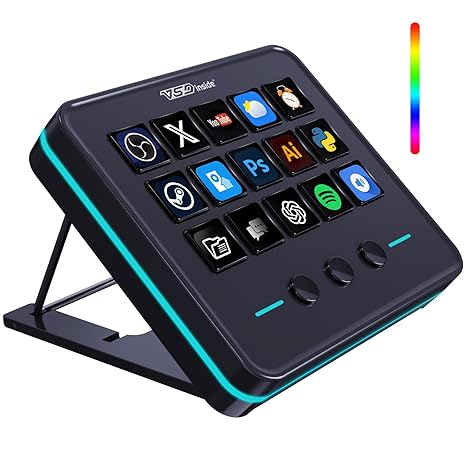
VSDINSIDE Macro Keypad, Stream Controller Deck Gaming Streaming Shortcut Keyboard, 18 Programmable Keys Customizable Visual AI Pad USB Soundboard for
Nr produktu:
219575296
PLN 273
Price Details
Excluding Shipping & Custom charges ( Shipping and custom charges will be calculated on checkout )
*All items will import from Stany Zjednoczone
0 ratings
Napisz recenzję
w magazynie
 Zaimportowano ze sklepu USA
Zamów teraz i otrzymaj około Wtorek, Lipiec 07
Bezpieczna transakcja
Ubuy dokłada wszelkich starań, aby chronić Twoje bezpieczeństwo i prywatność. Nasz zaawansowany system bezpieczeństwa płatności zapewnia poufność poprzez szyfrowanie Twoich danych podczas transmisji przy użyciu protokołów AES (Advanced Encryption Standards) i SSL (Secure Socket Layer). Twoje dane płatności są w 100% bezpieczne, ponieważ nie udostępniamy ich zewnętrznym sprzedawcom.
Nasi czołowi partnerzy logistyczni


Once you experience the VSDinside STREAMING DECK smart console, you’ll find live streaming is no longer possible without it.

Fast
Shipping

Free
Return*

Bezpieczne pakowanie

100% oryginalne produkty

PCI DSS Compliance

ISO 27001 Certified


Note: Step Down Voltage Transformer required for using electronics products of Stany Zjednoczone store (110-120). Recommended power converters Kup Teraz.


Co wyróżnia ten produkt
Customizable Keys
With 18 programmable keys, users can personalize shortcuts for gaming or streaming, enhancing their efficiency and productivity in various applications like OBS and YouTube.
Versatile Compatibility
The keypad is designed to work seamlessly with Windows, Mac, and Linux systems, making it an ideal accessory for a diverse range of users, from streamers to office professionals.
Compact Design
Its sleek and portable design fits perfectly on any desk setup, ensuring easy access to commands without cluttering the workspace, ideal for both home and office environments.
Szczegóły Produktu
Dla kogo jest przeznaczony?

-
Content Creators
Ideal for streamers and video creators who require quick access to various functions during live broadcasts.
-
Gamers
Perfect for gamers looking to enhance gameplay with customizable key setups for quick execution of commands.
-
Office Professionals
Useful for those in desk jobs needing macro shortcuts for improved productivity during repetitive tasks.

-
Casual Users
May not benefit casual users who do not require programmable keys or advanced features in their workflow.
-
Mobile Users
Not suitable for users who primarily work on the go, as its design is optimized for desk setups.
-
Heavy Typists
Not recommended for individuals focused on extensive typing, as it lacks standard keyboard functionality.
OPIS PRODUKTU
VSDINSIDE Macro Keypad, Stream Controller Deck Gaming Streaming Shortcut Keyboard, 18 Programmable Keys Customizable Visual AI Pad USB Soundboard for OBS, YouTube, Desk Office Setup, Laptop, PC, Mac
Masz jakieś zapytanie? Porozmawiaj z nami
Pytania i odpowiedzi klientów
-
pytanie:
What is the VSDINSIDE Macro Keypad used for?
odpowiedź: The VSDINSIDE Macro Keypad is designed for streamers, gamers, and content creators to streamline their workflow. With 18 programmable keys, users can customize shortcuts for various functions, enhancing productivity during live streaming and gaming sessions. This allows you to switch scenes, trigger sound effects, or execute complex commands at the touch of a button, enabling a smoother, more engaging viewer experience. -
pytanie:
Can the keys on the VSDINSIDE Macro Keypad be customized?
odpowiedź: Yes, the keys on the VSDINSIDE Macro Keypad are highly customizable. Users can program each of the 18 keys to perform specific actions or functions, tailored to their needs. This customization is particularly useful for streamers and gamers who require quick access to various controls such as switching graphics, adjusting audio levels, or activating macros, enhancing their interactive experience while gaming or streaming. -
pytanie:
Is the VSDINSIDE Macro Keypad compatible with multiple operating systems?
odpowiedź: Absolutely, the VSDINSIDE Macro Keypad is designed to be compatible with various operating systems, including Windows and Mac OS. This versatility allows users from different backgrounds to incorporate the keypad into their existing setups. Whether you’re using it for gaming, streaming, or creative tasks, having a keypad that works across platforms makes it an excellent addition to your toolkit. -
pytanie:
How does the Visual AI feature work in the VSDINSIDE Macro Keypad?
odpowiedź: The Visual AI feature in the VSDINSIDE Macro Keypad provides a dynamic and interactive interface for users. It allows for visual customization where users can assign images and icons to keys, making it easier to identify functions during use. This feature is particularly beneficial during high-pressure situations like live streaming, where quick recognition of commands can significantly enhance workflow and performance. -
pytanie:
What are some practical uses for the VSDINSIDE Macro Keypad?
odpowiedź: The VSDINSIDE Macro Keypad boasts a range of practical uses, making it a versatile tool. Streamers can use it to change scenes or trigger effects, gamers may employ it to execute complex combos quickly, while content creators can utilize it for shortcuts in video editing software. The versatility of the keypad makes it a valuable tool across various digital environments, boosting productivity and enhancing the user experience. -
pytanie:
Is the VSDINSIDE Macro Keypad portable?
odpowiedź: Yes, the VSDINSIDE Macro Keypad is designed with portability in mind. Its compact size makes it easy to fit into a backpack or laptop bag, making it convenient for on-the-go use. This portability means you can take your macro keypad to gaming tournaments, streaming events, or collaborative projects, ensuring you have your customized setup available whenever you need it. -
pytanie:
What type of connectivity does the VSDINSIDE Macro Keypad use?
odpowiedź: The VSDINSIDE Macro Keypad connects via USB, ensuring a reliable and fast connection to your computer or laptop. The USB connectivity allows for a plug-and-play setup, meaning you can start using it almost immediately without the need for any special software installations. This straightforward approach makes it accessible to both beginners and experienced users alike. -
pytanie:
Can I use the VSDINSIDE Macro Keypad with my gaming console?
odpowiedź: The VSDINSIDE Macro Keypad is primarily designed for use with computers and may not be directly compatible with gaming consoles. However, if your console supports USB input and allows for keyboard accessory setups, it may work in limited scenarios. Users looking for console compatibility should verify their specific gaming console's ability to recognize external keyboards for macro functions. -
pytanie:
What is required to set up the VSDINSIDE Macro Keypad?
odpowiedź: Setting up the VSDINSIDE Macro Keypad is straightforward. You simply connect the keypad to a USB port on your computer or laptop. Once connected, you can use software provided or compatible applications to configure the keys as per your requirements. This setup process allows for quick customization to match your gaming or streaming needs, enabling you to optimize your workflow efficiently. -
pytanie:
Where can I buy the VSDINSIDE Macro Keypad in Poland?
odpowiedź: You can buy the VSDINSIDE Macro Keypad at Ubuy, a reliable online shopping platform that offers a variety of electronics and gadgets. Ubuy provides a user-friendly interface and secure payment options, making it easy for customers in Poland to purchase tech products like the Macro Keypad. Additionally, they often provide detailed product descriptions and reviews, helping you make informed decisions.
VSDINSIDE Gaming Keyboards Editorial Review
The macro keypad has garnered a glowing reception among users, particularly those in the trading, gaming, and content creation fields. Customers have highlighted its versatility, noting that it serves well beyond streaming applications; many report using it for a variety of computer tasks such as launching folders, executing shortcuts, and streamlining repetitive actions. The standout feature that users rave about is its ability to automatically switch profiles based on which application is open, providing a customized experience without the hassle of manual adjustments. This level of automation enhances workflow efficiency, making it an exceptional tool for video editing and gaming alike. Users have found the setup process to be quick and intuitive, allowing them to hit the ground running within minutes of unboxing. Customization options appear to be a major selling point, as reviewers appreciate the ability to change iCons on the keys and set up macros. The provision for different profiles and the flexibility to leave buttons unmapped until they are needed seems to alleviate potential overwhelm during setup. The physical design, particularly the stand, has also been well-received for its stability and ergonomic angle, preventing it from sliding during use. Overall, many users feel that this macro keypad represents outstanding value given its price, encouraging both new users and experienced tech enthusiasts to invest in it as a productivity tool. **
Opinie i oceny klientów
1 oceny klientów
-
5 gwiazdka
100%
-
4 gwiazdka
0%
-
3 gwiazdka
0%
-
2 gwiazdka
0%
-
1 gwiazdka
0%
Zrecenzuj ten produkt
Podziel się opinią z innymi klientami
Zalety
- Versatile for multiple tasks beyond streaming
- Automatic profile switching based on active applications
- Quick and intuitive setup process
- Extensive customization options for iCons and macros
- Stable physical design with an adjustable stand
- Great value for the price
Wady
- Some users experienced initial challenges with configuration
Historia ceny produktu
Ważne informacje
- Ograniczenia: W przypadku produktów wysyłanych za granicę należy pamiętać, że wszelkie gwarancje producenta mogą być nieważne; opcje serwisowe producenta mogą być niedostępne; instrukcje obsługi produktów, podręczniki i ostrzeżenia dotyczące bezpieczeństwa mogą nie być dostępne w języku kraju docelowego; produkty (i materiały towarzyszące) mogą nie spełniać norm wykonania, specyfikacji i wymogów dotyczących oznaczeń kraju docelowego; produkty mogą nie spełniać standardów dotyczących napięcia i innych norm elektrycznych kraju docelowego (co w stosownych przypadkach wymaga użycia adaptera lub konwertera). Odbiorca jest odpowiedzialny za sprawdzenie, czy produkt może zostać legalnie zaimportowany do kraju docelowego. W przypadku zamawiania produktów w sklepie Ubuy lub u jego partnerów odbiorca jest oficjalnie zgłoszonym importerem i musi spełniać wszystkie wymogi przepisów oraz regulacji kraju docelowego.
- Nie wszystkie produkty znajdujące się na Ubuy są na sprzedaż, ponieważ Ubuy to globalna wyszukiwarka. Produkty podlegają przepisom eksportowym/handlowym.
PLN 273
Zamów teraz i otrzymaj około Wtorek, Lipiec 07
Ten produkt nie jest ograniczony w moim kraju. (Kliknij powyższy link, jeśli ten produkt nie jest ograniczony w Twoim kraju, aby nasz zespół sprawdził i zezwolił na jego sprzedaż).
QTY:
Bezpieczna transakcja
Ubuy dokłada wszelkich starań, aby chronić Twoje bezpieczeństwo i prywatność. Nasz zaawansowany system bezpieczeństwa płatności zapewnia poufność poprzez szyfrowanie Twoich danych podczas transmisji przy użyciu protokołów AES (Advanced Encryption Standards) i SSL (Secure Socket Layer). Twoje dane płatności są w 100% bezpieczne, ponieważ nie udostępniamy ich zewnętrznym sprzedawcom.
Nasi czołowi partnerzy logistyczni
Fastest cross-border delivery
Cechy i zalety
- Transform your streaming experience with the VSDinside Streaming Deck.
- Enjoy 10x faster streaming setup and seamless live management.
- Customize 18 macro keys for your specific workflow needs.
- One-click command for sound effects and media control enhances efficiency.
- RGB light ring creates an engaging desktop atmosphere.
- Perfect for gamers, streamers, and content creators striving for peak performance.