- Strona główna /
- Elektronika /
- Computer Accessories /
- Computer Accessories & Peripherals /
- Cables & Accessories /
- Cables & Interconnects /
- USB Cables /
- EEEKit 2 Port USB 2.0 Manual Sharing Switch H...
0 ratings




Nr produktu:
4999500
EEEKit 2 Port USB 2.0 Manual Sharing Switch Hub, Printer Scanner Splitter Adapter with 2 Pack USB A to B Cables
Nr produktu:
4999500
PLN 114
Szczegóły ceny
Excluding Shipping & Custom charges ( Shipping and custom charges will be calculated on checkout )
*All items will import from Stany Zjednoczone
0 ratings
Napisz recenzję
W magazynie
 Zaimportowano ze sklepu USA
Zamów teraz i otrzymaj około Sobota, Sierpień 15
Bezpieczna transakcja
Ubuy dokłada wszelkich starań, aby chronić Twoje bezpieczeństwo i prywatność. Nasz zaawansowany system bezpieczeństwa płatności zapewnia poufność poprzez szyfrowanie Twoich danych podczas transmisji przy użyciu protokołów AES (Advanced Encryption Standards) i SSL (Secure Socket Layer). Twoje dane płatności są w 100% bezpieczne, ponieważ nie udostępniamy ich zewnętrznym sprzedawcom.
Nasi czołowi partnerzy logistyczni


The EEEKit Bundle for Printer Switch allows you to share a USB device between two computers, making it a convenient and cost-effective solution for home or office use.

Szybka
wysyłka

Bezpłatny
zwrot*

Bezpieczne pakowanie

100% oryginalne produkty

Zgodność z PCI DSS

Certyfikat ISO 27001


Note: Step Down Voltage Transformer required for using electronics products of Stany Zjednoczone store (110-120). Recommended power converters Kup Teraz.


Co wyróżnia ten produkt
Manual Switching
Allows users to effortlessly switch between two PCs for printer access, eliminating the need for complex software or setup, enhancing usability in home or office environments.
USB 2.0 Compatibility
Supports USB 2.0 for fast and reliable data transfer, ensuring efficient scanning and printing without latency issues, suitable for both personal and professional tasks.
Complete Bundle
Includes two USB A to B printer cables, providing everything needed for immediate setup and use, offering excellent value and convenience for users looking to streamline their printing workflow.
Szczegóły Produktu
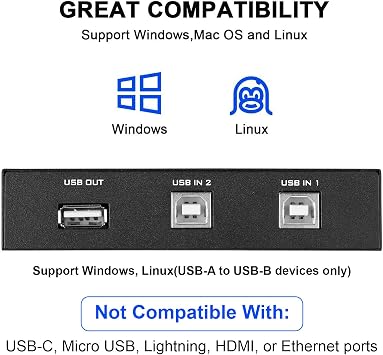
- Wide compatibility with printers, scanners, external hard drives, projectors, cameras, hubs, and keyboards with USB-A ports
- Cost-saving device that allows 2 computers to access USB-compatible devices
- Easy installation with plug and play, push button switch, and no external power supply required
- Includes 2 Port USB 2.0 Sharing Switch Box and 2 high-speed multi-shielded USB 2.0 A-Male to B-Male cables (5 Feet each)
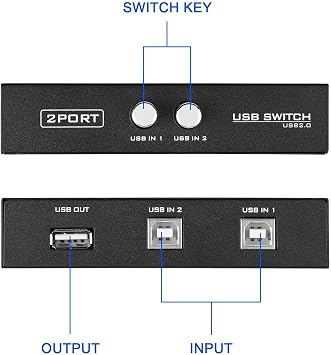
- Allows 2 computers to access one single USB compliant device with each button to control each port
- USB 2.0 compliant and supports DOS, Windows 7 8 10, Win95/98/98SE/2000/ME/XP, WinNT
| Hardware Interface | USB, USB 2.0 |
| Additional Features | Powered |
| Compatible Devices | PC, Printers, Projectors, Scanners |
| Total Usb Ports | 2 |
| Data Transfer Rate | 480 megabits_per_second |
| Number of Ports | 2 |
| Operating System | Windows 10, Windows 7 |
| Color | Black |
| Enclosure Material | Polycarbonate |
| Brand | EEEKit |
| Manufacturer | EEEKit |
| UPC | 700580736831 715444590054 |
| Number of Items | 1 |
| Model Number | 772116 |
| Mfr Part Number | B070020-E004934587FBA |
| Special Feature | Powered |
| Item Weight | 0.5 lbs (230 grams) |
Dla kogo jest przeznaczony?

-
Small Office Use
Ideal for small offices with multiple computers sharing a single printer or scanner for cost-saving solutions.
-
Home Office Setup
Perfect for remote workers needing a simple way to switch between two PCs using one printer.
-
Students' Needs
Great for students using shared printers in dorm rooms or study areas to minimize equipment footprint.

-
High-Volume Printing
Not suitable for environments requiring heavy printing, as manual switching could disrupt workflow efficiency.
OPIS PRODUKTU
Masz pytania? Porozmawiaj z nami
Pytania i odpowiedzi klientów
-
pytanie:
What is the main function of the EEEKit 2 Port USB 2.0 Manual Printer Scanner Sharing Switch Hub?
odpowiedź: The primary function of the EEEKit 2 Port USB 2.0 Manual Printer Scanner Sharing Switch Hub is to allow two different computers to share a single USB printer or scanner. This is particularly useful in home offices or small businesses, where resources need to be optimized. With a simple switch, users can toggle between the two connected PCs, ensuring both can access the same printer or scanner without the hassle of constantly plugging and unplugging cables. -
pytanie:
How do you set up the EEEKit USB switch hub?
odpowiedź: Setting up the EEEKit USB switch hub is straightforward. Simply connect the USB B end of the provided cables to your printer or scanner, and the USB A ends to the two computers. Then, use the manual switch on the hub to choose which PC you want to access the printer or scanner. This setup enables quick and efficient swapping, making it ideal for shared workspaces where multiple users need to print or scan documents. -
pytanie:
Is any software required to use the EEEKit sharing switch hub?
odpowiedź: No, the EEEKit 2 Port USB sharing switch hub operates without any software installation. It is a plug-and-play device, which means once it’s physically connected to your printer/scanner and computers, it will work immediately upon switching. This feature makes it highly convenient and user-friendly for individuals who might not be tech-savvy and want to avoid complicated setups. -
pytanie:
Can I connect more than two computers to the EEEKit hub?
odpowiedź: The EEEKit 2 Port USB switch hub is designed specifically for two computers to connect to one printer or scanner. While you cannot directly connect more than two computers, you can use additional USB hubs or splitters to expand your setup. However, this may complicate the operation and is not recommended for optimal performance since the hub is built for straightforward two-PC sharing. -
pytanie:
Which devices are compatible with the EEEKit switch hub?
odpowiedź: The EEEKit switch hub is compatible with most USB printers and scanners that utilize USB 2.0 connections. This includes a wide range of popular brands, ensuring that users can rely on the hub for their everyday printing and scanning needs. If you have a device that fits this description, it is likely to work seamlessly with the switch hub. -
pytanie:
What are the benefits of using a USB sharing switch hub?
odpowiedź: Using a USB sharing switch hub like the EEEKit offers various benefits, such as saving space and reducing clutter by eliminating the need for multiple printers or scanners. It streamlines operations in shared environments, making it easier for multiple users to access a single device without interruptions or downtime. It also contributes to cost efficiency by allowing users to share resources effectively. -
pytanie:
What is included in the EEEKit switch hub package?
odpowiedź: The EEEKit switch hub package typically includes the USB sharing switch hub itself and two USB A to B cables. These cables enable immediate connection to your printer or scanner and your computers, ensuring you have everything you need to get started with sharing functionality right out of the box. Keep in mind to verify if any additional accessories are required for your specific setup. -
pytanie:
Is there a power supply needed for the EEEKit switch hub?
odpowiedź: No separate power supply is needed for the EEEKit 2 Port USB switch hub. It operates solely on the power supplied through the USB connections to the computers and the printer/scanner. This makes it highly portable and convenient for on-the-go users who require a simple solution without additional power needs, enhancing its usability in various work environments. -
pytanie:
What should I do if the switch hub is not working?
odpowiedź: If the EEEKit switch hub is not functioning correctly, first check all physical connections to ensure they are secure. Disconnect and reconnect the USB cables, and verify that the printer or scanner is powered and functional. Additionally, confirm that you've selected the correct PC using the manual switch. If the issue persists, testing with different USB ports or devices can help isolate the problem. -
pytanie:
Where can I buy the EEEKit 2 Port USB 2.0 Manual Printer Scanner Sharing Switch Hub?
odpowiedź: You can purchase the EEEKit 2 Port USB 2.0 Manual Printer Scanner Sharing Switch Hub on Ubuy, which offers a wide range of electronic products. Ubuy provides a convenient platform for users in Poland to find and order this device, ensuring you receive it directly at your doorstep with a secure shopping experience.
EEEKit USB Cables 772116 Editorial Review


The USB 2.0 Printer Sharing Switch is an easy-to-use device that allows you to switch one printer between two computers. The unit measures approximately 4.5 inches long by 3 inches wide (including buttons) by 1 inch high. This product is commonly used to share printers between computers but it can also switch between mice and other devices. The customer experience and reception of the product are varied. Positive feedback regards the ease of use, high quality, fast shipping, and compatibility with different operating systems. Negative feedback concerns the cheapness of the Chinese-made hardware, poor quality of connectors and cables that disconnect at the slightest touch or do not seat reliably, and manufacturing defects that cause the device to work inconsistently or to stop working after the 30-day return window.
Opinie i oceny klientów
1231 oceny klientów
-
5 gwiazdka
76%
-
4 gwiazdka
11%
-
3 gwiazdka
5%
-
2 gwiazdka
2%
-
1 gwiazdka
6%
Zrecenzuj ten produkt
Podziel się opinią z innymi klientami
Zalety
- Easy-to-use device
- Can switch one printer between two computers
- Can switch between other devices
- Compatible with different operating systems
- Fast shipping
Wady
- Poor quality of connectors and cables
Zaufanie do platformy i bezpieczeństwo kupujących

MA
Mohammad
Zweryfikowany kupujący
“Excellent quality and original too,when ubuy send original things I will appreciate that ,I very satisfied thank you”
23 July 2026 · via Trustpilot
CK
Chitra
Zweryfikowany kupujący
“The order and delivery progress was communicated very well. Package arrived within the estimated time. Products arrived as expected in good condition.”
22-Jul-26 · via Trustpilot
K
kund
Zweryfikowany kupujący
“Good supply of products. Safe payment methods, and shipment worldwide! Genuine products.”
23-Jul-26 · via Trustpilot
OO
Onesi
Zweryfikowany kupujący
“Was my first time buying a product from Ubuy, but I found it so helpful. This is reliable. Gonna place a new order!”
22 July 2026 · via Trustpilot
SJ
SAO JOHN
Zweryfikowany kupujący
“Ubuy is a great online platform to buy stuff. Reliable, fast delivery time and great value for money. I've been using Ubuy online shopping platform for three years now and will continue to do so.”
23 July 2026 · via Trustpilot
Bezpieczna realizacja zamówienia
Dostawa na cały świat
Łatwe zwroty
Oryginalne produkty
Historia ceny produktu
Ważne informacje
- Ograniczenia: W przypadku produktów wysyłanych za granicę należy pamiętać, że wszelkie gwarancje producenta mogą być nieważne; opcje serwisowe producenta mogą być niedostępne; instrukcje obsługi produktów, podręczniki i ostrzeżenia dotyczące bezpieczeństwa mogą nie być dostępne w języku kraju docelowego; produkty (i materiały towarzyszące) mogą nie spełniać norm wykonania, specyfikacji i wymogów dotyczących oznaczeń kraju docelowego; produkty mogą nie spełniać standardów dotyczących napięcia i innych norm elektrycznych kraju docelowego (co w stosownych przypadkach wymaga użycia adaptera lub konwertera). Odbiorca jest odpowiedzialny za sprawdzenie, czy produkt może zostać legalnie zaimportowany do kraju docelowego. W przypadku zamawiania produktów w sklepie Ubuy lub u jego partnerów odbiorca jest oficjalnie zgłoszonym importerem i musi spełniać wszystkie wymogi przepisów oraz regulacji kraju docelowego.
- Nie wszystkie produkty znajdujące się na Ubuy są na sprzedaż, ponieważ Ubuy to globalna wyszukiwarka. Produkty podlegają przepisom eksportowym/handlowym.
PLN 114
Zamów teraz i otrzymaj około Sobota, Sierpień 15
Ten produkt nie jest ograniczony w moim kraju. (Kliknij powyższy link, jeśli ten produkt nie jest ograniczony w Twoim kraju, aby nasz zespół sprawdził i zezwolił na jego sprzedaż).
Ilość:
Bezpieczna transakcja
Zgodność z PCI DSS oraz certyfikat ISO 27001:2022, szyfrowane płatności i pełna ochrona kupującego przy każdym zamówieniu.
Nasi czołowi partnerzy logistyczni
Najszybsza dostawa międzynarodowa
Cechy i zalety
- Share a USB device between two computers
- Compatible with USB 2.0/1.1/1.0
- No external power required
- Includes 2 USB A to B cables
- Easy to use with individual buttons
- Ideal for home or office use
Gwarancja Ubuy
Ciesz się bezstresowymi zakupami dzięki 100% oryginalnym produktom, bezpieczeństwu płatności zgodnemu z PCI DSS, ochronie danych z certyfikatem ISO 27001, najszybszej dostawie międzynarodowej, bezpłatnym zwrotom* oraz bezpiecznemu pakowaniu przy każdym zamówieniu.