0 ratings


Nr produktu:
245584665
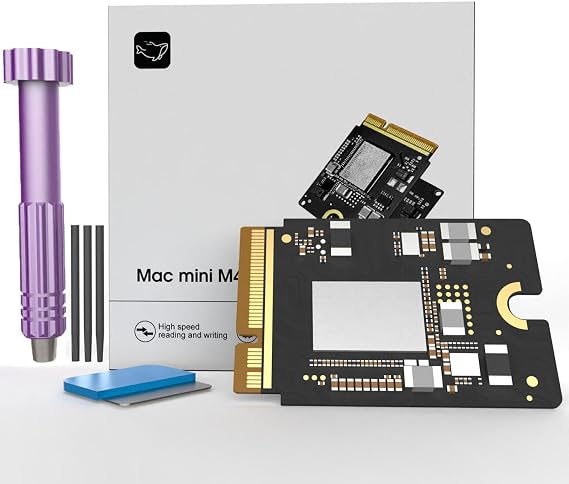
Mac mini M4 SSD 1TB, Hard Disk Storage Upgrade for Mac mini M4
88% klientów poleciłoby ten produkt znajomym
Nr produktu:
245584665
PLN 1429
Szczegóły ceny
Bez kosztów wysyłki i cła ( Koszty wysyłki i cła zostaną obliczone przy finalizacji zamówienia )
*Wszystkie produkty zostaną zaimportowane z Stany Zjednoczone
0 ratings
Napisz recenzję
W magazynie
 Zaimportowano ze sklepu USA
Zamów teraz i otrzymaj około Monday, Wrzesień 07
Bezpieczna transakcja
Ubuy dokłada wszelkich starań, aby chronić Twoje bezpieczeństwo i prywatność. Nasz zaawansowany system bezpieczeństwa płatności zapewnia poufność poprzez szyfrowanie Twoich danych podczas transmisji przy użyciu protokołów AES (Advanced Encryption Standards) i SSL (Secure Socket Layer). Twoje dane płatności są w 100% bezpieczne, ponieważ nie udostępniamy ich zewnętrznym sprzedawcom.
Nasi czołowi partnerzy logistyczni


Expand your Mac mini M4 storage with our 1TB SSD, boasting read/write speeds of up to 3300 MB/s for lightning-fast performance!

Szybka
wysyłka

Bezpłatny
zwrot*

Bezpieczne pakowanie

100% oryginalne produkty

Zgodność z PCI DSS

Certyfikat ISO 27001






Note: Step Down Voltage Transformer required for using electronics products of Stany Zjednoczone store (110-120). Recommended power converters Kup Teraz.


Co wyróżnia ten produkt
High-Speed Performance
Experience lightning-fast data access and transfer speeds with the 1TB SSD, significantly improving overall system performance compared to standard hard drives.
User-Friendly Upgrade
Easily upgrade your Mac Mini M4 with this SSD, providing a hassle-free solution to enhance storage capacity without professional assistance.
Reliable Durability
Designed for longevity, this SSD offers superior resilience against shocks and vibrations, ensuring your data remains safe and secure over time.
Szczegóły Produktu
| Digital Storage Capacity | 1 TB |
| Hard Disk Interface | eSATA |
| Connectivity Technology | Thunderbolt |
| Additional Features | Data Recovery Service |
| Hard Disk Form Factor | 2.5 inches (6.4 cm) |
| Compatible Devices | Macmini M4 |
| Specific Uses For Product | Personal |
| Read Speed | 3300 megabytes_per_second |
| Media Speed | 3300 megabytes_per_second |
| Data Transfer Rate | 3300 megabits_per_second |
| Form Factor | 2.5-inch (6.4 cm) |
| Hardware Connectivity | Thunderbolt |
| Installation Type | Internal Hard Drive |
| Enclosure Material | Nand Flash |
| Brand | Zinweyton |
| Model Number | AD-AU |
| Hard Disk Description | Solid State Drive |
| Built-In Media | 1 |
| Model Name | AD-AU |
| Manufacturer | Zinweyton |
| Hard-Drive Size | 1 TB |
| Number of Items | 1 |
| Unit Count | 1 Count |
| Customer Package Type | Standard Packaging |
| Special Feature | Data Recovery Service |
| Hard Disk Size | 1 TB |
| Item Weight | 0.5 lbs (230 grams) |
Dla kogo jest przeznaczony?

-
Creative Professionals
Ideal for designers and video editors requiring fast data access and large storage for high-resolution projects.
-
Gamers
A perfect choice for gamers needing quick load times and ample space for games and media files.
-
Home Office Users
Great for remote workers who need reliable performance and sufficient storage for work documents and applications.

-
Basic Users
Not ideal for casual users who only need minimal storage and basic functionality from their devices.
OPIS PRODUKTU
Mac mini M4 SSD 1TB, Hard Disk Storage Upgrade for Mac mini M4
Masz pytania? Porozmawiaj z nami
Pytania i odpowiedzi klientów
-
pytanie:
What are the benefits of upgrading to a 1TB SSD for my Mac mini?
odpowiedź: Upgrading to a 1TB SSD significantly enhances your Mac mini's performance. The increased storage capacity allows you to store more applications, files, and media without worrying about running out of space. Additionally, SSDs provide faster read and write speeds compared to traditional hard drives, resulting in quicker boot times, application launches, and file transfers. This upgrade is particularly beneficial for users working with large files or demanding applications, such as video editing software or graphic design programs. -
pytanie:
Is the M4 Macmini 1TB SSD compatible with my Mac mini model?
odpowiedź: The M4 Macmini 1TB SSD is designed for specific Mac mini models. Before making a purchase, it’s crucial to verify compatibility with your Mac mini version. You can typically find compatibility information in the product specifications or by checking Apple’s official documentation. Ensuring that the SSD matches your system's model will guarantee optimal performance and reliability post-installation, allowing you to take full advantage of the storage upgrade. -
pytanie:
Can I install the 1TB SSD myself, or will I need professional help?
odpowiedź: Yes, the M4 Macmini 1TB SSD is designed for DIY installation, making it accessible for users with basic technical skills. The process typically involves opening the Mac mini case, replacing the current hard drive with the SSD, and securely reassembling the unit. Installation guides and video tutorials are often available online to assist you through each step. However, if you're uncomfortable performing the upgrade yourself, seeking help from a professional technician is always an option. -
pytanie:
What tools do I need to install the M4 Macmini 1TB SSD?
odpowiedź: To install the M4 Macmini 1TB SSD, you'll need a few basic tools. Typically, a Torx screwdriver set and a spudger tool are essential for opening the Mac mini and safely removing the existing hard drive. Additionally, you may require an ESD strap to prevent static damage to internal components. Preparing these tools before starting the installation process will help ensure a smooth and safe upgrade experience, allowing you to focus on the task at hand. -
pytanie:
Will upgrading to a 1TB SSD improve gaming performance on my Mac mini?
odpowiedź: Absolutely, upgrading to a 1TB SSD can enhance gaming performance on your Mac mini. SSDs provide faster data access, which translates to quicker load times for games and smoother gameplay. This enhancement is particularly evident in titles requiring substantial assets or textures. Players should notice an overall improvement in the gaming experience, enabling more fluid transitions and less lag during gameplay. -
pytanie:
What precautions should I take before installing the M4 Macmini SSD?
odpowiedź: Before installing the M4 Macmini SSD, it’s essential to back up all important data to avoid data loss. Additionally, you should ensure your workspace is well-lit and free from static electricity to protect your Mac mini’s internal components. Take your time to understand the installation process through manuals or guides, and prepare all necessary tools beforehand. Following these precautions will promote a successful upgrade and help maintain the integrity of your device. -
pytanie:
Can I use the M4 Macmini 1TB SSD for booting macOS?
odpowiedź: Yes, the M4 Macmini 1TB SSD is suitable for booting macOS. In fact, installing macOS on an SSD can lead to notable improvements in system responsiveness and performance. After installation, you can easily configure the new SSD as your startup disk through system preferences. This setup allows for faster boot times, allowing you to start working more quickly and efficiently. -
pytanie:
What is the expected lifespan of an SSD compared to a traditional hard drive?
odpowiedź: SSDs, including the M4 Macmini 1TB SSD, generally offer a longer lifespan than traditional hard drives. With no moving parts, SSDs are less prone to mechanical failure, making them more durable. While the actual lifespan varies based on usage, typically, SSDs can last many years while providing consistent speed and performance. This longevity makes them an excellent investment for users seeking reliable storage solutions. -
pytanie:
What format should I use to initialize my new SSD after installation?
odpowiedź: After installing the M4 Macmini 1TB SSD, it is recommended to initialize it in the APFS format. This file system is optimized for SSDs and provides improved efficiency for macOS. To format the drive, you can use the Disk Utility application available in macOS. Choosing the right format ensures your SSD operates smoothly and takes full advantage of its performance capabilities, helping you achieve optimal results. -
pytanie:
Where can I buy the 2025 M4 Macmini 1TB SSD Storage Upgrade Internal Hard Disk for Mac mini in Poland?
odpowiedź: You can purchase the 2025 M4 Macmini 1TB SSD Storage Upgrade Internal Hard Disk for Mac mini at Ubuy. They offer a wide range of products, including this SSD upgrade, ensuring convenience in your shopping experience. Ubuy is known for its reliable service and can help you find the right components for your Mac mini.
Zinweyton Internal Components AD-AU Editorial Review
Mac mini M4 SSD 1TB, Hard Disk Storage Upgrade for Mac mini M4 offers users a reliable and significant performance boost with a storage capacity of 1 TB. This internal SSD boasts impressive read speeds of up to 3300 MB/s, ensuring fast data access and transfer. Users have found the installation process straightforward, especially with available online guides, and the drive functions seamlessly once installed, resembling the original Apple SSD. A consideration is that you may need a separate Mac to restore macOS after installation, which some find important. Feedback highlights the cost-effectiveness of this upgrade compared to Apple’s offerings, making it a favored choice among Mac mini M4 users.
Opinie i oceny klientów
1 oceny klientów
-
5 gwiazdka
100%
-
4 gwiazdka
0%
-
3 gwiazdka
0%
-
2 gwiazdka
0%
-
1 gwiazdka
0%
Zrecenzuj ten produkt
Podziel się opinią z innymi klientami
Zalety
- Easy installation with online guides available
- Impressive read speeds of 3300MB/s
- Cost-effective compared to Apple upgrades
- Resembles original Apple SSD aesthetics
- Includes all necessary installation tools
Wady
- Requires another Mac for macOS restoration
Zaufanie do platformy i bezpieczeństwo kupujących

MA
Mohammad
Zweryfikowany kupujący
“Excellent quality and original too,when ubuy send original things I will appreciate that ,I very satisfied thank you”
23 July 2026 · via Trustpilot
CK
Chitra
Zweryfikowany kupujący
“The order and delivery progress was communicated very well. Package arrived within the estimated time. Products arrived as expected in good condition.”
22-Jul-26 · via Trustpilot
K
kund
Zweryfikowany kupujący
“Good supply of products. Safe payment methods, and shipment worldwide! Genuine products.”
23-Jul-26 · via Trustpilot
OO
Onesi
Zweryfikowany kupujący
“Was my first time buying a product from Ubuy, but I found it so helpful. This is reliable. Gonna place a new order!”
22 July 2026 · via Trustpilot
SJ
SAO JOHN
Zweryfikowany kupujący
“Ubuy is a great online platform to buy stuff. Reliable, fast delivery time and great value for money. I've been using Ubuy online shopping platform for three years now and will continue to do so.”
23 July 2026 · via Trustpilot
Bezpieczna realizacja zamówienia
Dostawa na cały świat
Łatwe zwroty
Oryginalne produkty
Historia ceny produktu
Ważne informacje
- Ograniczenia: W przypadku produktów wysyłanych za granicę należy pamiętać, że wszelkie gwarancje producenta mogą być nieważne; opcje serwisowe producenta mogą być niedostępne; instrukcje obsługi produktów, podręczniki i ostrzeżenia dotyczące bezpieczeństwa mogą nie być dostępne w języku kraju docelowego; produkty (i materiały towarzyszące) mogą nie spełniać norm wykonania, specyfikacji i wymogów dotyczących oznaczeń kraju docelowego; produkty mogą nie spełniać standardów dotyczących napięcia i innych norm elektrycznych kraju docelowego (co w stosownych przypadkach wymaga użycia adaptera lub konwertera). Odbiorca jest odpowiedzialny za sprawdzenie, czy produkt może zostać legalnie zaimportowany do kraju docelowego. W przypadku zamawiania produktów w sklepie Ubuy lub u jego partnerów odbiorca jest oficjalnie zgłoszonym importerem i musi spełniać wszystkie wymogi przepisów oraz regulacji kraju docelowego.
- Nie wszystkie produkty znajdujące się na Ubuy są na sprzedaż, ponieważ Ubuy to globalna wyszukiwarka. Produkty podlegają przepisom eksportowym/handlowym.
PLN 1429
Zamów teraz i otrzymaj około Monday, Wrzesień 07
Ten produkt nie jest ograniczony w moim kraju. (Kliknij powyższy link, jeśli ten produkt nie jest ograniczony w Twoim kraju, aby nasz zespół sprawdził i zezwolił na jego sprzedaż).
Ilość:
Bezpieczna transakcja
Zgodność z PCI DSS oraz certyfikat ISO 27001:2022, szyfrowane płatności i pełna ochrona kupującego przy każdym zamówieniu.
Nasi czołowi partnerzy logistyczni
Najszybsza dostawa międzynarodowa
Cechy i zalety
- Perfect compatibility with Mac mini M4 for easy installation.
- Fully tested for reliability and consistent performance without speed drops.
- Offers 1TB capacity to store more photos, videos, documents, and apps.
- High-speed performance with read/write speeds of up to 3300 MB/s.
- Improves computer startup time and application launch speeds.
- Enhance your digital experience with efficient file transfer capabilities.
Gwarancja Ubuy
Ciesz się bezstresowymi zakupami dzięki 100% oryginalnym produktom, bezpieczeństwu płatności zgodnemu z PCI DSS, ochronie danych z certyfikatem ISO 27001, najszybszej dostawie międzynarodowej, bezpłatnym zwrotom* oraz bezpiecznemu pakowaniu przy każdym zamówieniu.