- Strona główna /
- Książki /
- Komputery i technologia /
- Programming /
- Microsoft Programming /
- VBA /
- Mastering Excel VBA Programming: A Hands-On G...
0 ratings




Nr produktu:
117098142
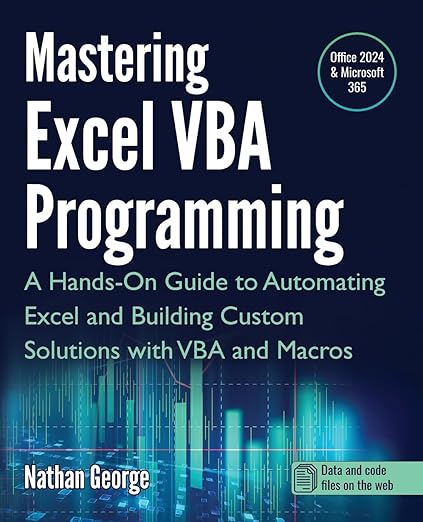
Mastering Excel VBA Programming: A Hands-On Guide to Automating Excel and Building Custom Solutions with VBA and Macros
87% klientów poleciłoby ten produkt znajomym
Nr produktu:
117098142
PLN 183
Szczegóły ceny
Bez kosztów wysyłki i cła ( Koszty wysyłki i cła zostaną obliczone przy finalizacji zamówienia )
*Wszystkie produkty zostaną zaimportowane z Stany Zjednoczone
W magazynie
 Zaimportowano ze sklepu USA
Zamów teraz i otrzymaj około Piątek, Wrzesień 11
Bezpieczna transakcja
Ubuy dokłada wszelkich starań, aby chronić Twoje bezpieczeństwo i prywatność. Nasz zaawansowany system bezpieczeństwa płatności zapewnia poufność poprzez szyfrowanie Twoich danych podczas transmisji przy użyciu protokołów AES (Advanced Encryption Standards) i SSL (Secure Socket Layer). Twoje dane płatności są w 100% bezpieczne, ponieważ nie udostępniamy ich zewnętrznym sprzedawcom.
Nasi czołowi partnerzy logistyczni


This book will teach you how to use the power of VBA to create sophisticated Excel solutions in a step-by-step approach.

Szybka
wysyłka

Bezpłatny
zwrot*

Bezpieczne pakowanie

100% oryginalne produkty

Zgodność z PCI DSS

Certyfikat ISO 27001






Note: Step Down Voltage Transformer required for using electronics products of Stany Zjednoczone store (110-120). Recommended power converters Kup Teraz.


Co wyróżnia ten produkt
Practical Application
Offers hands-on projects that enable users to immediately apply learned VBA concepts to real-world scenarios, enhancing both understanding and retention of material.
Comprehensive Coverage
Covers everything from basic to advanced VBA techniques, providing a thorough resource that caters to both beginners and experienced users seeking to deepen their Excel automation skills.
Custom Solutions
Guides users in creating tailored Excel solutions, empowering them to save time and improve efficiency by automating repetitive tasks seamlessly with VBA and macros.
Szczegóły Produktu
- Leverage the full power of Excel automation!This guide will provide you with all the information you need to automate any task in Excel and save time and effort. Learn how to extend Excel's functionality with VBA to create solutions not possible with the standard features.Mastering Excel VBA Programming takes you step-by-step from beginner to expert in Excel VBA. This book starts with the basics, so you don't need prior programming experience to begin creating powerful solutions for your data with Excel VBA today. If you already have some experience with this popular application, this book will enhance your knowledge and experience.Practical examples for hands-on learningMastering Excel VBA Programming is a practical guide, and it comes with several practice labs and downloadable solution files that enable you to follow the examples in the book hands-on. Screenshots illustrate the concepts, features, and tasks covered.This book covers Excel 2024 and the latest version of Excel for Microsoft 365 (2025 update).With this book, you will:Quickly use Excel macros to automate repetitive tasks.Master Excel VBA essentials like variables, arrays, decision structures, and looping constructs.Use debugging tools to eliminate even the most difficult-to-find errors.Learn efficient techniques for handling unexpected errors and providing users with clear custom messages.Understand the Excel objects hierarchy and how to access and use Excel objects in code to perform actions.Programmatically create and manipulate workbooks and worksheets, including working with their Event procedures.Use the Range object to access worksheet cells and ranges to work with data and worksheet formulas.Create sophisticated custom dialog boxes and data entry forms with UserForms.Access and use external data from Microsoft Access and SQL Server with ActiveX Data Objects (ADO).Programmatically generate charts and pivot tables for visualizations and summarizing large sets of data for presentations and analysis.Create User-Defined Functions (UDFs) for custom calculations.Convert your VBA application to an Excel Add-in to deploy to users.Scroll up, click the Buy Now button on the top right-hand side of the page, and get started today!
| Publisher | GTech Publishing |
| Publication date | February 4, 2025 |
| Language | English |
| Print length | 505 pages |
| ISBN-10 | 1915476143 |
| ISBN-13 | 978-1915476142 |
| Item Weight | 1.9 pounds (860 grams) |
| Dimensions | 7.5 x 1.14 x 9.25 inches (19.1 x 2.9 x 23.5 cm) |
Dla kogo jest przeznaczony?

-
Aspiring Programmers
Perfect for individuals looking to enhance their programming skills specifically in Excel using VBA and Macros.
-
Business Analysts
Ideal for analysts who need to automate repetitive tasks in Excel to improve efficiency and accuracy.
-
Excel Power Users
Beneficial for advanced Excel users wanting to customize solutions and streamline their workflows using VBA.

-
Beginners in Excel
Not suitable for users without basic Excel skills, as VBA requires foundational knowledge of Excel functionalities.
OPIS PRODUKTU
Masz pytania? Porozmawiaj z nami
Pytania i odpowiedzi klientów
-
pytanie:
What is Excel VBA Programming and why is it important?
odpowiedź: Excel VBA Programming involves using Visual Basic for Applications to automate tasks and create custom functionalities within Excel. It is essential for users who want to enhance their productivity by streamlining repetitive tasks, creating advanced data analysis tools, and developing customized applications tailored to their specific needs. Mastering VBA can significantly boost efficiency, allowing for complex data manipulation and user-specific automations. -
pytanie:
Who should consider learning VBA for Excel?
odpowiedź: Anyone who regularly uses Excel and wants to maximize its capabilities should consider learning VBA. This includes data analysts, financial professionals, project managers, and even casual users looking to automate their workflows. Learning VBA can transform how you interact with Excel, making processes more efficient and user-friendly. For example, a project manager can automate reporting processes, saving hours of manual work. -
pytanie:
Can beginners learn VBA programming effectively through this guide?
odpowiedź: Yes, 'Mastering Excel VBA Programming' is designed for both beginners and those with some programming knowledge. It includes hands-on exercises and practical examples that gradually build your skills. Beginners can start with basic concepts and progressively tackle more complex projects, making it accessible for anyone determined to enhance their Excel proficiency and automate processes. -
pytanie:
What specific topics are covered in this guide?
odpowiedź: The guide covers a variety of topics essential for mastering VBA, including the fundamentals of programming, automating repetitive tasks, building custom functions, and creating user forms. It also dives into advanced techniques such as error handling and debugging. Each section is complemented with examples and exercises, ensuring a practical understanding that can be applied to real-world scenarios in Excel. -
pytanie:
How can VBA enhance my Excel data analysis?
odpowiedź: VBA can significantly improve your data analysis capabilities by allowing you to automate calculations, create custom analytical tools, and visualize data more effectively. By scripting repetitive tasks, you can focus on interpreting results and making decisions rather than spending time on manual inputs. For instance, a financial analyst can automate report generation, ensuring data is always up-to-date without manual intervention. -
pytanie:
Are there any prerequisites for learning VBA?
odpowiedź: While there are no stringent prerequisites, a basic understanding of Excel and its functionalities is beneficial. Familiarity with concepts such as formulas, functions, and Excel’s interface will help you grasp VBA concepts more quickly. Having practical experience in Excel will make it easier to understand how VBA can complement your existing skills, enriching your overall proficiency. -
pytanie:
What are some practical applications of VBA in the workplace?
odpowiedź: VBA has numerous practical applications in various sectors. For instance, it can be used to automate report generation, create interactive dashboards, or set up data input forms for employee use. In finance, analysts can use VBA to automate spreadsheet calculations, while marketers might use it for managing and analyzing customer data, ultimately saving time and reducing errors in data entry. -
pytanie:
How does this guide help in building custom solutions?
odpowiedź: This guide provides step-by-step instructions and practical examples to help users design and implement custom solutions in Excel. By learning VBA, users can tailor functionalities to meet specific requirements, such as developing unique data-processing scripts or creating customized user interfaces. It empowers users to think creatively about how to apply Excel to resolve specific challenges in their work environments. -
pytanie:
Is it possible to discover new features in Excel through VBA?
odpowiedź: Absolutely! Learning VBA opens up a whole new realm of possibilities in Excel that goes beyond built-in functionalities. By understanding how to program within Excel, you can harness advanced features like creating dynamic charts, automating data sorting, and enhancing user interactivity. This leads to discovering innovative ways to present and analyze data, ultimately improving your results and presentations. -
pytanie:
Where can I buy Mastering Excel VBA Programming in Poland?
odpowiedź: You can purchase 'Mastering Excel VBA Programming: A Hands-On Guide to Automating Excel and Building Custom Solutions with VBA and Macros' from Ubuy. Ubuy offers a convenient platform to explore and acquire this guide, ensuring a user-friendly shopping experience tailored to your location in Poland.
VBA Editorial Review
Nie znaleziono recenzji redakcyjnych
Opinie i oceny klientów
28 oceny klientów
-
5 gwiazdka
74%
-
4 gwiazdka
14%
-
3 gwiazdka
6%
-
2 gwiazdka
0%
-
1 gwiazdka
6%
Zrecenzuj ten produkt
Podziel się opinią z innymi klientami
Zalety
- Comprehensive and detailed content
- Hands-on approach for learning
- Great for all skill levels
- Practical examples included
- Empowers automation in Excel
Wady
- Some concepts may require extra practice.
Zaufanie do platformy i bezpieczeństwo kupujących

JG
Jazz
Zweryfikowany kupujący
“Easy to use and always helpful and sorts any issues I've had past and present”
1 September 2026 · via Trustpilot
EK
Emmanuel
Zweryfikowany kupujący
“I always receive support when I engage customer service. Overall my experience with UBUY has been top notch. Keep up the good work.”
31 August 2026 · via Trustpilot
F
fnd
Zweryfikowany kupujący
“The delivery was fast and the product came undamaged and authentic.”
29 August 2026 · via Trustpilot
LC
Leana
Zweryfikowany kupujący
“Ubuy is extremely efficient and to order online is an easy process. The verity of products to buy is really unlimited! My order was urgent and I got it on time. The products are great! Thank you Ubuy!”
25 August 2026 · via Trustpilot
HL
Hengo
Zweryfikowany kupujący
“Fast, convenient and cheap. Great store!”
27 August 2026 · via Trustpilot
Bezpieczna realizacja zamówienia
Dostawa na cały świat
Łatwe zwroty
Oryginalne produkty
Historia ceny produktu
Ważne informacje
- Ograniczenia: W przypadku produktów wysyłanych za granicę należy pamiętać, że wszelkie gwarancje producenta mogą być nieważne; opcje serwisowe producenta mogą być niedostępne; instrukcje obsługi produktów, podręczniki i ostrzeżenia dotyczące bezpieczeństwa mogą nie być dostępne w języku kraju docelowego; produkty (i materiały towarzyszące) mogą nie spełniać norm wykonania, specyfikacji i wymogów dotyczących oznaczeń kraju docelowego; produkty mogą nie spełniać standardów dotyczących napięcia i innych norm elektrycznych kraju docelowego (co w stosownych przypadkach wymaga użycia adaptera lub konwertera). Odbiorca jest odpowiedzialny za sprawdzenie, czy produkt może zostać legalnie zaimportowany do kraju docelowego. W przypadku zamawiania produktów w sklepie Ubuy lub u jego partnerów odbiorca jest oficjalnie zgłoszonym importerem i musi spełniać wszystkie wymogi przepisów oraz regulacji kraju docelowego.
- Nie wszystkie produkty znajdujące się na Ubuy są na sprzedaż, ponieważ Ubuy to globalna wyszukiwarka. Produkty podlegają przepisom eksportowym/handlowym.
PLN 183
Zamów teraz i otrzymaj około Piątek, Wrzesień 11
Ten produkt nie jest ograniczony w moim kraju. (Kliknij powyższy link, jeśli ten produkt nie jest ograniczony w Twoim kraju, aby nasz zespół sprawdził i zezwolił na jego sprzedaż).
Ilość:
Bezpieczna transakcja
Zgodność z PCI DSS oraz certyfikat ISO 27001:2022, szyfrowane płatności i pełna ochrona kupującego przy każdym zamówieniu.
Nasi czołowi partnerzy logistyczni
Najszybsza dostawa międzynarodowa
Cechy i zalety
- Master Excel with VBA and Macros, no programming experience required.
- Create faster, more effective spreadsheet solutions for your job or business.
- Learn real-world examples and practical applications for immediate use.
- Enhance career opportunities across various industries like finance and IT.
- Quickly automate repetitive tasks to save time and increase efficiency.
- Develop custom functions for complex calculations not possible with built-in features.
Gwarancja Ubuy
Ciesz się bezstresowymi zakupami dzięki 100% oryginalnym produktom, bezpieczeństwu płatności zgodnemu z PCI DSS, ochronie danych z certyfikatem ISO 27001, najszybszej dostawie międzynarodowej, bezpłatnym zwrotom* oraz bezpiecznemu pakowaniu przy każdym zamówieniu.