0 ratings


Nr produktu:
151059861
USB 3.0 Switcher 2 in 1 Out USB kvm Switch 2 Computers USB 3.1 Switcher 2 in 1 Out
89% klientów poleciłoby ten produkt znajomym
Nr produktu:
151059861
PLN 2170
Szczegóły ceny
Bez kosztów wysyłki i cła ( Koszty wysyłki i cła zostaną obliczone przy finalizacji zamówienia )
*Wszystkie produkty zostaną zaimportowane z Stany Zjednoczone
0 ratings
Napisz recenzję
W magazynie
 Zaimportowano ze sklepu USA
Zamów teraz i otrzymaj około Czwartek, Wrzesień 24
Bezpieczna transakcja
Ubuy dokłada wszelkich starań, aby chronić Twoje bezpieczeństwo i prywatność. Nasz zaawansowany system bezpieczeństwa płatności zapewnia poufność poprzez szyfrowanie Twoich danych podczas transmisji przy użyciu protokołów AES (Advanced Encryption Standards) i SSL (Secure Socket Layer). Twoje dane płatności są w 100% bezpieczne, ponieważ nie udostępniamy ich zewnętrznym sprzedawcom.
Nasi czołowi partnerzy logistyczni


Effortlessly share your keyboard, mouse, printer, and more between two computers with a single click.

Szybka
wysyłka

Bezpłatny
zwrot*

Bezpieczne pakowanie

100% oryginalne produkty

Zgodność z PCI DSS

Certyfikat ISO 27001






Note: Step Down Voltage Transformer required for using electronics products of Stany Zjednoczone store (110-120). Recommended power converters Kup Teraz.


Co wyróżnia ten produkt
Dual Computer Access
Effortlessly switch between two computers using a single USB connection, streamlining your workspace and enhancing productivity without multiple cables.
High-Speed Data Transfer
Supports USB 3.0 and 3.1 standards, allowing for fast data transfer rates up to 5Gbps, making file exchanges quick and efficient.
User-Friendly Interface
Designed with a simple push-button switching mechanism, making operation hassle-free while ensuring seamless connectivity without the need for additional software.
Szczegóły Produktu
| Operation Mode | ON-OFF-ON |
| Current Rating | 1000 milliamps |
| Operating Voltage | 5 volts |
| Contact Type | Normally Open |
| Connector Type | Hdmi, Usb |
| Switch Type | Push Button |
| Terminal | Usb |
| Circuit Type | 2-way |
| Mounting Type | Surface Mount |
| Actuator Type | Push Button |
| Number of Positions | 1 |
| Upper Temperature Rating | 60 u00b0C |
| Control Method | Touch |
| Connectivity Protocol | USB |
| Color | Green |
| Item Dimensions | 1 x 1 x 1 inches (2.5 x 2.5 x 2.5 cm) |
| Unit Count | 1 Count |
| Number of Items | 1 |
| Material Type | Aluminum |
| Contact Material | Aluminum |
| International Protection Rating | IP00 |
| Specification Met | NOM |
| Brand Name | GiantMatrix |
| Model | GMHOTMatrix2020005 |
| Manufacturer | GiantMatrix |
| UPC | 768795649513 |
| Included Components | HDMI cable |
| Part Number | GMHOTMatrix2020005 |
| Brand | GiantMatrix |
| Material | Aluminum |
| Item dimensions L x W x H | 1 x 1 x 1 inches (2.5 x 2.5 x 2.5 cm) |
Dla kogo jest przeznaczony?

-
Home Office Users
Ideal for users managing two computers at home, facilitating easy switching between devices for productivity.
-
Gaming Enthusiasts
Perfect for gamers who want to switch between gaming consoles and PCs, maintaining high-speed connectivity.
-
Small Businesses
Suitable for small offices needing a compact solution to manage multiple computers on a single monitor.

-
Heavy Data Users
Not ideal for users transferring large files simultaneously, as data speeds may be affected during switching.
OPIS PRODUKTU
USB 3.0 Switcher 2 in 1 Out USB kvm Switch 2 Computers USB 3.1 Switcher 2 in 1 Out
Masz pytania? Porozmawiaj z nami
Pytania i odpowiedzi klientów
-
pytanie:
What is a USB 3.0 Switcher 2 In 1 Out USB KVM Switch?
odpowiedź: A USB 3.0 Switcher 2 In 1 Out USB KVM Switch allows you to control two computers using a single set of keyboard, video, and mouse (KVM). This type of switch is designed to facilitate seamless switching between two systems, enhancing productivity in both home and office environments. Users can benefit from reduced workspace clutter, as it eliminates the need for multiple peripherals. A typical scenario is when you want to work on your personal and work computer simultaneously without the hassle of constantly plugging and unplugging devices. -
pytanie:
How does a KVM switch improve workflow?
odpowiedź: A KVM switch can significantly streamline your workflow by enabling you to switch between multiple computers with the press of a button. This makes multitasking easier, especially if you frequently need to access files, applications, or data from both systems. In practical use, a graphic designer may switch between a design computer and a testing machine, efficiently managing tasks without the interruption of constantly switching cables. This fosters an uninterrupted work rhythm, allowing for greater focus and less time wasted. -
pytanie:
Is the USB 3.0 Switcher compatible with all devices?
odpowiedź: The USB 3.0 Switcher is designed to be compatible with a wide range of devices, particularly those that support USB 3.0 and USB 3.1 technology. This includes laptops, desktops, and peripheral devices like printers and storage drives. However, ensuring compatibility largely depends on the specific systems you are using. For instance, if you have a high-performance gaming PC and a regular office computer, this switch will facilitate smooth data transfer between them, allowing you to utilize peripherals across both without issues. -
pytanie:
What cables do I need to use with the USB KVM switch?
odpowiedź: To use a USB KVM switch effectively, you generally need video cables (like HDMI or DisplayPort, depending on your setup) and USB cables to connect the computers to the switch. Each computer will need its respective cables leading to the KVM unit. It's advisable to choose high-quality cables to ensure maximum data transfer speeds and clear video output. For example, connecting a high-resolution monitor to the switch alongside your keyboard and mouse allows for optimal usage when switching between systems. -
pytanie:
Can you use this KVM switch with different operating systems?
odpowiedź: Yes, the USB 3.0 Switcher 2 In 1 Out is compatible with multiple operating systems, including Windows, macOS, and Linux. This versatility makes it ideal for users who work with diverse systems. For instance, a developer might use one computer for Windows programming while testing applications on a Linux machine. The ability to switch between operating systems enhances user experience, allowing them to integrate various technologies into their workflow effectively. -
pytanie:
What are the advantages of USB 3.1 over USB 3.0 in a KVM switch?
odpowiedź: USB 3.1 offers improved data transfer speeds and enhanced power delivery compared to USB 3.0. This means that when using a KVM switch equipped with USB 3.1, peripherals can operate at higher performance levels. For instance, if you're using an external hard drive, a USB 3.1 switch can significantly reduce the time it takes to transfer large files between computers. Users in creative industries, such as video editing or graphic design, will especially appreciate the speed boost for transferring large data sets or running demanding software. -
pytanie:
Is it possible to switch between computers without any delay?
odpowiedź: Yes, many modern USB KVM switches enable switching with minimal lag. Advanced models feature technologies such as hotkey switching or remote button control, allowing users to shift between systems almost instantaneously. This is particularly beneficial in scenarios where time-sensitive tasks are involved, such as IT troubleshooting or live presentations. Users can effortlessly manage multiple systems while maintaining a continuous workflow, which is crucial in high-pressure environments. -
pytanie:
What if I encounter issues while using the KVM switch?
odpowiedź: If you experience issues with your KVM switch, troubleshooting steps include checking connections, ensuring compatibility between devices, and verifying the required drivers are installed. Common problems include issues with video output or peripheral recognition. For instance, if your mouse isn't working after switching, make sure all USB connections are secure. Additionally, users can consult the manufacturer's manual or their website for detailed troubleshooting steps, often leading to quick resolutions. -
pytanie:
Where can I buy the USB 3.0 Switcher 2 In 1 Out USB KVM Switch in Poland?
odpowiedź: You can buy the USB 3.0 Switcher 2 In 1 Out USB KVM Switch from Ubuy in Poland. Ubuy offers a diverse selection of electronic products, ensuring you can find the specific switch that meets your needs. With Ubuy, you can enjoy a convenient shopping experience tailored to your preferences, and you're likely to find various options that cater to your KVM switch specifications.
GiantMatrix KVM Switches Editorial Review
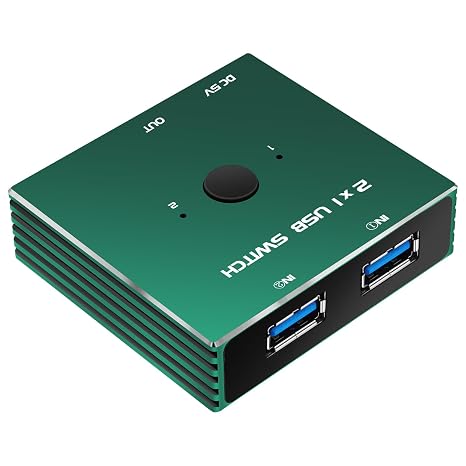
USB 3.0 Switcher 2 in 1 Out USB kvm Switch 2 Computers USB 3.1 Switcher 2 in 1 Out offers a straightforward solution for easily sharing USB peripherals between two computers. Its compact aluminum design is not only stylish but robust, enhancing the user experience with features like a push button for switching and blue LED indicators to identify active connections. Although primarily a USB switch without video switching capabilities, many users find it effective for various applications, such as sharing a keyboard and mouse or switching between backup devices, thanks to its simple operation and quality build. Most reviewers appreciate its ease of use and quality construction, reinforcing its practicality for standard USB sharing needs.
Opinie i oceny klientów
1 oceny klientów
-
5 gwiazdka
0%
-
4 gwiazdka
100%
-
3 gwiazdka
0%
-
2 gwiazdka
0%
-
1 gwiazdka
0%
Zrecenzuj ten produkt
Podziel się opinią z innymi klientami
Zalety
- Compact and stylish aluminum design
- Simple push-button operation
- Blue LED indicators for easy tracking
- Supports USB 3.0 speeds
- Sturdy build quality and materials
Wady
- May not function as a true KVM switch for video
Zaufanie do platformy i bezpieczeństwo kupujących

JK
Jasmin
Zweryfikowany kupujący
“Great products and very good service: very easy and very fast international delivery.”
9 September 2026 · via Trustpilot
AG
Anke
Zweryfikowany kupujący
“Wonderful online shopping experience, smooth transaction from the start. Payment method works conveniently and delivery is unexpectedly fast and reliable. You go the extra mile for service. What makes this even more amazing, you deliver to Namibia. I will remain a happy Ubuy customer and will increase my purchases for sure! Thank you!”
10 September 2026 · via Trustpilot
H
Hazel
Zweryfikowany kupujący
“Very easy to find the products what you need, and so fast delivery, that’s why I highly recommended to others costumers to used ubuy.”
10 September 2026 · via Trustpilot
O
Opaleye
Zweryfikowany kupujący
“I received exactly what I ordered I was skeptical about your site because that was my first time to order. But the order came timely and neatly packaged. I was not disappointed. Thank you.”
11 September 2026 · via Trustpilot
AC
Adele
Zweryfikowany kupujący
“Easy to find and order what you want on the website. Delivery is quick to the UK”
8 September 2026 · via Trustpilot
Bezpieczna realizacja zamówienia
Dostawa na cały świat
Łatwe zwroty
Oryginalne produkty
Historia ceny produktu
Ważne informacje
- Ograniczenia: W przypadku produktów wysyłanych za granicę należy pamiętać, że wszelkie gwarancje producenta mogą być nieważne; opcje serwisowe producenta mogą być niedostępne; instrukcje obsługi produktów, podręczniki i ostrzeżenia dotyczące bezpieczeństwa mogą nie być dostępne w języku kraju docelowego; produkty (i materiały towarzyszące) mogą nie spełniać norm wykonania, specyfikacji i wymogów dotyczących oznaczeń kraju docelowego; produkty mogą nie spełniać standardów dotyczących napięcia i innych norm elektrycznych kraju docelowego (co w stosownych przypadkach wymaga użycia adaptera lub konwertera). Odbiorca jest odpowiedzialny za sprawdzenie, czy produkt może zostać legalnie zaimportowany do kraju docelowego. W przypadku zamawiania produktów w sklepie Ubuy lub u jego partnerów odbiorca jest oficjalnie zgłoszonym importerem i musi spełniać wszystkie wymogi przepisów oraz regulacji kraju docelowego.
- Nie wszystkie produkty znajdujące się na Ubuy są na sprzedaż, ponieważ Ubuy to globalna wyszukiwarka. Produkty podlegają przepisom eksportowym/handlowym.
PLN 2170
Zamów teraz i otrzymaj około Czwartek, Wrzesień 24
Ten produkt nie jest ograniczony w moim kraju. (Kliknij powyższy link, jeśli ten produkt nie jest ograniczony w Twoim kraju, aby nasz zespół sprawdził i zezwolił na jego sprzedaż).
Ilość:
Bezpieczna transakcja
Zgodność z PCI DSS oraz certyfikat ISO 27001:2022, szyfrowane płatności i pełna ochrona kupującego przy każdym zamówieniu.
Nasi czołowi partnerzy logistyczni
Najszybsza dostawa międzynarodowa
Cechy i zalety
- Easily switch between two computers with one click.
- LED indicators show which device is currently active.
- Supports high-speed USB 3.0 data transfer at up to 5Gbps.
- Great compatibility with various operating systems, including Windows and Mac.
- Ideal for sharing keyboards, mice, printers, and other USB devices.
- Streamlines your workspace, reducing clutter and enhancing productivity.
Gwarancja Ubuy
Ciesz się bezstresowymi zakupami dzięki 100% oryginalnym produktom, bezpieczeństwu płatności zgodnemu z PCI DSS, ochronie danych z certyfikatem ISO 27001, najszybszej dostawie międzynarodowej, bezpłatnym zwrotom* oraz bezpiecznemu pakowaniu przy każdym zamówieniu.