0 ratings


Nr produktu:
43698670
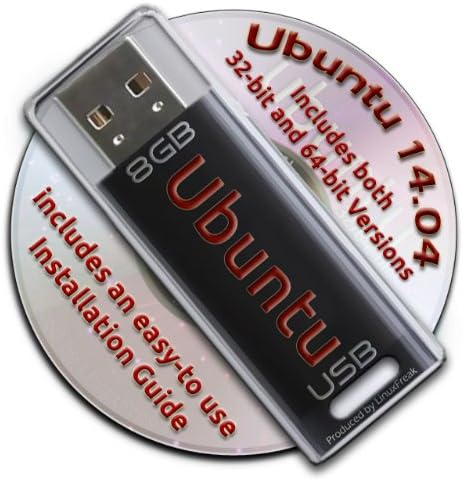
Ubuntu Linux 14.04 Bootable 8GB USB Flash Drive - Contains Both 32-bit and 64-bit.
69% klientów poleciłoby ten produkt znajomym
Nr produktu:
43698670
PLN 160
Szczegóły ceny
Bez kosztów wysyłki i cła ( Koszty wysyłki i cła zostaną obliczone przy finalizacji zamówienia )
*Wszystkie produkty zostaną zaimportowane z Stany Zjednoczone
0 ratings
Napisz recenzję
W magazynie
 Zaimportowano ze sklepu USA
Zamów teraz i otrzymaj około Sobota, Wrzesień 26
Bezpieczna transakcja
Ubuy dokłada wszelkich starań, aby chronić Twoje bezpieczeństwo i prywatność. Nasz zaawansowany system bezpieczeństwa płatności zapewnia poufność poprzez szyfrowanie Twoich danych podczas transmisji przy użyciu protokołów AES (Advanced Encryption Standards) i SSL (Secure Socket Layer). Twoje dane płatności są w 100% bezpieczne, ponieważ nie udostępniamy ich zewnętrznym sprzedawcom.
Nasi czołowi partnerzy logistyczni


Now you can take your Ubuntu installation with you anywhere, and always have your own O/S on any PC you use!

Szybka
wysyłka

Bezpłatny
zwrot*

Bezpieczne pakowanie

100% oryginalne produkty

Zgodność z PCI DSS

Certyfikat ISO 27001






Note: Step Down Voltage Transformer required for using electronics products of Stany Zjednoczone store (110-120). Recommended power converters Kup Teraz.


Co wyróżnia ten produkt
Dual Architecture
Includes both 32-bit and 64-bit versions, ensuring compatibility with a wide range of hardware setups, making it a versatile choice for all users.
Bootable Ready
Preloaded with Ubuntu 14.04, the USB drive is ready to boot immediately, offering a hassle-free setup to users wanting to experiment or install Linux.
Portable Convenience
The compact 8GB size makes it easy to carry, allowing users to have Ubuntu on-the-go, ideal for troubleshooting or secure computing on any compatible machine.
Szczegóły Produktu
| Item Weight | 3 ounces (85.05 grams) |
| Date First Available | April 18, 2014 |
| Manufacturer | LinuxFreak |
Dla kogo jest przeznaczony?

-
Linux Beginners
Ideal for users new to Linux wanting an easy installation process without needing additional technical skills.
-
Portable OS Users
Great for those needing a lightweight operating system that can be run from USB on multiple computers.
-
System Recovery
Useful for users wanting to troubleshoot or recover data from a non-booting computer using a live USB.

-
Windows Users
Not suitable for users who primarily use Windows and have no interest in transitioning to a Linux environment.
OPIS PRODUKTU
Ubuntu Linux 14.04 Bootable 8GB USB Flash Drive - Contains Both 32-bit and 64-bit.
Masz pytania? Porozmawiaj z nami
Pytania i odpowiedzi klientów
-
pytanie:
What is included on the Ubuntu Linux 14.04 Bootable USB Flash Drive?
odpowiedź: The Ubuntu Linux 14.04 Bootable USB Flash Drive comes pre-loaded with both the 32-bit and 64-bit versions of the Ubuntu operating system. This gives users the flexibility to choose the version that best fits their hardware capabilities. Additionally, the USB drive is formatted to be bootable, allowing for straightforward installation on compatible devices without the need for additional setup. Whether you're revamping an older computer or setting up a new system, this USB drive is a practical solution. -
pytanie:
How do I create a bootable USB drive with Ubuntu Linux 14.04?
odpowiedź: Creating a bootable USB drive with Ubuntu Linux 14.04 is a straightforward process. Simply plug the USB drive into your computer, and during the boot-up sequence, access the BIOS or boot menu. From there, you’ll select the USB drive as the boot device. The USB contains installation files that will lead you through the setup process. This method is efficient for installing Ubuntu on various machines quickly, so it's especially useful for system administrators or users managing multiple installations. -
pytanie:
Is Ubuntu Linux 14.04 suitable for older hardware?
odpowiedź: Yes, Ubuntu Linux 14.04 is particularly suitable for older hardware. Its lightweight design allows it to run smoothly on systems with lower specifications, making it an excellent choice for revitalizing older computers. Unlike some modern operating systems that require more resources, Ubuntu 14.04 can comfortably operate on machines with limited RAM and processing power, thereby extending the useful life of older devices. -
pytanie:
What are the key features of Ubuntu Linux 14.04?
odpowiedź: Ubuntu Linux 14.04 offers a rich set of features, including a user-friendly interface, improved performance, and robust security enhancements. The long-term support (LTS) status of this version means that it receives essential updates and support for an extended period. Features like the Unity desktop environment, compatibility with a wide range of hardware, and a vast repository of software applications greatly enhance user experience. This makes it ideal for both personal and professional use. -
pytanie:
Can I use this USB drive for persistent storage?
odpowiedź: Yes, you can utilize the Ubuntu Linux 14.04 Bootable USB Flash Drive for persistent storage, allowing you to save files and settings between sessions. Persistent storage enables you to keep installed applications and personal files, making the USB drive a flexible, portable solution for running Ubuntu. This is especially handy for individuals who need a reliable operating system on the go, whether for work or study. -
pytanie:
What should I do if I encounter issues booting from the USB drive?
odpowiedź: If you experience issues booting from the USB drive, first ensure that your computer is set to boot from USB in the BIOS settings. Double-check the connection and try using a different USB port if necessary. If the problem persists, the USB may need to be reformatted as a bootable drive again. Refer to the installation instructions that come with the USB or visit official Ubuntu documentation for troubleshooting tips to resolve common boot-related challenges. -
pytanie:
Is Ubuntu Linux 14.04 safe to use?
odpowiedź: Yes, Ubuntu Linux 14.04 is considered safe to use. The operating system is built with security in mind, featuring a robust permissions system and firewall. Regular security updates from the Ubuntu community help to protect users from vulnerabilities. Additionally, being open-source allows its code to be scrutinized by developers around the world, contributing to a more secure environment. This makes it a reliable choice for users who prioritize security in their computing activities. -
pytanie:
Can I run this Ubuntu version on a virtual machine?
odpowiedź: Absolutely! You can run Ubuntu Linux 14.04 on a virtual machine by using virtualization software such as VirtualBox or VMware. Simply create a new virtual machine, allocate resources such as RAM and disk space, and choose the USB drive as the boot medium. This is particularly useful for developers or testers who need to experiment with different operating systems without altering their main system. -
pytanie:
What are the system requirements for Ubuntu Linux 14.04?
odpowiedź: The system requirements for Ubuntu Linux 14.04 are quite modest, which is one reason for its popularity among users with older hardware. You need at least a 1 GHz processor, 1 GB of RAM, and around 5 GB of free disk space. However, for optimal performance, especially with the graphical interface, it is recommended to have 2 GB of RAM. This makes it accessible for a wide range of computers, from older desktops to newer laptops. -
pytanie:
Where can I buy Ubuntu Linux 14.04 Bootable 8GB USB Flash Drive?
odpowiedź: You can buy the Ubuntu Linux 14.04 Bootable 8GB USB Flash Drive from Ubuy in Poland. Ubuy provides a convenient platform for ordering tech products, ensuring that you receive a reliable and usable bootable drive directly to your location. This makes it easier for customers looking to upgrade their systems or try out Ubuntu for the first time.
LinuxFreak USB Flash Drives Editorial Review
Nie znaleziono recenzji redakcyjnych
Opinie i oceny klientów
1 oceny klientów
-
5 gwiazdka
100%
-
4 gwiazdka
0%
-
3 gwiazdka
0%
-
2 gwiazdka
0%
-
1 gwiazdka
0%
Zrecenzuj ten produkt
Podziel się opinią z innymi klientami
Zaufanie do platformy i bezpieczeństwo kupujących

JG
Jazz
Zweryfikowany kupujący
“Easy to use and always helpful and sorts any issues I've had past and present”
1 September 2026 · via Trustpilot
EK
Emmanuel
Zweryfikowany kupujący
“I always receive support when I engage customer service. Overall my experience with UBUY has been top notch. Keep up the good work.”
31 August 2026 · via Trustpilot
F
fnd
Zweryfikowany kupujący
“The delivery was fast and the product came undamaged and authentic.”
29 August 2026 · via Trustpilot
LC
Leana
Zweryfikowany kupujący
“Ubuy is extremely efficient and to order online is an easy process. The verity of products to buy is really unlimited! My order was urgent and I got it on time. The products are great! Thank you Ubuy!”
25 August 2026 · via Trustpilot
HL
Hengo
Zweryfikowany kupujący
“Fast, convenient and cheap. Great store!”
27 August 2026 · via Trustpilot
Bezpieczna realizacja zamówienia
Dostawa na cały świat
Łatwe zwroty
Oryginalne produkty
Historia ceny produktu
Ważne informacje
- Ograniczenia: W przypadku produktów wysyłanych za granicę należy pamiętać, że wszelkie gwarancje producenta mogą być nieważne; opcje serwisowe producenta mogą być niedostępne; instrukcje obsługi produktów, podręczniki i ostrzeżenia dotyczące bezpieczeństwa mogą nie być dostępne w języku kraju docelowego; produkty (i materiały towarzyszące) mogą nie spełniać norm wykonania, specyfikacji i wymogów dotyczących oznaczeń kraju docelowego; produkty mogą nie spełniać standardów dotyczących napięcia i innych norm elektrycznych kraju docelowego (co w stosownych przypadkach wymaga użycia adaptera lub konwertera). Odbiorca jest odpowiedzialny za sprawdzenie, czy produkt może zostać legalnie zaimportowany do kraju docelowego. W przypadku zamawiania produktów w sklepie Ubuy lub u jego partnerów odbiorca jest oficjalnie zgłoszonym importerem i musi spełniać wszystkie wymogi przepisów oraz regulacji kraju docelowego.
- Nie wszystkie produkty znajdujące się na Ubuy są na sprzedaż, ponieważ Ubuy to globalna wyszukiwarka. Produkty podlegają przepisom eksportowym/handlowym.
PLN 160
Zamów teraz i otrzymaj około Sobota, Wrzesień 26
Ten produkt nie jest ograniczony w moim kraju. (Kliknij powyższy link, jeśli ten produkt nie jest ograniczony w Twoim kraju, aby nasz zespół sprawdził i zezwolił na jego sprzedaż).
Ilość:
Bezpieczna transakcja
Zgodność z PCI DSS oraz certyfikat ISO 27001:2022, szyfrowane płatności i pełna ochrona kupującego przy każdym zamówieniu.
Nasi czołowi partnerzy logistyczni
Najszybsza dostawa międzynarodowa
Cechy i zalety
- Preinstalled USB stick for easy booting of Ubuntu Linux.
- Includes both 32-bit and 64-bit versions.
- Award-winning Linux OS with a complete set of applications.
- Lifetime free updates and multi-language support included.
- Comes with a productivity suite, web browser, and multimedia tools.
- Easy-to-follow installation guide included with pictures.
Gwarancja Ubuy
Ciesz się bezstresowymi zakupami dzięki 100% oryginalnym produktom, bezpieczeństwu płatności zgodnemu z PCI DSS, ochronie danych z certyfikatem ISO 27001, najszybszej dostawie międzynarodowej, bezpłatnym zwrotom* oraz bezpiecznemu pakowaniu przy każdym zamówieniu.