- Strona główna /
- Elektronika /
- Akcesoria komputerowe /
- Computer Accessories & Peripherals /
- Input Devices /
- Graphics Tablets /
- Wacom Intuos Small, Wired Graphic Drawing Tab...
0 ratings




Nr produktu:
220835228
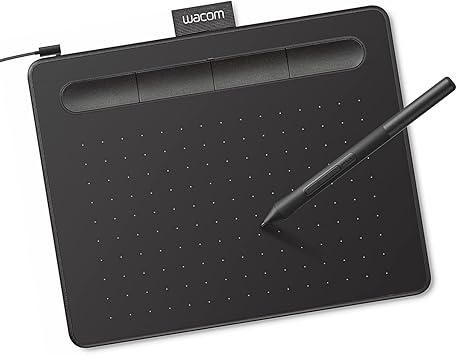
Wacom Intuos Small, Wired Graphic Drawing Tablet with Pen + Software
85% klientów poleciłoby ten produkt znajomym
Nr produktu:
220835228
PLN 720
Szczegóły ceny
Bez kosztów wysyłki i cła ( Koszty wysyłki i cła zostaną obliczone przy finalizacji zamówienia )
*Wszystkie produkty zostaną zaimportowane z Stany Zjednoczone
W magazynie
 Zaimportowano ze sklepu USA
Ilość:
Zamów teraz i otrzymaj około Piątek, Wrzesień 11
Bezpieczna transakcja
Ubuy dokłada wszelkich starań, aby chronić Twoje bezpieczeństwo i prywatność. Nasz zaawansowany system bezpieczeństwa płatności zapewnia poufność poprzez szyfrowanie Twoich danych podczas transmisji przy użyciu protokołów AES (Advanced Encryption Standards) i SSL (Secure Socket Layer). Twoje dane płatności są w 100% bezpieczne, ponieważ nie udostępniamy ich zewnętrznym sprzedawcom.
Nasi czołowi partnerzy logistyczni


Transform the world by bringing your vision to life with a Wacom pen in your hand.

Szybka
wysyłka

Bezpłatny
zwrot*

Bezpieczne pakowanie

100% oryginalne produkty

Zgodność z PCI DSS

Certyfikat ISO 27001






Note: Step Down Voltage Transformer required for using electronics products of Stany Zjednoczone store (110-120). Recommended power converters Kup Teraz.


Co wyróżnia ten produkt
Versatile Compatibility
Works seamlessly across multiple platforms including Chromebook, Mac, Android, and Windows, providing flexibility for artists and designers to use their preferred devices.
Customizable ExpressKeys
Four programmable ExpressKeys offer personalized shortcuts, enhancing workflow efficiency by allowing users to access their favorite functions instantly while drawing.
Included Training & Software
Comes with comprehensive training resources and software, enabling beginners to quickly master the tablet's features and enhance their artistic skills right out of the box.
Szczegóły Produktu
| Brand | Wacom |
| Model Name | Intuos Small |
| Built-In Media | Wacom Intuos Small Tablet, Wacom Pen 4k, USB-A cable with L-shaped Connector, 3 extra standard nibs and nb removal tool, Quick start guide, regulation sheet |
| Target Audience | Teacher |
| Model Number | CTL4100 |
| Global Trade Identification Number | 00753218986887 |
| Number of Items | 1 |
| Manufacturer | Wacom Technology Corporation |
| UPC | 753218986887 |
| Unit Count | 1 Count |
| Number of Packs | 1 |
| External Testing Certification | Não aplicavel |
| Item Type Name | Wacom Intuos Small, Without Bluetooth, black |
| Mfr Part Number | CTL4100 |
| Connectivity Technology | USB-A |
| Pressure Sensitivity | 4096 levels |
| Operating System | Works with Windows, Mac OS, Android |
| Additional Features | Plug-and-play with Chromebook |
| Specific Uses For Product | Designing, Digital Art, Photo Editing |
| Compatible Devices | Windows 7, 8.1 or 10 (excluding Windows 10 S; latest service pack/build), macOS 10.11 or later (latest update) |
| Display Type | Other |
| Screen Size | 7 inches (17.8 cm) |
| Item Dimensions L x W | 6.3"L x 7.87"W (16 cm) |
| Active Surface Area | 6" x 3.7" |
| Color | Black |
| EU Spare Part Availability Duration | 7 years |
| Special Feature | Plug-and-play with Chromebook |
| Package Weight | 2.53 Pound |
Co znajduje się w zestawie
Wacom Intuos Small Tablet, Wacom Pen 4k, USB-A cable with L-shaped Connector, 3 extra standard nibs and nb removal tool, Quick start guide, regulation sheet
Dla kogo jest przeznaczony?

-
Beginner Artists
Ideal for novice artists looking to start digital art without overwhelming features or complicated setups.
-
Students & Educators
Great for students and teachers needing a versatile tool for assignments, presentations, or digital teaching resources.
-
Mobile Creatives
Perfect for on-the-go creatives needing a compact, lightweight drawing solution compatible with multiple devices.

-
Professional Illustrators
May lack advanced features preferred by professional artists for intricate designs and robust performance needs.
OPIS PRODUKTU
Masz pytania? Porozmawiaj z nami
Pytania i odpowiedzi klientów
-
pytanie:
What are the main features of the Wacom Intuos Small Graphics Drawing Tablet?
odpowiedź: The Wacom Intuos Small Graphics Drawing Tablet boasts several impressive features, including a pressure-sensitive pen that offers 4096 levels of sensitivity, which allows for precise drawing and shading. It also includes four customizable ExpressKeys, enabling users to access frequently used functions quickly. Compatible with Chromebook, Mac, and Android devices, this tablet is versatile for artists of all skill levels. Ideal for digital artists, graphic designers, and hobbyists, the Intuos enhances creativity and workflow. -
pytanie:
How do the customizable ExpressKeys enhance the user experience?
odpowiedź: The four customizable ExpressKeys on the Wacom Intuos Small Graphics Drawing Tablet significantly enhance user experience by providing quick access to commonly used shortcuts. Users can program these keys to perform functions such as undo, redo, or switch tools, streamlining the creative process. This is particularly beneficial during time-sensitive projects or complex illustrations where efficiency is paramount. As a result, artists can maintain their creative flow without interruptions. -
pytanie:
Is the Wacom Intuos compatible with my device?
odpowiedź: Yes, the Wacom Intuos Small Graphics Drawing Tablet is compatible with a broad range of devices, including Chromebook, Mac, and Android systems. This multi-device compatibility makes it a versatile tool for digital artists, allowing them to use it with various applications. Whether drawing on a Chromebook during a lecture or using it with a Mac for a professional project, this tablet adapts to your workflow effortlessly, making it suitable for students, professionals, and casual creators alike. -
pytanie:
What software is included with the Wacom Intuos tablet?
odpowiedź: The Wacom Intuos Small Graphics Drawing Tablet comes with a selection of creative software to kickstart your artistic journey. This includes training resources and applications like Corel Painter Essentials and Clip Studio Paint, which cater to various artistic styles and preferences. The included software not only aids in improving skills but also provides users with tools to explore digital painting, illustration, and photo editing. These resources are perfect for beginners who are looking to learn and enhance their artistry. -
pytanie:
Can I use the Wacom Intuos tablet for photo editing?
odpowiedź: Absolutely! The Wacom Intuos Small Graphics Drawing Tablet is an excellent choice for photo editing. Its pressure-sensitive pen allows for fine control, enabling precise adjustments and retouching. Users can easily create masks, blend colors, and apply detailed edits, making it a favored tool among photographers and graphic designers. The intuitive interface and customizable options make it compatible with popular photo editing software, enhancing overall productivity in any editing workflow. -
pytanie:
How does the pen technology work on the Wacom Intuos tablet?
odpowiedź: The pen technology used in the Wacom Intuos Small Graphics Drawing Tablet is based on electromagnetic resonance, which detects the pen's pressure and tilt as you draw. This allows for a highly responsive experience, where the tablet captures every nuance of your art, from fine lines to smooth shading. This technology provides an authentic drawing experience comparable to traditional media, making it suitable for artists transitioning to digital art and enhancing their creative capabilities. -
pytanie:
What type of artists benefit most from the Wacom Intuos tablet?
odpowiedź: The Wacom Intuos Small Graphics Drawing Tablet is versatile, benefiting a wide range of artists. Beginners will find the included software and training valuable for developing their skills, while intermediate and advanced artists can utilize its pressure sensitivity and customization options to explore intricate designs. Illustrators, graphic designers, and hobbyists alike will appreciate its performance and adaptability across various artistic applications. Whether creating digital drawings, illustrations, or graphic art, this tablet supports diverse creative endeavors. -
pytanie:
Can I use the Wacom Intuos tablet for online tutoring or collaboration?
odpowiedź: Yes, the Wacom Intuos Small Graphics Drawing Tablet is an ideal tool for online tutoring or collaborative projects. Its precise drawing capabilities allow tutors to illustrate concepts live, while students can create and share their work seamlessly. This interactivity enhances remote learning experiences, making it easier for both instructors and learners to communicate ideas visually. It is especially useful for art classes, design critiques, and feedback sessions, where clarity and precision are essential. -
pytanie:
What is the setup process for the Wacom Intuos tablet?
odpowiedź: Setting up the Wacom Intuos Small Graphics Drawing Tablet is straightforward. First, download the necessary drivers from the Wacom website based on your operating system. Once installed, connect the tablet to your device via USB, and you're ready to go! The included software often guides you through initial setups and offers helpful tutorials. This process ensures that users of all experience levels can start creating quickly, making it an accessible option for aspiring artists. -
pytanie:
Where can I buy Wacom Intuos Small Graphics Drawing Tablet?
odpowiedź: You can conveniently purchase the Wacom Intuos Small Graphics Drawing Tablet at Ubuy. Ubuy offers a user-friendly shopping experience with a wide selection of tech products, including graphic tablets. Whether you're a student, professional artist, or hobbyist, Ubuy provides access to this versatile drawing tablet along with additional resources to help you on your creative journey.
Wacom Graphics Tablets CTL4100 Editorial Review


Wacom Intuos Small, Bluetooth Graphic Drawing Tablet with Pen + Software offers a seamless experience for digital artists and professionals alike. With 4096 levels of pressure sensitivity, this tablet makes drawing, photo editing, and note-taking both intuitive and natural. Users have appreciated its easy installation and compatibility with Windows 11 and Adobe Photoshop, underscoring its versatility for various creative tasks. The Bluetooth and USB-A connectivity options provide flexibility for different work setups, making it suitable for both students and teachers. Although some reviews mention challenges with latency when using Bluetooth or compatibility on certain devices, many find its overall performance and setup straightforward, making it highly recommended for designers.
Opinie i oceny klientów
23876 oceny klientów
-
5 gwiazdka
75%
-
4 gwiazdka
15%
-
3 gwiazdka
5%
-
2 gwiazdka
2%
-
1 gwiazdka
3%
Zrecenzuj ten produkt
Podziel się opinią z innymi klientami
Zalety
- Easy installation with various compatible operating systems
- Lightweight design perfect for portable use
- Pressure-sensitive pen enhances drawing experience
- Dual connectivity via Bluetooth and USB-A
- Compact size fits well on desks
Zaufanie do platformy i bezpieczeństwo kupujących

JG
Jazz
Zweryfikowany kupujący
“Easy to use and always helpful and sorts any issues I've had past and present”
1 September 2026 · via Trustpilot
EK
Emmanuel
Zweryfikowany kupujący
“I always receive support when I engage customer service. Overall my experience with UBUY has been top notch. Keep up the good work.”
31 August 2026 · via Trustpilot
F
fnd
Zweryfikowany kupujący
“The delivery was fast and the product came undamaged and authentic.”
29 August 2026 · via Trustpilot
LC
Leana
Zweryfikowany kupujący
“Ubuy is extremely efficient and to order online is an easy process. The verity of products to buy is really unlimited! My order was urgent and I got it on time. The products are great! Thank you Ubuy!”
25 August 2026 · via Trustpilot
HL
Hengo
Zweryfikowany kupujący
“Fast, convenient and cheap. Great store!”
27 August 2026 · via Trustpilot
Bezpieczna realizacja zamówienia
Dostawa na cały świat
Łatwe zwroty
Oryginalne produkty
Historia ceny produktu
Ważne informacje
- Ograniczenia: W przypadku produktów wysyłanych za granicę należy pamiętać, że wszelkie gwarancje producenta mogą być nieważne; opcje serwisowe producenta mogą być niedostępne; instrukcje obsługi produktów, podręczniki i ostrzeżenia dotyczące bezpieczeństwa mogą nie być dostępne w języku kraju docelowego; produkty (i materiały towarzyszące) mogą nie spełniać norm wykonania, specyfikacji i wymogów dotyczących oznaczeń kraju docelowego; produkty mogą nie spełniać standardów dotyczących napięcia i innych norm elektrycznych kraju docelowego (co w stosownych przypadkach wymaga użycia adaptera lub konwertera). Odbiorca jest odpowiedzialny za sprawdzenie, czy produkt może zostać legalnie zaimportowany do kraju docelowego. W przypadku zamawiania produktów w sklepie Ubuy lub u jego partnerów odbiorca jest oficjalnie zgłoszonym importerem i musi spełniać wszystkie wymogi przepisów oraz regulacji kraju docelowego.
- Nie wszystkie produkty znajdujące się na Ubuy są na sprzedaż, ponieważ Ubuy to globalna wyszukiwarka. Produkty podlegają przepisom eksportowym/handlowym.
PLN 720
Zamów teraz i otrzymaj około Piątek, Wrzesień 11
Ten produkt nie jest ograniczony w moim kraju. (Kliknij powyższy link, jeśli ten produkt nie jest ograniczony w Twoim kraju, aby nasz zespół sprawdził i zezwolił na jego sprzedaż).
Ilość:
Bezpieczna transakcja
Zgodność z PCI DSS oraz certyfikat ISO 27001:2022, szyfrowane płatności i pełna ochrona kupującego przy każdym zamówieniu.
Nasi czołowi partnerzy logistyczni
Najszybsza dostawa międzynarodowa
Cechy i zalety
- Ideal for beginners in drawing, painting, and photo editing.
- Compatible with Mac, PC, Chromebook, and select Android devices.
- Includes useful software and online tutorials for creative guidance.
- Perfect for educational settings to enhance learning and flexibility.
- Features a compact design, making it portable and space-efficient.
- Customizable ExpressKeys for personalized workflow.
Gwarancja Ubuy
Ciesz się bezstresowymi zakupami dzięki 100% oryginalnym produktom, bezpieczeństwu płatności zgodnemu z PCI DSS, ochronie danych z certyfikatem ISO 27001, najszybszej dostawie międzynarodowej, bezpłatnym zwrotom* oraz bezpiecznemu pakowaniu przy każdym zamówieniu.