0 ratings






Nr produktu:
219426644
OWC Thunderbolt Go Dock, 11 Ports, Built in Power Supply, 90W Charging, TB4 (USB-C), USB, HDMI, 2.5GbE, SD, Also Compatible with USB-C Devices,
75% respondentów poleciłoby to znajomemu
Nr produktu:
219426644
PLN 1096
Price Details
Excluding Shipping & Custom charges ( Shipping and custom charges will be calculated on checkout )
*All items will import from Stany Zjednoczone
w magazynie
 Zaimportowano ze sklepu USA
QTY:
Produkty dostępne w magazynie: 20.
Zamów teraz i otrzymaj około Sunday, Lipiec 05
Bezpieczna transakcja
Ubuy dokłada wszelkich starań, aby chronić Twoje bezpieczeństwo i prywatność. Nasz zaawansowany system bezpieczeństwa płatności zapewnia poufność poprzez szyfrowanie Twoich danych podczas transmisji przy użyciu protokołów AES (Advanced Encryption Standards) i SSL (Secure Socket Layer). Twoje dane płatności są w 100% bezpieczne, ponieważ nie udostępniamy ich zewnętrznym sprzedawcom.
Nasi czołowi partnerzy logistyczni


Power and charge your devices with up to 85W while enjoying ultra-fast data transfer speeds with our versatile hub.

Fast
Shipping

Free
Return*

Bezpieczne pakowanie

100% oryginalne produkty

PCI DSS Compliance

ISO 27001 Certified


Note: Step Down Voltage Transformer required for using electronics products of Stany Zjednoczone store (110-120). Recommended power converters Kup Teraz.


Co wyróżnia ten produkt
Multiple Connections
The OWC 11-port docking station supports various connections including Thunderbolt 5, USB 3.2, and SD/micro-SD card reading, catering to diverse device compatibility and enhancing productivity.
High Power Delivery
With 140W power delivery, this docking station efficiently charges connected devices while enabling high-performance data transfer, ensuring that power-intensive tasks are handled smoothly without interruptions.
2.5 GbE Network
Featuring a 2.5GbE port, this docking station enhances wired network performance, providing faster internet speeds for seamless streaming, gaming, and downloading compared to standard Ethernet connections.
Szczegóły Produktu
- Supports new Intel Thunderbolt Share technology with full Thunderbolt Share enablement and license for Intel Thunderbolt Share included.
- Power Delivery: Thunderbolt 4 host port provides up to 90W of power to the host computer; Built-in power supply eliminates heavy power brick hassle while enabling more workflows vs bus-powered docks; Thunderbolt 4 device ports (for external drives and other devices) provide 15W of power; USB port provides up to 1.5A of power for bus-powered drives and device charging
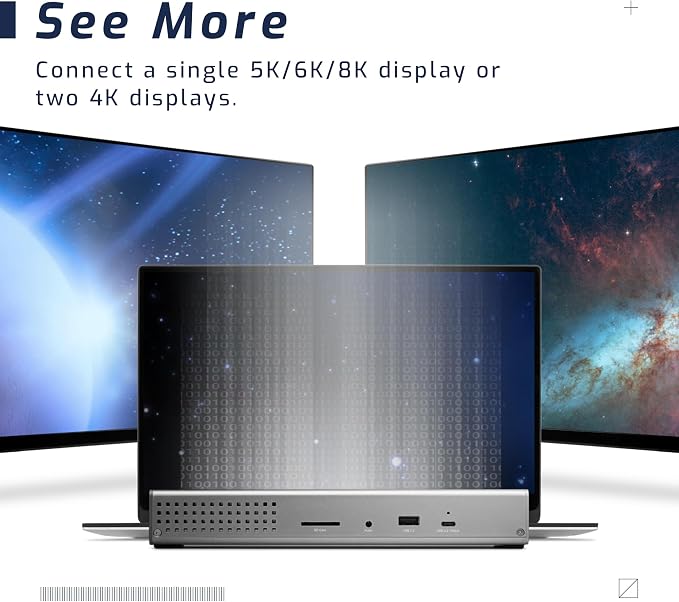
- Display Support: Up to one 8K display @ 60Hz, one 4K display @ 120Hz, two 4K displays @ 60Hz, two 5K displays @ 60Hz; Display Support by Port: Thunderbolt 4: Up to 8K @ 60Hz or 4K @ 120Hz via a native Thunderbolt 4 display or other display that supports USB-C connections and DisplayPort 1.4; NOTE: Actual display support varies by computer specifications; Supported Intel-based Apple Mac models and Thunderbolt 4 PCs support two displays
- Dual display support, including available resolution and refresh rates, is dependent on host hardware and drivers; Silicon M1 Pro, M1 Max, and M1 Ultra Mac models, Intel-based Mac models, and Thunderbolt 4 PCs can support up to two displays at up to 4K @ 60Hz via Thunderbolt; Silicon M1, M2 and M3 Mac models can support one external display up to 4K @ 60Hz via Thunderbolt
- Device Ports: (1) Host Port - Thunderbolt 4 up to 40 Gb/s (5000 MB/s); Works with Thunderbolt or USB (USB-C or USB-A) host port; (2) Thunderbolt 4 (USB-C) Ports; (1) USB 3.2 Gen 2 Type-C Port up to 10Gb/s (1250MB/s) - USB 2.0/3.0 backwards compatible; (2) USB 3.2 Gen 2 Type-A Ports up to 10Gb/s (1250MB/s) - USB 2.0/3.0 backwards compatible; (1) USB 2.0 Port; (1) HDMI Port; (1) 2.5 Gigabit Ethernet (2.5GbE) RJ-45 Port; (1) 3.5mm Stereo Audio Output Port; (1) Secure Digital (SD) SD 4.0 UHS-II
- Compatible with USB-C Macs, PCs, iPads, Chromebooks, and Android host computers and devices with Thunderbolt 4, Thunderbolt 3, USB4, or USB (Non-Thunderbolt USB connection may limit some functionality).
| Hardware Interface | Thunderbolt, USB, USB Type C |
| Compatible Devices | Compatible with Thunderbolt and USB-C Macs, PCs, iPads, Chromebooks, and Android Devices (Thunderbolt 4, Thunderbolt 3, USB4, and USB host computers and mobile devices) |
| Total Usb Ports | 6 |
| Number of Ports | 11 |
| Total Number of HDMI Ports | 1 |
| Wattage | 90 watts |
| Smart Home Compatibility | Not Smart Home Compatible |
| Item Dimensions L x W x H | 9.5"L x 3.6"W x 1.4"H (24.1 x 9.1 x 3.6 cm) |
| Item Weight | 2.09 Pounds (950 grams) |
| Brand | OWC |
| UPC | 810100980757 |
| Manufacturer | Other World Computing |
| Model Number | OWCTB4DKG11P |
| Mfr Part Number | OWCTB4DKG11P |
| Color | aluminum |
| Compatible Devices | Compatible with Thunderbolt and USB-C Macs, PCs, iPads, Chromebooks, and Android Devices (Thunderbolt 4, Thunderbolt 3, USB4, and USB host computers and mobile devices) See more |
| Total USB Ports | 6 |
| Product Dimensions (L x W x H) | 9.5"L x 3.6"W x 1.4"H (24.1 x 9.1 x 3.6 cm) |
| Total HDMI Ports | 1 |
Dla kogo jest przeznaczony?

-
Creative Professionals
Ideal for videographers and photographers needing multiple connections for devices and fast data transfer capabilities.
-
Game Developers
Perfect for game developers who require high-speed network access and the ability to connect multiple peripherals.
-
Tech Enthusiasts
Great for tech enthusiasts looking for advanced connectivity options and high power delivery for charging laptops.

-
Casual Users
Not suitable for casual users who only need basic connectivity without the need for additional ports or power.
-
Budget-Conscious Buyers
Not ideal for budget-constrained buyers as docking stations can be expensive with features they may not need.
-
Mobile Workers
Not recommended for mobile workers who require portable solutions that are lightweight and easy to carry.
OPIS PRODUKTU
Masz jakieś zapytanie? Porozmawiaj z nami
Pytania i odpowiedzi klientów
-
pytanie:
What is the primary purpose of the OWC 14-Port Thunderbolt Dock?
odpowiedź: The OWC 14-Port Thunderbolt Dock serves as a comprehensive connectivity solution for modern devices. It allows users to connect multiple peripherals like external drives, displays, and other USB devices simultaneously. With its wide range of ports, this dock is perfect for creative professionals, gamers, and anyone requiring high-speed data transfer and efficient workspace management. -
pytanie:
What types of devices can I connect to the OWC Thunderbolt Dock?
odpowiedź: You can connect a variety of devices to the OWC 14-Port Thunderbolt Dock, including external hard drives, SSDs, monitors, and other USB peripherals. This versatility makes it ideal for users who work with multiple gadgets, as the dock supports Thunderbolt 3 technology, ensuring fast data transfers and high-resolution displays. -
pytanie:
How much power does the OWC 14-Port Dock provide for charging?
odpowiedź: The OWC 14-Port Dock includes 85W charging capabilities, allowing you to charge your laptop and other connected devices efficiently. This feature is particularly beneficial for individuals who require their devices to maintain high performance during heavy tasks, such as video editing or 3D modeling, where sustained power is essential. -
pytanie:
Does the dock support dual monitors?
odpowiedź: Yes, the OWC Thunderbolt Dock supports dual monitors. With its Mini DisplayPort and Thunderbolt connections, users can seamlessly extend their desktop to two displays, enhancing productivity in multitasking scenarios. This makes it an excellent choice for professionals who often work with complex visual layouts. -
pytanie:
Can I use the dock with non-Apple devices?
odpowiedź: Absolutely, the OWC 14-Port Thunderbolt Dock is compatible with both macOS and Windows operating systems. This makes it a versatile choice for users with various devices, ensuring seamless connectivity and functionality regardless of brand preference. -
pytanie:
What is the data transfer speed of the ports on the dock?
odpowiedź: The dock features two Thunderbolt ports capable of 40 Gbps transfer speeds and USB 3.2 ports that offer data rates up to 10 Gbps. This combination allows users to transfer large files quickly and efficiently, which is particularly useful for multimedia editing and data-intensive applications. -
pytanie:
Is there an audio output option available on the dock?
odpowiedź: Yes, the OWC 14-Port Thunderbolt Dock includes an audio output, making it convenient for users who need to connect headphones or external speakers. This feature supports a complete workstation setup for both professionals and casual users who enjoy high-quality audio. -
pytanie:
How does the docking station enhance a workspace setup?
odpowiedź: The OWC 14-Port Thunderbolt Dock consolidates multiple connections into one central hub, minimizing cable clutter and maximizing workspace efficiency. It’s particularly beneficial for individuals who frequently plug in and unplug devices, providing a streamlined solution for their technological needs. -
pytanie:
Is the OWC Thunderbolt Dock portable?
odpowiedź: While primarily designed for desktop use, the OWC 14-Port Thunderbolt Dock is compact enough to be portable, making it a great choice for professionals on the go. You can easily take it to offices, coworking spaces, or home setups, ensuring access to a comprehensive suite of ports anywhere. -
pytanie:
Where can I buy OWC 14-Port Thunderbolt Dock in Poland?
odpowiedź: You can purchase the OWC 14-Port Thunderbolt Dock from Ubuy in Poland. Ubuy offers an extensive selection of tech products and accessories, providing a reliable platform for acquiring the latest technology innovations, ensuring you can easily find and purchase this dock.
OWC Docking Stations OWCTB4DKG11P Editorial Review


Nie znaleziono recenzji redakcyjnych
Opinie i oceny klientów
92 oceny klientów
-
5 gwiazdka
65%
-
4 gwiazdka
12%
-
3 gwiazdka
7%
-
2 gwiazdka
3%
-
1 gwiazdka
13%
Zrecenzuj ten produkt
Podziel się opinią z innymi klientami
Historia ceny produktu
Ważne informacje
- Ograniczenia: W przypadku produktów wysyłanych za granicę należy pamiętać, że wszelkie gwarancje producenta mogą być nieważne; opcje serwisowe producenta mogą być niedostępne; instrukcje obsługi produktów, podręczniki i ostrzeżenia dotyczące bezpieczeństwa mogą nie być dostępne w języku kraju docelowego; produkty (i materiały towarzyszące) mogą nie spełniać norm wykonania, specyfikacji i wymogów dotyczących oznaczeń kraju docelowego; produkty mogą nie spełniać standardów dotyczących napięcia i innych norm elektrycznych kraju docelowego (co w stosownych przypadkach wymaga użycia adaptera lub konwertera). Odbiorca jest odpowiedzialny za sprawdzenie, czy produkt może zostać legalnie zaimportowany do kraju docelowego. W przypadku zamawiania produktów w sklepie Ubuy lub u jego partnerów odbiorca jest oficjalnie zgłoszonym importerem i musi spełniać wszystkie wymogi przepisów oraz regulacji kraju docelowego.
- Nie wszystkie produkty znajdujące się na Ubuy są na sprzedaż, ponieważ Ubuy to globalna wyszukiwarka. Produkty podlegają przepisom eksportowym/handlowym.
PLN 1096
Zamów teraz i otrzymaj około Sunday, Lipiec 05
Ten produkt nie jest ograniczony w moim kraju. (Kliknij powyższy link, jeśli ten produkt nie jest ograniczony w Twoim kraju, aby nasz zespół sprawdził i zezwolił na jego sprzedaż).
QTY:
Produkty dostępne w magazynie: 20.
Bezpieczna transakcja
Ubuy dokłada wszelkich starań, aby chronić Twoje bezpieczeństwo i prywatność. Nasz zaawansowany system bezpieczeństwa płatności zapewnia poufność poprzez szyfrowanie Twoich danych podczas transmisji przy użyciu protokołów AES (Advanced Encryption Standards) i SSL (Secure Socket Layer). Twoje dane płatności są w 100% bezpieczne, ponieważ nie udostępniamy ich zewnętrznym sprzedawcom.
Nasi czołowi partnerzy logistyczni
Fastest cross-border delivery
Cechy i zalety
- Delivers up to 85W power for charging notebook computers.
- Features 2 high-powered USB Type-A ports with 5Gb/s speed.
- Supports up to one 5K display or two 4K displays at 60Hz.
- Offers rapid import speeds of up to 312MB/s with SD UHS-II card slots.
- Equipped with multiple ports including Thunderbolt, USB-C, USB-A, and Ethernet.
- Backward compatible with Thunderbolt 2/Thunderbolt devices.