0 ratings


Nr produktu:
59914905
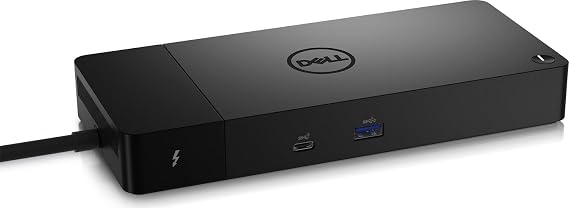
Dell ThunderBolt 4 Dock (WD22TB4), Black
77% klientów poleciłoby ten produkt znajomym
Nr produktu:
59914905
PLN 876
Szczegóły ceny
Bez kosztów wysyłki i cła ( Koszty wysyłki i cła zostaną obliczone przy finalizacji zamówienia )
*Wszystkie produkty zostaną zaimportowane z Stany Zjednoczone
0 ratings
Napisz recenzję
W magazynie
 Zaimportowano ze sklepu USA
Zamów teraz i otrzymaj około Środa, Wrzesień 09
Bezpieczna transakcja
Ubuy dokłada wszelkich starań, aby chronić Twoje bezpieczeństwo i prywatność. Nasz zaawansowany system bezpieczeństwa płatności zapewnia poufność poprzez szyfrowanie Twoich danych podczas transmisji przy użyciu protokołów AES (Advanced Encryption Standards) i SSL (Secure Socket Layer). Twoje dane płatności są w 100% bezpieczne, ponieważ nie udostępniamy ich zewnętrznym sprzedawcom.
Nasi czołowi partnerzy logistyczni


Modular Thunderbolt 4 Dock with swappable module capability for easy upgrades and SuperBoost technologies for fast charging

Szybka
wysyłka

Bezpłatny
zwrot*

Bezpieczne pakowanie

100% oryginalne produkty

Zgodność z PCI DSS

Certyfikat ISO 27001






Note: Step Down Voltage Transformer required for using electronics products of Stany Zjednoczone store (110-120). Recommended power converters Kup Teraz.


Co wyróżnia ten produkt
Versatile Connectivity
Offers multiple ports including USB-C, HDMI, and Ethernet, allowing users to connect various devices effortlessly, enhancing productivity for professionals needing extensive connectivity in one dock.
Fast Charging Capability
Delivers up to 90W power delivery for quick device charging, ensuring you stay powered throughout the day without needing multiple adapters, ideal for active users on the go.
Compact Design
Sleek, space-efficient design fits seamlessly in any workspace, providing users with a clutter-free environment while maintaining high functionality, perfect for home and office settings.
Szczegóły Produktu
| Hardware Interface | Thunderbolt 4 |
| Compatible Devices | Dell, HDMI, Thunderbolt, USB C, Windows 10 |
| Total Usb Ports | 7 |
| Number of Ports | 11 |
| Total Number of HDMI Ports | 1 |
| Wattage | 180 watts |
| Input Voltage | 230 volts_of_alternating_current |
| Minimum Required Operating System Version | Windows 11 |
| Item Dimensions L x W x H | 9.7"L x 6.5"W x 1.1"H (24.6 x 16.5 x 2.8 cm) |
| Item Weight | 650 g |
| Color | Black |
| Brand | Dell |
| Number of Items | 1 |
| Number of Packs | 1 |
| Global Trade Identification Number | 05397184635629, 05397184718902 |
| Manufacturer | Dell Computers |
| Item Type Name | Doking Station |
| Model Number | DELL-WD22TB4 |
| Mfr Part Number | DELL-WD22TB4 |
| Total USB Ports | 7 |
| Product Dimensions (L x W x H) | 9.7"L x 6.5"W x 1.1"H (24.6 x 16.5 x 2.8 cm) |
| Total HDMI Ports | 1 |
| Country of Origin | This item will be imported from US |
| Date First Available | August 19, 2022 |
| What is in the box | Dell ThunderBolt 4 Dock... For more details, please check description/product details |
Dla kogo jest przeznaczony?

-
Business Professionals
Ideal for professionals needing multiple connections for laptops to boost productivity with docking and charging capabilities.
-
Content Creators
Great for video editors and designers who require high-speed data transfer and support for multiple high-resolution displays.
-
Remote Workers
Perfect for remote employees who need a versatile docking solution for seamless connectivity to various peripherals at home.

-
Casual Users
Individuals who simply use laptops for basic tasks may find the dock excessively advanced and overpriced for their needs.
OPIS PRODUKTU
Dell ThunderBolt 4 Dock (WD22TB4), Black
Masz pytania? Porozmawiaj z nami
Pytania i odpowiedzi klientów
-
pytanie:
What are the key features of the Dell ThunderBolt 4 Dock WD22TB4?
odpowiedź: The Dell ThunderBolt 4 Dock WD22TB4 boasts crucial features like dual 4K display support, multiple USB-C and USB-A ports, and a 90W power delivery capability. This dock enhances your workspace by allowing you to connect up to three displays and a variety of peripherals—all while ensuring a single, powerful connection to your laptop. It's particularly useful for professionals engaged in graphic design or video editing who need high-resolution displays. -
pytanie:
Is the Dell ThunderBolt 4 Dock WD22TB4 compatible with all laptops?
odpowiedź: While the Dell ThunderBolt 4 Dock WD22TB4 is primarily designed for Thunderbolt 4 and USB-C compatible laptops, it may also work with USB-C devices, although with limited functionality. To ensure maximum performance and access to all features, utilizing a Thunderbolt 4 device is recommended. This compatibility is essential for users who mix work with various devices, as it guarantees seamless connectivity. -
pytanie:
How does the Dell ThunderBolt 4 Dock WD22TB4 improve workflow for remote workers?
odpowiedź: The Dell ThunderBolt 4 Dock WD22TB4 significantly enhances workflow by offering multiple connectivity options that simplify the setup process. Users can connect their laptop, keyboard, mouse, external drives, and dual monitors through a single cable. This consolidation helps in creating a clean and organized workspace, which is excellent for remote workers who need to switch between different tasks rapidly. -
pytanie:
Can I charge my laptop using the Dell ThunderBolt 4 Dock WD22TB4?
odpowiedź: Yes, the Dell ThunderBolt 4 Dock WD22TB4 supports charging through its USB-C connection, providing up to 90W of power delivery to compatible laptops. This feature greatly reduces the need for multiple chargers and keeps your workspace uncluttered. It's particularly beneficial for professionals who are often on the move and need a single docking solution that both powers and connects all their devices. -
pytanie:
What types of ports does the Dell ThunderBolt 4 Dock WD22TB4 have?
odpowiedź: The Dell ThunderBolt 4 Dock WD22TB4 incorporates a variety of ports, including USB-C Thunderbolt 4 ports, USB-A ports, an HDMI port, and an audio output jack. This extensive selection allows for diverse peripheral connections, catering to the needs of creative professionals who may require audio interfaces, additional storage, or multiple monitors for their work. -
pytanie:
How can I set up multiple displays with the Dell ThunderBolt 4 Dock WD22TB4?
odpowiedź: Setting up multiple displays with the Dell ThunderBolt 4 Dock WD22TB4 is straightforward. You can connect up to two 4K monitors via the dock using its HDMI and DisplayPort outputs. Simply connect your monitors to the respective ports and switch your laptop display settings to 'Extend' for a seamless multi-monitor experience. This is particularly beneficial for professionals who require extensive screen real estate for multitasking. -
pytanie:
Does the Dell ThunderBolt 4 Dock WD22TB4 support data transfer?
odpowiedź: Absolutely! The Dell ThunderBolt 4 Dock WD22TB4 supports high-speed data transfer through its multiple USB ports, allowing you to quickly transfer files to and from external drives. The dock is ideal for users who work with large files, such as video editors or graphic designers, as it ensures efficient data handling while also connecting all your devices through one hub. -
pytanie:
What is the maximum resolution supported by the Dell ThunderBolt 4 Dock WD22TB4?
odpowiedź: The maximum resolution supported by the Dell ThunderBolt 4 Dock WD22TB4 is dual 4K at 60Hz. This capability is crucial for professionals who depend on high-fidelity visuals, such as video editors or software developers. The dock ensures that your visuals remain sharp and vibrant, which can enhance your viewing experience and improve productivity. -
pytanie:
Can the Dell ThunderBolt 4 Dock WD22TB4 be used with gaming laptops?
odpowiedź: Yes, the Dell ThunderBolt 4 Dock WD22TB4 can be used with gaming laptops that feature Thunderbolt 4 or USB-C ports. It allows gamers to connect external displays and peripherals while providing a robust power supply. This makes it an attractive option for gamers who want to streamline their setup without sacrificing performance. -
pytanie:
Where can I buy the Dell ThunderBolt 4 Dock WD22TB4?
odpowiedź: You can purchase the Dell ThunderBolt 4 Dock WD22TB4 at Ubuy. Ubuy offers a reliable platform where you can find this product along with detailed descriptions and customer reviews to help inform your buying decision.
Dell Docking Stations DELL-WD22TB4 Editorial Review
Dell ThunderBolt 4 Dock (WD22TB4), Black is a powerful docking station designed to enhance connectivity for Dell laptops and other compatible devices. With a total of 11 ports, including 7 USB ports and 1 HDMI port, it supports running dual monitors and provides fast charging capabilities. Users have appreciated its ability to connect multiple devices seamlessly, running a portable office from anywhere. However, some customers have experienced issues with used units being sold as new and noted that it lacks sufficient USB-A ports. It's essential to ensure compatibility, particularly that your laptop supports Thunderbolt 3 or 4 for optimal performance.
Opinie i oceny klientów
1 oceny klientów
-
5 gwiazdka
100%
-
4 gwiazdka
0%
-
3 gwiazdka
0%
-
2 gwiazdka
0%
-
1 gwiazdka
0%
Zrecenzuj ten produkt
Podziel się opinią z innymi klientami
Zalety
- Supports dual monitors effortlessly
- Seamless connectivity for multiple devices
- Fast charging capabilities for laptops
- Compact design with lightweight build
- Compatible with a variety of devices
Wady
- Limited USB-A ports may require additional adapters
Zaufanie do platformy i bezpieczeństwo kupujących

MA
Mohammad
Zweryfikowany kupujący
“Excellent quality and original too,when ubuy send original things I will appreciate that ,I very satisfied thank you”
23 July 2026 · via Trustpilot
CK
Chitra
Zweryfikowany kupujący
“The order and delivery progress was communicated very well. Package arrived within the estimated time. Products arrived as expected in good condition.”
22-Jul-26 · via Trustpilot
K
kund
Zweryfikowany kupujący
“Good supply of products. Safe payment methods, and shipment worldwide! Genuine products.”
23-Jul-26 · via Trustpilot
OO
Onesi
Zweryfikowany kupujący
“Was my first time buying a product from Ubuy, but I found it so helpful. This is reliable. Gonna place a new order!”
22 July 2026 · via Trustpilot
SJ
SAO JOHN
Zweryfikowany kupujący
“Ubuy is a great online platform to buy stuff. Reliable, fast delivery time and great value for money. I've been using Ubuy online shopping platform for three years now and will continue to do so.”
23 July 2026 · via Trustpilot
Bezpieczna realizacja zamówienia
Dostawa na cały świat
Łatwe zwroty
Oryginalne produkty
Historia ceny produktu
Ważne informacje
- Ograniczenia: W przypadku produktów wysyłanych za granicę należy pamiętać, że wszelkie gwarancje producenta mogą być nieważne; opcje serwisowe producenta mogą być niedostępne; instrukcje obsługi produktów, podręczniki i ostrzeżenia dotyczące bezpieczeństwa mogą nie być dostępne w języku kraju docelowego; produkty (i materiały towarzyszące) mogą nie spełniać norm wykonania, specyfikacji i wymogów dotyczących oznaczeń kraju docelowego; produkty mogą nie spełniać standardów dotyczących napięcia i innych norm elektrycznych kraju docelowego (co w stosownych przypadkach wymaga użycia adaptera lub konwertera). Odbiorca jest odpowiedzialny za sprawdzenie, czy produkt może zostać legalnie zaimportowany do kraju docelowego. W przypadku zamawiania produktów w sklepie Ubuy lub u jego partnerów odbiorca jest oficjalnie zgłoszonym importerem i musi spełniać wszystkie wymogi przepisów oraz regulacji kraju docelowego.
- Nie wszystkie produkty znajdujące się na Ubuy są na sprzedaż, ponieważ Ubuy to globalna wyszukiwarka. Produkty podlegają przepisom eksportowym/handlowym.
PLN 876
Zamów teraz i otrzymaj około Środa, Wrzesień 09
Ten produkt nie jest ograniczony w moim kraju. (Kliknij powyższy link, jeśli ten produkt nie jest ograniczony w Twoim kraju, aby nasz zespół sprawdził i zezwolił na jego sprzedaż).
Ilość:
Bezpieczna transakcja
Zgodność z PCI DSS oraz certyfikat ISO 27001:2022, szyfrowane płatności i pełna ochrona kupującego przy każdym zamówieniu.
Nasi czołowi partnerzy logistyczni
Najszybsza dostawa międzynarodowa
Cechy i zalety
- Connect displays and peripherals to your system with a single cable for ultimate productivity
- Highest number of ports connects multiple 4k displays
- Fast Data Transfer of 40 GB/s
Gwarancja Ubuy
Ciesz się bezstresowymi zakupami dzięki 100% oryginalnym produktom, bezpieczeństwu płatności zgodnemu z PCI DSS, ochronie danych z certyfikatem ISO 27001, najszybszej dostawie międzynarodowej, bezpłatnym zwrotom* oraz bezpiecznemu pakowaniu przy każdym zamówieniu.