- Strona główna /
- Software /
- Operating Systems /
- Microsoft System Builder | Windws 11 Home | Intended use for new systems | Install on a new PC | Branded by Microsoft
0 ratings




Nr produktu:
50534952
Microsoft System Builder | Windws 11 Home | Intended use for new systems | Install on a new PC | Branded by Microsoft
Nr produktu:
50534952
PLN 667
Szczegóły ceny
Excluding Shipping & Custom charges ( Shipping and custom charges will be calculated on checkout )
*All items will import from Stany Zjednoczone
W magazynie
 Zaimportowano ze sklepu USA
Zamów teraz i otrzymaj około Czwartek, Sierpień 06
Bezpieczna transakcja
Ubuy dokłada wszelkich starań, aby chronić Twoje bezpieczeństwo i prywatność. Nasz zaawansowany system bezpieczeństwa płatności zapewnia poufność poprzez szyfrowanie Twoich danych podczas transmisji przy użyciu protokołów AES (Advanced Encryption Standards) i SSL (Secure Socket Layer). Twoje dane płatności są w 100% bezpieczne, ponieważ nie udostępniamy ich zewnętrznym sprzedawcom.
Nasi czołowi partnerzy logistyczni


We’ve reimagined every element of the Windows 11 UX to feel effortless, personal, and focused.

Szybka
wysyłka

Bezpłatny
zwrot*

Bezpieczne pakowanie

100% oryginalne produkty

Zgodność z PCI DSS

Certyfikat ISO 27001


Note: Step Down Voltage Transformer required for using electronics products of Stany Zjednoczone store (110-120). Recommended power converters Kup Teraz.


Co wyróżnia ten produkt
New System Compatibility
Designed specifically for new PC builds, ensuring seamless installation and optimal performance on the latest hardware configurations that enhance user experience.
Genuine Microsoft Branding
Officially branded by Microsoft, guaranteeing authenticity and access to the latest updates, security features, and robust support that users trust and rely on.
User-Friendly Installation
Simplifies the setup process for novice users with guided installation, making it easy to configure their new systems without technical complications, bridging the gap for all skill levels.
Szczegóły Produktu
- STREAMLINED & INTUITIVE UI, DVD FORMAT | Intelligent desktop | Personalize your experience for simpler efficiency | Powerful security built-in and enabled.
- OEM IS TO BE INSTALLED ON A NEW PC with no prior version of Windows installed and cannot be transferred to another machine.
- OEM DOES NOT PROVIDE SUPPORT | To acquire product with Microsoft support, obtain the full packaged “Retail” version.
- PRODUCT SHIPS IN PLAIN ENVELOPE | Activation key is located under scratch-off area on label.
- GENUINE WINDOWS SOFTWARE IS BRANDED BY MIRCOSOFT ONLY.
| Product Dimensions | 7.5 x 5.5 x 0.1 inches (19.1 x 14 x 0.3 cm); 1.6 ounces (45.36 grams) |
| Item model number | KW9-00633 |
| Date First Available | December 2, 2021 |
| Manufacturer | Microsoft |
Dla kogo jest przeznaczony?

-
New PC Builders
Ideal for individuals assembling a new computer, providing a reliable operating system for smooth performance.
-
Home Users
Perfect for everyday users who need an intuitive and user-friendly interface for personal tasks and entertainment.
-
Developers
Beneficial for developers setting up workstations, offering modern features and support for the latest application development.

-
Casual Users
May not suit individuals who require minimal or no customization and prefer operating systems pre-installed on machines.
OPIS PRODUKTU
Masz pytania? Porozmawiaj z nami
Pytania i odpowiedzi klientów
-
pytanie:
What is Microsoft System Builder and how does it relate to Windows 11 Home?
odpowiedź: Microsoft System Builder refers to a version of Windows 11 Home specifically designed for OEMs and system builders. It allows users to install a fresh copy of Windows 11 on new PCs that they assemble or upgrade. This edition ensures that those building custom systems can operate with the latest features and enhanced security that Windows 11 offers. It's perfect for tech enthusiasts who want to create a tailored computing experience or for businesses setting up new workstations. -
pytanie:
Can I install Microsoft Windows 11 Home on hardware that I build myself?
odpowiedź: Yes, you can install Microsoft Windows 11 Home on self-built hardware. This version is specifically aimed at new system installations, making it an ideal option for custom PC builds. When creating your system, ensure your components meet the minimum system requirements for Windows 11, which includes specific CPU, RAM, and storage specifications. Many enthusiasts and gamers choose this version to enjoy optimal performance and the latest technology advancements. -
pytanie:
What are the key features of Windows 11 Home?
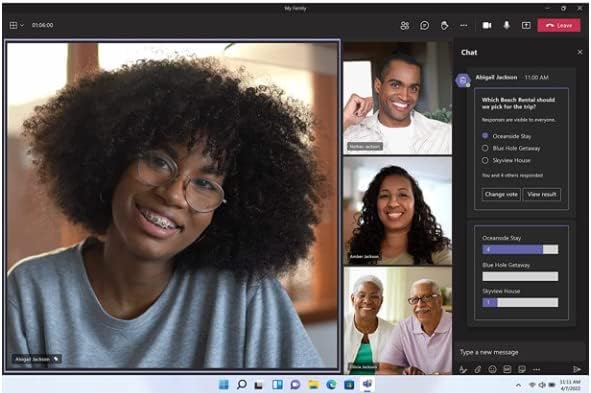
odpowiedź: Windows 11 Home offers several key features, including a revamped Start Menu, enhanced touch controls, and improved gaming capabilities with DirectStorage. Additionally, it supports virtual desktops and includes integrated Microsoft Teams for seamless communication. These features cater to a diverse range of users, from casual home users to gamers looking for optimized performance. The redesigned interface enhances user experience by providing a more intuitive interaction with the operating system. -
pytanie:
Is Microsoft System Builder Windows 11 Home suitable for gaming?
odpowiedź: Absolutely, Microsoft System Builder Windows 11 Home is highly suitable for gaming. It includes features like DirectStorage, which reduces load times by allowing games to load assets directly from the SSD, enhancing performance. Moreover, the operating system supports gaming tools such as Xbox Game Pass, providing access to a vast library of games. This makes it a great choice for gamers who want to ensure their new systems can handle the latest titles and heavy graphics demands. -
pytanie:
What are the system requirements for installing Windows 11 Home?
odpowiedź: To install Windows 11 Home, your system must meet specific requirements: a compatible 64-bit processor, 4 GB RAM, 64 GB storage, DirectX 12 compatible graphics, and support for TPM version 2.0. Additionally, a display of at least 720p resolution is necessary. Meeting these requirements ensures that Windows 11 runs efficiently, allowing users to take full advantage of its capabilities and optimizations, whether for casual use, productivity, or gaming. -
pytanie:
How does the installation process for System Builder Windows 11 Home work?
odpowiedź: Installing System Builder Windows 11 Home involves creating a bootable USB drive with the Windows installation media, which you can download from the Microsoft website. Once the bootable USB is ready, insert it into your new PC and boot from it. Follow the on-screen prompts to install the operating system. This process allows you to customize installation settings and partition your drives as needed. It's important for system builders to have a clear plan for their setup before beginning the installation. -
pytanie:
Do I need a Microsoft account to use Windows 11 Home?
odpowiedź: While you can set up Windows 11 Home with a local account, a Microsoft account provides additional features and benefits. With a Microsoft account, you can access services like OneDrive, sync your settings across devices, and download apps from the Microsoft Store. This is particularly beneficial for users who use multiple devices, as it allows for a seamless integration and access to various cloud services, enhancing productivity and user experience. -
pytanie:
Can I upgrade from Windows 10 to Windows 11 Home using System Builder?
odpowiedź: Yes, users can upgrade from Windows 10 to Windows 11 Home using the System Builder version as long as their hardware supports the upgrade. The installation process will guide you through backing up your current data and settings, while ensuring your system meets Windows 11's requirements. This upgrade is ideal for those looking to take advantage of Windows 11's enhanced performance and user experience without needing to start fresh on a new system. -
pytanie:
What support options are available for System Builder Windows 11 Home?
odpowiedź: Support for System Builder Windows 11 Home primarily comes from community forums, Microsoft's documentation, and tech enthusiast communities rather than direct customer support. Users can find a wealth of information on troubleshooting, installation guides, and performance optimization online. This setup is common among PC builders who often troubleshoot and share solutions with each other, leading to a collaborative problem-solving environment that enhances user knowledge. -
pytanie:
Where can I buy Microsoft System Builder Windows 11 Home?
odpowiedź: You can purchase Microsoft System Builder Windows 11 Home from Ubuy in Poland. Ubuy offers a straightforward shopping experience with a secure platform, ensuring you acquire the official Microsoft software required for new PC installations. This option provides system builders and tech enthusiasts with a reliable source to get the latest Windows operating system for their custom programs, helping you to set up your system efficiently.
Microsoft Operating Systems KW9-00633 Editorial Review


Microsoft OEM System Builder Windows 10 Home 64-bit is a branded product by Microsoft that has mixed reviews. Customers have reported several installation problems and issues with activation keys. One customer installed Windows on their new desktop perfectly by following instructions, and the seller offered help. Another customer claimed to have installed it, but the activation key did not work, and Microsoft offered no support to the problem. Some customers found the product easy to operate and appreciated that it had drivers for all their apps. Customers have also reported that Microsoft is stopping individuals from installing it on their own builds, and it is only meant for system builders, and OEMs are no longer supported by Microsoft. Customers can use the key from this CD if they have installed Windows 10 from a downloaded ISO from the Microsoft website. The OEM version comes with a product key COA license sticker that can be applied to the computer. The product can handle as much RAM your computer can take, and it is upgradable to Windows 11. Windows 10 Home 64-bit OEM is intended for pre-installation on a new PC and cannot be transferred to another computer once installed.
Opinie i oceny klientów
2545 oceny klientów
-
5 gwiazdka
69%
-
4 gwiazdka
9%
-
3 gwiazdka
5%
-
2 gwiazdka
2%
-
1 gwiazdka
15%
Zrecenzuj ten produkt
Podziel się opinią z innymi klientami
Zalety
- Easy to operate
- Handles as much RAM as you have
- Upgradable to Windows 11
Wady
- Customers have reported installation problems, particularly with activation keys.
Zaufanie do platformy i bezpieczeństwo kupujących

MA
Mohammad
Zweryfikowany kupujący
“Excellent quality and original too,when ubuy send original things I will appreciate that ,I very satisfied thank you”
23 July 2026 · via Trustpilot
CK
Chitra
Zweryfikowany kupujący
“The order and delivery progress was communicated very well. Package arrived within the estimated time. Products arrived as expected in good condition.”
22-Jul-26 · via Trustpilot
K
kund
Zweryfikowany kupujący
“Good supply of products. Safe payment methods, and shipment worldwide! Genuine products.”
23-Jul-26 · via Trustpilot
OO
Onesi
Zweryfikowany kupujący
“Was my first time buying a product from Ubuy, but I found it so helpful. This is reliable. Gonna place a new order!”
22 July 2026 · via Trustpilot
SJ
SAO JOHN
Zweryfikowany kupujący
“Ubuy is a great online platform to buy stuff. Reliable, fast delivery time and great value for money. I've been using Ubuy online shopping platform for three years now and will continue to do so.”
23 July 2026 · via Trustpilot
Bezpieczna realizacja zamówienia
Dostawa na cały świat
Łatwe zwroty
Oryginalne produkty
Historia ceny produktu
Ważne informacje
- Ograniczenia: W przypadku produktów wysyłanych za granicę należy pamiętać, że wszelkie gwarancje producenta mogą być nieważne; opcje serwisowe producenta mogą być niedostępne; instrukcje obsługi produktów, podręczniki i ostrzeżenia dotyczące bezpieczeństwa mogą nie być dostępne w języku kraju docelowego; produkty (i materiały towarzyszące) mogą nie spełniać norm wykonania, specyfikacji i wymogów dotyczących oznaczeń kraju docelowego; produkty mogą nie spełniać standardów dotyczących napięcia i innych norm elektrycznych kraju docelowego (co w stosownych przypadkach wymaga użycia adaptera lub konwertera). Odbiorca jest odpowiedzialny za sprawdzenie, czy produkt może zostać legalnie zaimportowany do kraju docelowego. W przypadku zamawiania produktów w sklepie Ubuy lub u jego partnerów odbiorca jest oficjalnie zgłoszonym importerem i musi spełniać wszystkie wymogi przepisów oraz regulacji kraju docelowego.
- Nie wszystkie produkty znajdujące się na Ubuy są na sprzedaż, ponieważ Ubuy to globalna wyszukiwarka. Produkty podlegają przepisom eksportowym/handlowym.
PLN 667
Zamów teraz i otrzymaj około Czwartek, Sierpień 06
Ten produkt nie jest ograniczony w moim kraju. (Kliknij powyższy link, jeśli ten produkt nie jest ograniczony w Twoim kraju, aby nasz zespół sprawdził i zezwolił na jego sprzedaż).
Ilość:
Bezpieczna transakcja
Zgodność z PCI DSS oraz certyfikat ISO 27001:2022, szyfrowane płatności i pełna ochrona kupującego przy każdym zamówieniu.
Nasi czołowi partnerzy logistyczni
Najszybsza dostawa międzynarodowa
Cechy i zalety
- Streamlined and intuitive UI
- Intelligent desktop
- Personalized and accessible
- App compatibility guaranteed
- Flexible upgrade options
- Zero Trust-ready OS for maximum security
Gwarancja Ubuy
Ciesz się bezstresowymi zakupami dzięki 100% oryginalnym produktom, bezpieczeństwu płatności zgodnemu z PCI DSS, ochronie danych z certyfikatem ISO 27001, najszybszej dostawie międzynarodowej, bezpłatnym zwrotom* oraz bezpiecznemu pakowaniu przy każdym zamówieniu.