0 ratings


Nr produktu:
17979493
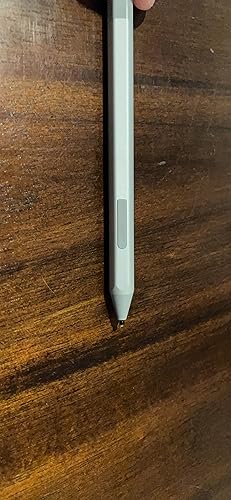
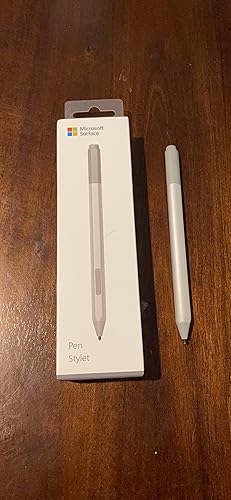
Microsoft Surface Pen Ice Blue (EYU-00049)
Nr produktu:
17979493
PLN 586
Szczegóły ceny
Excluding Shipping & Custom charges ( Shipping and custom charges will be calculated on checkout )
*All items will import from Stany Zjednoczone
W magazynie
 Zaimportowano ze sklepu USA
Ilość:
Produkty dostępne w magazynie: 9.
Zamów teraz i otrzymaj około Sobota, Sierpień 15
Bezpieczna transakcja
Ubuy dokłada wszelkich starań, aby chronić Twoje bezpieczeństwo i prywatność. Nasz zaawansowany system bezpieczeństwa płatności zapewnia poufność poprzez szyfrowanie Twoich danych podczas transmisji przy użyciu protokołów AES (Advanced Encryption Standards) i SSL (Secure Socket Layer). Twoje dane płatności są w 100% bezpieczne, ponieważ nie udostępniamy ich zewnętrznym sprzedawcom.
Nasi czołowi partnerzy logistyczni


Create without limits. New Surface Pen is better and faster than ever.

Szybka
wysyłka

Bezpłatny
zwrot*

Bezpieczne pakowanie

100% oryginalne produkty

Zgodność z PCI DSS

Certyfikat ISO 27001


Note: Step Down Voltage Transformer required for using electronics products of Stany Zjednoczone store (110-120). Recommended power converters Kup Teraz.


Szczegóły Produktu
- Tilt the tip to artistically shade your drawings — just like you would with a graphite pencil
- The rubber eraser on the tail end rubs away your mistakes, just like the eraser on your graphite pencil
- Writes like pen on paper, with precision ink on one end that enables tilt1 and a natural-feeling rubber eraser on the other
- Sketch, shade, and paint with artistic precision and finer control with 4,096 pressure points that respond to the lightest touch
- Ink flows out in real time with no lag or latency. No matter how fast you’re writing or drawing, the ink flows directly from the tip of your Pen to your screen
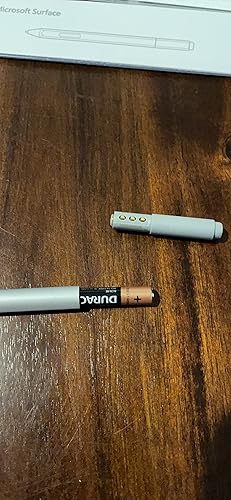
| Number of Batteries | 1 CR2 batteries required. (included) |
| Compatible Devices | Tablet |
| Minimum Required Operating System Version | Windows 10 |
| Item Weight | 18.14 g |
| Item Dimensions | 7 x 0.5 x 2 inches (17.8 x 1.3 x 5.1 cm) |
| Color | Ice Blue |
| Enclosure Material | Rubber |
| Brand | Microsoft |
| Model Number | EYU-00049 |
| UPC | 889842530247 |
| Global Trade Identification Number | 00889842530247 |
| Unit Count | 1 Count |
| Manufacturer | Microsoft Surface Accessories - PC |
| Mfr Part Number | EYU-00049 |
| Material | Rubber |
| Item dimensions L x W x H | 7 x 0.5 x 2 inches (17.8 x 1.3 x 5.1 cm) |
| Number of Packs | 1 |
OPIS PRODUKTU
Masz pytania? Porozmawiaj z nami
Pytania i odpowiedzi klientów
-
pytanie:
What devices is the Microsoft Surface Pen compatible with?
odpowiedź: The Microsoft Surface Pen is primarily compatible with Surface devices, such as Surface Pro, Surface Laptop, Surface Book, and Surface Studio. It offers seamless integration with Windows 10 and later operating systems, providing an intuitive experience for drawing, writing, and note-taking. Additionally, it can be used with select other touch-enabled Windows devices that support stylus input, making it versatile for creative professionals and students alike. -
pytanie:
How does the precision of the Surface Pen enhance creativity?
odpowiedź: The precision of the Microsoft Surface Pen is designed to mimic the feel of traditional writing instruments, featuring a fine tip that offers remarkable accuracy, which is crucial for designers and artists. With pressure sensitivity, you can create varying line thicknesses and shading effects, making it ideal for sketching, illustrating, or editing documents. This level of detail allows users to express their creativity without limits, whether in a digital art application or while annotating documents. -
pytanie:
What are the key features of the Ice Blue Microsoft Surface Pen?
odpowiedź: The Ice Blue Microsoft Surface Pen boasts a sleek design and various features such as tilt support, pressure sensitivity, and 4,096 levels of pressure responsiveness. This makes it perfect for artists and designers needing to create a wide range of strokes with precision. The color Ice Blue adds a stylish aesthetic to your tech, ensuring you have a functional tool that looks good too. Additionally, it has an eraser function on the end for quick corrections, enhancing productivity. -
pytanie:
Can I replace the nibs on the Microsoft Surface Pen?
odpowiedź: Yes, you can replace the nibs on the Microsoft Surface Pen. The pen comes with a standard nib pre-installed and includes additional nib types for various styles of writing and drawing. This feature is essential for users who want to maintain a specific level of firmness or softness with their strokes, allowing for a customized experience based on personal preferences or project needs. You can easily swap out the nibs by following the instructions provided in the user guide. -
pytanie:
Is the Surface Pen usable for gaming?
odpowiedź: While primarily designed for productivity and creative applications, the Microsoft Surface Pen can be used for gaming on compatible touch-enabled devices. It can offer a unique input method for titles that support stylus input, enhancing gameplay, especially in puzzle or drawing games. However, traditional gaming devices like game controllers may provide a more conventional gaming experience, so the Surface Pen may not be suitable for all types of games. -
pytanie:
How do I connect the Surface Pen to my Surface device?
odpowiedź: Connecting the Microsoft Surface Pen to your Surface device is straightforward. Simply press the top button of the pen to turn it on, and it should automatically pair via Bluetooth. Ensure Bluetooth is enabled on your Surface device, and you’ll receive a notification to complete the pairing. Once connected, you can start using the pen with compatible applications, enhancing your productivity, whether for note-taking or creative projects. -
pytanie:
What applications work best with the Surface Pen?
odpowiedź: Microsoft’s suite of applications, including OneNote, Office, and Windows Ink, work seamlessly with the Surface Pen. Creative applications like Adobe Illustrator and Photoshop also leverage its precision and pressure sensitivity features. Whether you're taking notes during lectures, sketching in a design app, or working on presentations, the Surface Pen enhances functionality in various scenarios, catering to both students and professionals who rely on tactile input. -
pytanie:
What are the benefits of using the Surface Pen over a traditional stylus?
odpowiedź: The Microsoft Surface Pen offers several advantages over traditional styluses, including advanced pressure sensitivity, tilt recognition, and programmable buttons for quick access to features. Unlike standard styluses, the Surface Pen provides an authentic drawing and writing experience, closely resembling the feel of pen on paper. This precision makes it particularly beneficial for artists and note-takers, allowing for dynamic and expressive input across a variety of applications. -
pytanie:
What color options are available for the Microsoft Surface Pen?
odpowiedź: The Microsoft Surface Pen is available in multiple color options to suit individual styles and preferences. Colors like Ice Blue, Black, Platinum, and Poppy Red offer users the chance to personalize their devices. This variety not only provides aesthetic appeal but also allows you to mix and match with your Surface device, creating a cohesive tech ensemble that showcases your personality and taste. -
pytanie:
Where can I buy Microsoft Surface Pen – Ice Blue EYU-00049?
odpowiedź: You can conveniently purchase the Microsoft Surface Pen – Ice Blue EYU-00049 from Ubuy. Ubuy offers a wide selection of tech products, ensuring you find the exact model you need, along with reliable service. Their platform makes it easy to browse and choose from various options, allowing you to get the Surface Pen delivered right to your doorstep, simplifying your shopping experience.
Microsoft Microsoft EYU-00049 Editorial Review




Nie znaleziono recenzji redakcyjnych
Opinie i oceny klientów
8721 oceny klientów
-
5 gwiazdka
82%
-
4 gwiazdka
10%
-
3 gwiazdka
4%
-
2 gwiazdka
1%
-
1 gwiazdka
3%
Zrecenzuj ten produkt
Podziel się opinią z innymi klientami
Zaufanie do platformy i bezpieczeństwo kupujących

MA
Mohammad
Zweryfikowany kupujący
“Excellent quality and original too,when ubuy send original things I will appreciate that ,I very satisfied thank you”
23 July 2026 · via Trustpilot
CK
Chitra
Zweryfikowany kupujący
“The order and delivery progress was communicated very well. Package arrived within the estimated time. Products arrived as expected in good condition.”
22-Jul-26 · via Trustpilot
K
kund
Zweryfikowany kupujący
“Good supply of products. Safe payment methods, and shipment worldwide! Genuine products.”
23-Jul-26 · via Trustpilot
OO
Onesi
Zweryfikowany kupujący
“Was my first time buying a product from Ubuy, but I found it so helpful. This is reliable. Gonna place a new order!”
22 July 2026 · via Trustpilot
SJ
SAO JOHN
Zweryfikowany kupujący
“Ubuy is a great online platform to buy stuff. Reliable, fast delivery time and great value for money. I've been using Ubuy online shopping platform for three years now and will continue to do so.”
23 July 2026 · via Trustpilot
Bezpieczna realizacja zamówienia
Dostawa na cały świat
Łatwe zwroty
Oryginalne produkty
Historia ceny produktu
Ważne informacje
- Ograniczenia: W przypadku produktów wysyłanych za granicę należy pamiętać, że wszelkie gwarancje producenta mogą być nieważne; opcje serwisowe producenta mogą być niedostępne; instrukcje obsługi produktów, podręczniki i ostrzeżenia dotyczące bezpieczeństwa mogą nie być dostępne w języku kraju docelowego; produkty (i materiały towarzyszące) mogą nie spełniać norm wykonania, specyfikacji i wymogów dotyczących oznaczeń kraju docelowego; produkty mogą nie spełniać standardów dotyczących napięcia i innych norm elektrycznych kraju docelowego (co w stosownych przypadkach wymaga użycia adaptera lub konwertera). Odbiorca jest odpowiedzialny za sprawdzenie, czy produkt może zostać legalnie zaimportowany do kraju docelowego. W przypadku zamawiania produktów w sklepie Ubuy lub u jego partnerów odbiorca jest oficjalnie zgłoszonym importerem i musi spełniać wszystkie wymogi przepisów oraz regulacji kraju docelowego.
- Nie wszystkie produkty znajdujące się na Ubuy są na sprzedaż, ponieważ Ubuy to globalna wyszukiwarka. Produkty podlegają przepisom eksportowym/handlowym.
PLN 586
Zamów teraz i otrzymaj około Sobota, Sierpień 15
Ten produkt nie jest ograniczony w moim kraju. (Kliknij powyższy link, jeśli ten produkt nie jest ograniczony w Twoim kraju, aby nasz zespół sprawdził i zezwolił na jego sprzedaż).
Ilość:
Produkty dostępne w magazynie: 9.
Bezpieczna transakcja
Zgodność z PCI DSS oraz certyfikat ISO 27001:2022, szyfrowane płatności i pełna ochrona kupującego przy każdym zamówieniu.
Nasi czołowi partnerzy logistyczni
Najszybsza dostawa międzynarodowa
Cechy i zalety
- Precision ink on one end and a rubber eraser on the other
- Tilt for shading, greater sensitivity, and virtually no lag
- Windows and Office give Surface Pen more power than ever
- Easy Note-Taking with OneNote
- Streamline editing documents with digital inking
- Natural writing and drawing tool with 4,096 pressure points
- Compatibility with a wide range of Surface devices
Gwarancja Ubuy
Ciesz się bezstresowymi zakupami dzięki 100% oryginalnym produktom, bezpieczeństwu płatności zgodnemu z PCI DSS, ochronie danych z certyfikatem ISO 27001, najszybszej dostawie międzynarodowej, bezpłatnym zwrotom* oraz bezpiecznemu pakowaniu przy każdym zamówieniu.