- Strona główna /
- Elektronika /
- Television & Video /
- Akcesoria do telewizorów /
- Piloty /
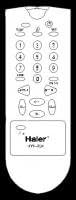
- Haier TV-5620-06 Remote -
0 ratings


Nr produktu:
163071782
Haier TV-5620-06 Remote -
Nr produktu:
163071782
PLN 112
Szczegóły ceny
Bez kosztów wysyłki i cła ( Koszty wysyłki i cła zostaną obliczone przy finalizacji zamówienia )
*Wszystkie produkty zostaną zaimportowane z Stany Zjednoczone
0 ratings
Napisz recenzję
W magazynie
 Zaimportowano ze sklepu USA
Ilość:
Produkty dostępne w magazynie: 2.
Zamów teraz i otrzymaj około Piątek, Wrzesień 25
Bezpieczna transakcja
Ubuy dokłada wszelkich starań, aby chronić Twoje bezpieczeństwo i prywatność. Nasz zaawansowany system bezpieczeństwa płatności zapewnia poufność poprzez szyfrowanie Twoich danych podczas transmisji przy użyciu protokołów AES (Advanced Encryption Standards) i SSL (Secure Socket Layer). Twoje dane płatności są w 100% bezpieczne, ponieważ nie udostępniamy ich zewnętrznym sprzedawcom.
Nasi czołowi partnerzy logistyczni


Szybka
wysyłka

Bezpłatny
zwrot*

Bezpieczne pakowanie

100% oryginalne produkty

Zgodność z PCI DSS

Certyfikat ISO 27001






Note: Step Down Voltage Transformer required for using electronics products of Stany Zjednoczone store (110-120). Recommended power converters Kup Teraz.


Co wyróżnia ten produkt
Universal Compatibility
The Haier TV-5620-06 remote works seamlessly with multiple Haier TV models, ensuring that users can control their devices without needing multiple remotes.
Ergonomic Design
Designed for comfort, the remote fits naturally in your hand, making it easy to navigate through channels and settings during long viewing sessions.
Easy Setup
Setup is straightforward, requiring no complicated programming, enabling users to start using their remote with minimal effort and enhancing overall convenience.
Szczegóły Produktu
| Additional Features | Ergonomic |
| Compatible Devices | Television |
| Connectivity Technology | Infrared |
| Controller Type | Button Control |
| Item Weight | 3.2 ounces (90.72 grams) |
| Brand | Haier |
| Model Number | TV-5620-06 |
| Number of Items | 1 |
| Unit Count | 1 Count |
| Built-In Media | appliance-replacement-parts |
| Item Type Name | Remote - () |
| Manufacturer | Haier |
| Mfr Part Number | TV-5620-06 |
| Special Feature | Ergonomic |
Dla kogo jest przeznaczony?

-
Elderly Users
Simplicity and large buttons make it easy for older individuals to operate without confusion.
-
Replacement Needs
Ideal for those needing a new remote due to loss or damage of their original Haier remote.
-
Budget Conscious
Affordable option for users looking for a reliable remote without spending much on a brand new unit.

-
Smart TV Users
Those with smart features may find limited functionality without advanced features required for streaming.
OPIS PRODUKTU
Masz pytania? Porozmawiaj z nami
Pytania i odpowiedzi klientów
-
pytanie:
What devices are compatible with the Haier TV-5620-06 Remote?
odpowiedź: The Haier TV-5620-06 Remote is designed specifically for use with select Haier television models. It effectively controls essential functions such as power, volume, and channel selection. If your Haier TV model is supported, you can expect seamless integration and functionality. Additionally, it may work with compatible devices that accept universal remote input, making it a versatile choice for managing multiple devices in your entertainment setup. -
pytanie:
How do I troubleshoot issues with my Haier TV-5620-06 Remote?
odpowiedź: If you encounter issues with your Haier TV-5620-06 Remote, start by checking the battery level, as low battery can cause performance problems. Ensure that there are no obstructions between the remote and the TV sensor. If the remote still doesn’t function, try resetting it by removing the batteries, pressing all buttons for a few seconds, then reinserting the batteries. This fixes many minor glitches, helping restore functionality for a smoother viewing experience. -
pytanie:
Is the Haier TV-5620-06 Remote a universal remote?
odpowiedź: No, the Haier TV-5620-06 Remote is not a universal remote; it is specifically designed for Haier TVs. This means it is optimized to work with Haier models for maximum functionality, allowing you to easily navigate parameters specifically tailored to your Haier TV features. If you need multi-device control, consider looking for a universal remote that supports multiple brands to accommodate all your home entertainment gear. -
pytanie:
How do I program my Haier TV-5620-06 Remote?
odpowiedź: Programming your Haier TV-5620-06 Remote is straightforward. If your remote is pre-programmed, it should work as is. For those needing programming, first turn on your TV, then press and hold the 'TV' button until the LED lights up, followed by pressing the 'Power' button. Once the TV turns off, the remote is programmed. This setup enables quick access to your favorite channels and settings, improving your overall viewing experience. -
pytanie:
Can I use the Haier TV-5620-06 Remote to control other devices?
odpowiedź: The Haier TV-5620-06 Remote is specifically crafted for Haier TVs and is not designed to control other devices like DVD players or sound systems directly. However, if you are using a compatible universal remote, you can set it up to control your entire entertainment system. This can streamline your experience by allowing one remote for playback, volume control, and navigation across various devices. -
pytanie:
What should I do if my Haier TV-5620-06 Remote is not responding?
odpowiedź: If your Haier TV-5620-06 Remote is unresponsive, start troubleshooting by checking the batteries; low or dead batteries are common culprits. Ensure the remote is pointed directly at the TV's sensor without obstacles in the way. If issues persist, reset the remote as described in the troubleshooting section, as it can clear minor technical hiccups. This ensures that you can continue enjoying your favorite shows without interruptions. -
pytanie:
Does the Haier TV-5620-06 Remote require any special setup?
odpowiedź: The Haier TV-5620-06 Remote does not require complex setup procedures as it is primarily built for use with designated Haier TV models. Simply insert fresh batteries, and the remote should be ready for immediate use. If you're a new user, familiarizing yourself with the layout will help you navigate your television functions more smoothly, letting you dive into your favorite entertainment without hassle. -
pytanie:
Where can I find a replacement for the Haier TV-5620-06 Remote?
odpowiedź: For a reliable replacement of the Haier TV-5620-06 Remote, check online platforms that specialize in electronics. Alternatives include vendor-specific websites, but for immediate needs in Poland, Ubuy is a top choice. Ubuy stocks genuine remotes and offers a smooth purchasing experience, ensuring you can quickly restore the functionality of your Haier television for uninterrupted enjoyment. -
pytanie:
What features does the Haier TV-5620-06 Remote offer?
odpowiedź: The Haier TV-5620-06 Remote includes several features like dedicated buttons for easy navigation, channel control, volume adjustment, and quick access to settings. Its ergonomic design ensures comfortable handling during extensive viewing sessions. The intuitive layout minimizes the learning curve for new users, making it easier to switch channels, adjust settings, and enhance your entertainment experience right from the couch. -
pytanie:
Is the Haier TV-5620-06 Remote durable?
odpowiedź: Yes, the Haier TV-5620-06 Remote is built with durability in mind. It features high-quality materials that withstand daily usage. However, as with any electronic device, careful handling is recommended to prevent damage from drops or spills. This ensures that you can enjoy reliable performance over time, allowing you to manage your TV efficiently without worrying about frequent replacements.
Haier Remote Controls TV-5620-06 Editorial Review
Nie znaleziono recenzji redakcyjnych
Opinie i oceny klientów
1 oceny klientów
-
5 gwiazdka
100%
-
4 gwiazdka
0%
-
3 gwiazdka
0%
-
2 gwiazdka
0%
-
1 gwiazdka
0%
Zrecenzuj ten produkt
Podziel się opinią z innymi klientami
Zaufanie do platformy i bezpieczeństwo kupujących

JG
Jazz
Zweryfikowany kupujący
“Easy to use and always helpful and sorts any issues I've had past and present”
1 September 2026 · via Trustpilot
EK
Emmanuel
Zweryfikowany kupujący
“I always receive support when I engage customer service. Overall my experience with UBUY has been top notch. Keep up the good work.”
31 August 2026 · via Trustpilot
F
fnd
Zweryfikowany kupujący
“The delivery was fast and the product came undamaged and authentic.”
29 August 2026 · via Trustpilot
LC
Leana
Zweryfikowany kupujący
“Ubuy is extremely efficient and to order online is an easy process. The verity of products to buy is really unlimited! My order was urgent and I got it on time. The products are great! Thank you Ubuy!”
25 August 2026 · via Trustpilot
HL
Hengo
Zweryfikowany kupujący
“Fast, convenient and cheap. Great store!”
27 August 2026 · via Trustpilot
Bezpieczna realizacja zamówienia
Dostawa na cały świat
Łatwe zwroty
Oryginalne produkty
Historia ceny produktu
Ważne informacje
- Ograniczenia: W przypadku produktów wysyłanych za granicę należy pamiętać, że wszelkie gwarancje producenta mogą być nieważne; opcje serwisowe producenta mogą być niedostępne; instrukcje obsługi produktów, podręczniki i ostrzeżenia dotyczące bezpieczeństwa mogą nie być dostępne w języku kraju docelowego; produkty (i materiały towarzyszące) mogą nie spełniać norm wykonania, specyfikacji i wymogów dotyczących oznaczeń kraju docelowego; produkty mogą nie spełniać standardów dotyczących napięcia i innych norm elektrycznych kraju docelowego (co w stosownych przypadkach wymaga użycia adaptera lub konwertera). Odbiorca jest odpowiedzialny za sprawdzenie, czy produkt może zostać legalnie zaimportowany do kraju docelowego. W przypadku zamawiania produktów w sklepie Ubuy lub u jego partnerów odbiorca jest oficjalnie zgłoszonym importerem i musi spełniać wszystkie wymogi przepisów oraz regulacji kraju docelowego.
- Nie wszystkie produkty znajdujące się na Ubuy są na sprzedaż, ponieważ Ubuy to globalna wyszukiwarka. Produkty podlegają przepisom eksportowym/handlowym.
PLN 112
Zamów teraz i otrzymaj około Piątek, Wrzesień 25
Ten produkt nie jest ograniczony w moim kraju. (Kliknij powyższy link, jeśli ten produkt nie jest ograniczony w Twoim kraju, aby nasz zespół sprawdził i zezwolił na jego sprzedaż).
Ilość:
Produkty dostępne w magazynie: 2.
Bezpieczna transakcja
Zgodność z PCI DSS oraz certyfikat ISO 27001:2022, szyfrowane płatności i pełna ochrona kupującego przy każdym zamówieniu.
Nasi czołowi partnerzy logistyczni
Najszybsza dostawa międzynarodowa
Gwarancja Ubuy
Ciesz się bezstresowymi zakupami dzięki 100% oryginalnym produktom, bezpieczeństwu płatności zgodnemu z PCI DSS, ochronie danych z certyfikatem ISO 27001, najszybszej dostawie międzynarodowej, bezpłatnym zwrotom* oraz bezpiecznemu pakowaniu przy każdym zamówieniu.