- Strona główna /
- Gry wideo /
- PC /
- Akcesoria /
- Controllers /
- Flight Controls /
- Honeycomb Bravo Throttle Quadrant
0 ratings




Nr produktu:
29974995
Honeycomb Bravo Throttle Quadrant
Nr produktu:
29974995
PLN 1633
Szczegóły ceny
Bez kosztów wysyłki i cła ( Koszty wysyłki i cła zostaną obliczone przy finalizacji zamówienia )
*Wszystkie produkty zostaną zaimportowane z Stany Zjednoczone
0 ratings
Napisz recenzję
W magazynie
 Zaimportowano ze sklepu USA
Zamów teraz i otrzymaj około Środa, Wrzesień 16
Bezpieczna transakcja
Ubuy dokłada wszelkich starań, aby chronić Twoje bezpieczeństwo i prywatność. Nasz zaawansowany system bezpieczeństwa płatności zapewnia poufność poprzez szyfrowanie Twoich danych podczas transmisji przy użyciu protokołów AES (Advanced Encryption Standards) i SSL (Secure Socket Layer). Twoje dane płatności są w 100% bezpieczne, ponieważ nie udostępniamy ich zewnętrznym sprzedawcom.
Nasi czołowi partnerzy logistyczni


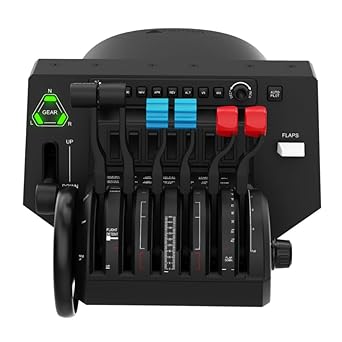
Honeycomb Aeronautical offers a universal all-in-one cockpit system with the Bravo Throttle Quadrant, supporting configurations from small single-engine planes to four-jet airliners.

Szybka
wysyłka

Bezpłatny
zwrot*

Bezpieczne pakowanie

100% oryginalne produkty

Zgodność z PCI DSS

Certyfikat ISO 27001






Note: Step Down Voltage Transformer required for using electronics products of Stany Zjednoczone store (110-120). Recommended power converters Kup Teraz.


Co wyróżnia ten produkt
All-in-One System
Integrates throttle, autopilot, and annunciator panel, providing a comprehensive cockpit experience without the clutter of multiple devices, enhancing the immersive flight simulation.
Configurable Throttle Setup
Allows users to customize throttle functions according to their specific flight preferences, ensuring versatile control and improved simulation accuracy tailored to various aircraft models.
Precision Controls
Features a trim wheel and dedicated buttons for gears and flaps, ensuring precise handling and smoother operations, which enhances the realism and effectiveness of flight maneuvers.
Szczegóły Produktu
| Compatible Devices | PC, Mac |
| Controller Type | Throttle Quadrant |
| Connectivity Technology | USB-C cable |
| Additional Features | Multiuse |
| Button Quantity | 1 |
| Hardware Platform | Desktop |
| Package Quantity | 1 |
| Item Dimensions | 18.2 x 13.1 x 10.2 inches (46.2 x 33.3 x 25.9 cm) |
| Item Dimensions D x W x H | 10.5"D x 13.1"W x 10.2"H (26.7 x 33.3 x 25.9 cm) |
| Color | Black |
| Brand Name | Honeycomb Aeronautical |
| Model Name | Bravo Throttle Quadrant |
| Manufacturer | Honeycomb Aeronautical |
| Global Trade Identification Number | 04039621003042 |
| Item Highlight | Flight simulator controls w/autopilot, annunciator panel, gear, flaps |
| External Testing Certification | Não aplicável |
| Model Number | AER-HONEYQUAD |
| Unit Count | 1 Count |
| Manufacturer Part Number | AER-HONEYQUAD |
| Package Weight | 14.10 Pound |
Dla kogo jest przeznaczony?

-
Aviation Enthusiasts
Ideal for simulationists who want a realistic flying experience with comprehensive controls and features.
-
Flight Schools
Perfect for flight training programs needing a versatile and reliable cockpit system for students to practice controls.
-
Serious Gamers
Great for gamers looking to enhance their flight simulator experience with realistic controls and customizable settings.

-
Casual Gamers
May overwhelm casual players seeking simple controls; not necessary for basic flight simulation enjoyment.
OPIS PRODUKTU
Masz pytania? Porozmawiaj z nami
Pytania i odpowiedzi klientów
-
pytanie:
What is the Honeycomb Aeronautical Bravo Flight Simulator Throttle Quadrant?
odpowiedź: The Honeycomb Aeronautical Bravo Flight Simulator Throttle Quadrant is an advanced flight simulation control device designed for both casual and professional flight simulation enthusiasts. It features six interchangeable levers that can be customized to control trim, gear, flaps, autopilot, and radio switch panels. This versatility allows users to tailor their experience according to their preferred aircraft type or flight scenario, enhancing realism and immersion in flight simulation. -
pytanie:
What types of aircraft can the Bravo Throttle Quadrant be used with?
odpowiedź: The Bravo Throttle Quadrant is compatible with a wide variety of aircraft types, from general aviation to commercial airliners and even military jets. It seamlessly integrates with popular flight simulation software such as Microsoft Flight Simulator, X-Plane, and Prepar3D. Flight enthusiasts can use it to simulate everything from flying a Boeing 747 to a small Cessna, making it a versatile choice for any aircraft simulation. -
pytanie:
How do the interchangeable levers work?
odpowiedź: The Bravo Throttle Quadrant comes with six interchangeable levers that allow you to customize your controls depending on your flight preferences. Simply detach and replace the levers to suit your needs, whether you want to control throttle, flaps, or landing gear. This feature makes it adaptable for various aircraft configurations and personal flight styles, providing an immersive experience tailored to individual preferences. -
pytanie:
Is the Bravo Throttle Quadrant easy to set up?
odpowiedź: Yes, setting up the Honeycomb Bravo Throttle Quadrant is straightforward. It typically involves plugging it into your computer via USB and configuring it within your flight simulation software. Most modern simulators recognize the device without requiring extensive configurations. Clear manuals and online support also provide guidance. Once set up, you can enjoy an enhanced simulation experience almost immediately, making it suitable for both new and experienced users. -
pytanie:
Does the Bravo Throttle Quadrant have a realistic feel?
odpowiedź: Absolutely! The Bravo Throttle Quadrant is designed with realism in mind, featuring smooth and precise movements with a solid build quality. It includes tactile feedback on the levers, replicating the feel of real aircraft controls. This realism enhances the overall simulation experience, making users feel more connected to their virtual aircraft as they engage in flight maneuvers or procedures. -
pytanie:
Is the Honeycomb Bravo compatible with VR headsets?
odpowiedź: Yes, the Honeycomb Bravo Throttle Quadrant is compatible with VR headsets when used with simulators that support VR functionality. Using it with VR allows for an immersive flying experience, as you can manipulate the throttle quadrant while engaging in a fully realized 3D cockpit environment. This combined use offers a unique opportunity for sim pilots to experience flight simulation at its highest level of realism. -
pytanie:
Can I program the switches and levers for specific functions?
odpowiedź: Yes, programming the switches and levers on the Honeycomb Bravo Throttle Quadrant is a straightforward process. Most flight simulation software allows users to assign specific functions to each lever and toggle switch according to their preferences. This capability ensures that users can customize their setups extensively, providing quick access to functions like autopilot, navigation, and communication controls for a simplified flying experience. -
pytanie:
What is the weight of the Bravo Throttle Quadrant?
odpowiedź: The Honeycomb Aeronautical Bravo Throttle Quadrant weighs approximately several pounds, providing stability during use. Its robust design ensures that it stays in place on your desk, reducing movement during intense simulation scenarios. This weight, coupled with its non-slip feet, increases user confidence and comfort, allowing for an immersive flight experience without the distraction of the device shifting unexpectedly. -
pytanie:
Where can I buy the Honeycomb Aeronautical Bravo Flight Simulator Throttle Quadrant in Poland?
odpowiedź: You can purchase the Honeycomb Aeronautical Bravo Flight Simulator Throttle Quadrant from Ubuy in Poland. Ubuy offers a reliable platform for acquiring high-quality flight simulation equipment, ensuring you get the product delivered conveniently. Browse Ubuy’s selection to find the Bravo Throttle Quadrant and enjoy an enhanced flight simulation experience. -
pytanie:
Is it suitable for beginners in flight simulation?
odpowiedź: Yes, the Honeycomb Bravo Throttle Quadrant is suitable for beginners in flight simulation. Its intuitive design and adjustable controls make it easier for new users to engage with flight mechanics without overwhelming complexity. Coupled with clear setup instructions, it provides an entry point into flight simulation, allowing beginners to gain confidence while learning the necessary controls to operate various aircraft effectively.
Honeycomb Aeronautical Flight Controls AER-HONEYQUAD Editorial Review


Honeycomb Bravo Throttle Quadrant is a premium flight simulation device known for its outstanding construction and ease of setup, making it ideal for enthusiasts using MSFS 2020 and beyond. This throttle quadrant supports a wide range of aircraft types, offering customizable throttle setups along with numerous buttons and switches for enhanced functionality. Users appreciate the realistic throttle tension and high build quality. While many praise its versatility, some have noted minor limitations, such as a non-analog trim wheel and compatibility issues with X-Plane 12. However, the aftermarket support is immense, allowing for upgrades and enhancements for a truly tailored experience.
Opinie i oceny klientów
1633 oceny klientów
-
5 gwiazdka
81%
-
4 gwiazdka
10%
-
3 gwiazdka
5%
-
2 gwiazdka
1%
-
1 gwiazdka
3%
Zrecenzuj ten produkt
Podziel się opinią z innymi klientami
Zalety
- Easy plug and play setup
- Versatile for various aircraft types
- Smooth operation of sliders
- High-quality build and materials
- Detailed attention to cockpit realism
Wady
- May require additional space on your desk
Zaufanie do platformy i bezpieczeństwo kupujących

JG
Jazz
Zweryfikowany kupujący
“Easy to use and always helpful and sorts any issues I've had past and present”
1 September 2026 · via Trustpilot
EK
Emmanuel
Zweryfikowany kupujący
“I always receive support when I engage customer service. Overall my experience with UBUY has been top notch. Keep up the good work.”
31 August 2026 · via Trustpilot
F
fnd
Zweryfikowany kupujący
“The delivery was fast and the product came undamaged and authentic.”
29 August 2026 · via Trustpilot
LC
Leana
Zweryfikowany kupujący
“Ubuy is extremely efficient and to order online is an easy process. The verity of products to buy is really unlimited! My order was urgent and I got it on time. The products are great! Thank you Ubuy!”
25 August 2026 · via Trustpilot
HL
Hengo
Zweryfikowany kupujący
“Fast, convenient and cheap. Great store!”
27 August 2026 · via Trustpilot
Bezpieczna realizacja zamówienia
Dostawa na cały świat
Łatwe zwroty
Oryginalne produkty
Historia ceny produktu
Ważne informacje
- Ograniczenia: W przypadku produktów wysyłanych za granicę należy pamiętać, że wszelkie gwarancje producenta mogą być nieważne; opcje serwisowe producenta mogą być niedostępne; instrukcje obsługi produktów, podręczniki i ostrzeżenia dotyczące bezpieczeństwa mogą nie być dostępne w języku kraju docelowego; produkty (i materiały towarzyszące) mogą nie spełniać norm wykonania, specyfikacji i wymogów dotyczących oznaczeń kraju docelowego; produkty mogą nie spełniać standardów dotyczących napięcia i innych norm elektrycznych kraju docelowego (co w stosownych przypadkach wymaga użycia adaptera lub konwertera). Odbiorca jest odpowiedzialny za sprawdzenie, czy produkt może zostać legalnie zaimportowany do kraju docelowego. W przypadku zamawiania produktów w sklepie Ubuy lub u jego partnerów odbiorca jest oficjalnie zgłoszonym importerem i musi spełniać wszystkie wymogi przepisów oraz regulacji kraju docelowego.
- Nie wszystkie produkty znajdujące się na Ubuy są na sprzedaż, ponieważ Ubuy to globalna wyszukiwarka. Produkty podlegają przepisom eksportowym/handlowym.
PLN 1633
Zamów teraz i otrzymaj około Środa, Wrzesień 16
Ten produkt nie jest ograniczony w moim kraju. (Kliknij powyższy link, jeśli ten produkt nie jest ograniczony w Twoim kraju, aby nasz zespół sprawdził i zezwolił na jego sprzedaż).
Ilość:
Bezpieczna transakcja
Zgodność z PCI DSS oraz certyfikat ISO 27001:2022, szyfrowane płatności i pełna ochrona kupującego przy każdym zamówieniu.
Nasi czołowi partnerzy logistyczni
Najszybsza dostawa międzynarodowa
Cechy i zalety
- Universal cockpit system suitable for various aircraft types.
- Configurable for single-engine and multi-engine setups.
- Features include autopilot panel and annunciator with important status lights.
- Supports up to four thrust levers and separate flap switches for airliners.
- Allows for thrust reverser operation directly on the quadrant.
- Compatible with major flight simulators like Microsoft Flight Simulator and X-Plane.
Gwarancja Ubuy
Ciesz się bezstresowymi zakupami dzięki 100% oryginalnym produktom, bezpieczeństwu płatności zgodnemu z PCI DSS, ochronie danych z certyfikatem ISO 27001, najszybszej dostawie międzynarodowej, bezpłatnym zwrotom* oraz bezpiecznemu pakowaniu przy każdym zamówieniu.