0 ratings






Nr produktu:
496095
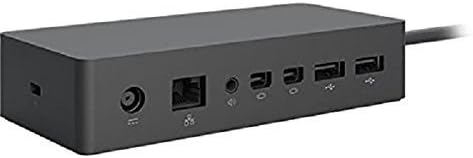
Microsoft Surface Dock (Pd9-00003),Black
87% klientów poleciłoby ten produkt znajomym
Nr produktu:
496095
PLN 555
Szczegóły ceny
Excluding Shipping & Custom charges ( Shipping and custom charges will be calculated on checkout )
*All items will import from Stany Zjednoczone
17%
W magazynie
 Zaimportowano ze sklepu USA
Ilość:
W magazynie pozostało tylko 1 pozycji.
Zamów teraz i otrzymaj około Monday, Sierpień 24
Bezpieczna transakcja
Ubuy dokłada wszelkich starań, aby chronić Twoje bezpieczeństwo i prywatność. Nasz zaawansowany system bezpieczeństwa płatności zapewnia poufność poprzez szyfrowanie Twoich danych podczas transmisji przy użyciu protokołów AES (Advanced Encryption Standards) i SSL (Secure Socket Layer). Twoje dane płatności są w 100% bezpieczne, ponieważ nie udostępniamy ich zewnętrznym sprzedawcom.
Nasi czołowi partnerzy logistyczni


Transform your surface into a desktop PC by plugging in your dock with the surface connect cable.

Szybka
wysyłka

Bezpłatny
zwrot*

Bezpieczne pakowanie

100% oryginalne produkty

Zgodność z PCI DSS

Certyfikat ISO 27001


Note: Step Down Voltage Transformer required for using electronics products of Stany Zjednoczone store (110-120). Recommended power converters Kup Teraz.


Co wyróżnia ten produkt
Multiple Ports
Equipped with various ports, the Surface Dock allows seamless connectivity to multiple devices like monitors, keyboards, and external drives, enhancing productivity without cable clutter.
Fast Charging
The Surface Dock provides quick charging capabilities, ensuring your Surface device stays powered during intense work sessions, which is essential for professionals on the go.
Sleek Design
With its modern black finish and compact size, the Microsoft Surface Dock complements any workspace while ergonomically maintaining functionality, making it an attractive addition to your setup.
Szczegóły Produktu
- Compatibility: Surface go, surface laptop, surface laptop 2, surface pro, surface pro 3, surface pro 4,surface pro 6, surface book, surface book 2
- 2x Mini display ports, 1x Gigabit Ethernet port
- 4 USB 3.0 ports, 1x audio out port
- Magnetic surface connect cable. Transform your surface into a desktop PC by plugging in your dock with the surface connect cable. External power supply
- High speed data transferring
| Hardware Interface | Ethernet |
| Compatible Devices | Microsoft Surface Pro 3 |
| Total Usb Ports | 4 |
| Number of Ports | 4 |
| Total Number of HDMI Ports | 2 |
| Item Dimensions L x W x H | 5.12"L x 1.18"W x 2.36"H (13 x 3 x 6 cm) |
| Color | Black |
| Brand | Microsoft |
| Number of Items | 1 |
| Global Trade Identification Number | 00885370996340 |
| Unit Count | 1 Count |
| UPC | 885370996340 |
| Manufacturer | Microsoft |
| Model Number | PD9-00003 |
| Mfr Part Number | PD9-00003 |
| Total USB Ports | 4 |
| Product Dimensions (L x W x H) | 5.12"L x 1.18"W x 2.36"H (13 x 3 x 6 cm) |
| Total HDMI Ports | 2 |
| Package Weight | 3 Pound |
Dla kogo jest przeznaczony?

-
Remote Workers
Ideal for remote workers needing multiple connections and quick access to peripherals for better productivity.
-
Students
Perfect for students using Surface devices for presentations and who need to connect to projectors and monitors.
-
Home Offices
Great for home office setups, allowing seamless switching between laptop and desktop peripherals for enhanced workflow.

-
Casual Users
Not suitable for casual users who require basic functionality without the need for multiple display connections.
OPIS PRODUKTU
Masz pytania? Porozmawiaj z nami
Pytania i odpowiedzi klientów
-
pytanie:
What are the main features of the Microsoft Surface Dock (Pd9-00003)?
odpowiedź: The Microsoft Surface Dock (Pd9-00003) features multiple ports including two Mini DisplayPort outputs, multiple USB 3.0 ports, and an Ethernet connection. This allows users to connect dual 4K monitors, charge your Surface device, and access high-speed internet all through a single dock. It enhances productivity, especially in multi-tasking environments. For instance, professionals working from home can seamlessly transition from a laptop setup to a desktop environment by simply connecting their Surface device to the dock. -
pytanie:
Is the Microsoft Surface Dock compatible with all Surface devices?
odpowiedź: The Microsoft Surface Dock is designed specifically to work with Surface devices equipped with the Surface Connect port. This includes models like the Surface Pro 4, Surface Book, Surface Laptop, and newer models. Compatibility ensures that users can easily power their devices while connecting to peripherals. As an example, a Surface Pro user can enjoy a desktop experience by using the dock to connect external monitors and USB devices without any hassle. -
pytanie:
How does the docking station improve productivity?
odpowiedź: By utilizing the Microsoft Surface Dock, users can significantly boost productivity by setting up a multi-monitor workstation, which allows for better organization of applications and windows. The dock supports dual 4K displays, enabling users to have expansive screen real estate for tasks like graphic design or programming. For instance, a graphic designer can keep design tools on one screen and previews on another, streamlining their workflow. -
pytanie:
Can I charge my Surface device while using the dock?
odpowiedź: Yes, the Microsoft Surface Dock provides power to your Surface device while connected, ensuring that you can work uninterrupted. It eliminates the need for separate charging cables and also provides ample power to run connected peripherals. For example, using the dock during a video conference lets users stay fully powered while accessing cameras and microphones plugged into the dock. -
pytanie:
What connectivity options does the Surface Dock support?
odpowiedź: The Surface Dock offers various connectivity options, including USB 3.0 ports for high-speed data transfer, a Gigabit Ethernet port for reliable internet access, and Mini DisplayPort outputs for connecting monitors. These diverse options make it suitable for different professional setups, allowing users to customize their workspace. A typical office scenario would involve connecting a printer and external drives through the USB ports while maintaining a stable internet connection. -
pytanie:
What is the design of the Microsoft Surface Dock like?
odpowiedź: The Microsoft Surface Dock has a sleek, minimalistic design that complements Surface devices aesthetically. It is compact, allowing it to fit on most desks without taking up much space. This design not only enhances the visual appeal of a workspace but also promotes organized cable management. In a professional setting, this can lead to a cleaner and more efficient work environment. -
pytanie:
How do I set up the Microsoft Surface Dock?
odpowiedź: Setting up the Microsoft Surface Dock is straightforward: simply plug the dock into a power outlet and connect your Surface device using the Surface Connect cable. From there, you can add peripherals like keyboards, mice, and monitors through the available ports. For users transitioning from a laptop to a desktop experience, this simplicity allows for quick adjustments without technical setup challenges. -
pytanie:
Does the Surface Dock support audio output?
odpowiedź: Yes, the Microsoft Surface Dock supports audio output through connected displays or speakers. When attaching monitors equipped with built-in speakers, audio can be routed seamlessly, making it ideal for video conferencing or media playback. This feature enhances the overall experience for presentations or virtual meetings, as users can maintain sound quality without additional complications. -
pytanie:
Are there any performance limitations when using the Surface Dock?
odpowiedź: While the Surface Dock is highly capable, performance can vary based on the connected Surface device and the number of peripherals used simultaneously. For instance, while running dual 4K monitors, heavy applications may cause strain on lower-end Surface models. Users should check individual specifications and optimize their setups accordingly to ensure the best experience. -
pytanie:
Where can I buy the Microsoft Surface Dock (Pd9-00003)?
odpowiedź: You can purchase the Microsoft Surface Dock (Pd9-00003) from Ubuy in Poland. Ubuy offers a user-friendly shopping experience with a variety of options for quick and convenient purchasing tailored to customers in your region.
Microsoft Docking Stations PD9-00003 Editorial Review


The Microsoft Surface Dock PD9-00003 allows users to connect their Surface Pro 3 or 4 tablets to multiple monitors and peripheral devices through the charging port. The dock also charges the tablet when in use and connects with 110-volt power. Users are able to run two 4K monitors at 30Hz, or one 4K monitor at 60Hz while connected to the dock and an additional monitor connected through the Surface Pro 4’s built-in charging port. The dock is not compatible with the Surface 2, but is compatible with the Surface Book and the Surface Go. Overall, customer reviews indicate that this product works well and is easy to set up, however, some have expressed disappointment with the lack of specific ports, such as a USB Type-C. **
Opinie i oceny klientów
4462 oceny klientów
-
5 gwiazdka
76%
-
4 gwiazdka
12%
-
3 gwiazdka
5%
-
2 gwiazdka
1%
-
1 gwiazdka
6%
Zrecenzuj ten produkt
Podziel się opinią z innymi klientami
Zalety
- Works as advertised
- Easy plug-and-play setup
- Charges the Surface Pro while in use
- Eliminates wire clutter
- Compatible with the Surface Pro 3, 4, Book, and Go
Wady
- Limited to 30Hz when running two 4K monitors
Zaufanie do platformy i bezpieczeństwo kupujących

MA
Mohammad
Zweryfikowany kupujący
“Excellent quality and original too,when ubuy send original things I will appreciate that ,I very satisfied thank you”
23 July 2026 · via Trustpilot
CK
Chitra
Zweryfikowany kupujący
“The order and delivery progress was communicated very well. Package arrived within the estimated time. Products arrived as expected in good condition.”
22-Jul-26 · via Trustpilot
K
kund
Zweryfikowany kupujący
“Good supply of products. Safe payment methods, and shipment worldwide! Genuine products.”
23-Jul-26 · via Trustpilot
OO
Onesi
Zweryfikowany kupujący
“Was my first time buying a product from Ubuy, but I found it so helpful. This is reliable. Gonna place a new order!”
22 July 2026 · via Trustpilot
SJ
SAO JOHN
Zweryfikowany kupujący
“Ubuy is a great online platform to buy stuff. Reliable, fast delivery time and great value for money. I've been using Ubuy online shopping platform for three years now and will continue to do so.”
23 July 2026 · via Trustpilot
Bezpieczna realizacja zamówienia
Dostawa na cały świat
Łatwe zwroty
Oryginalne produkty
Historia ceny produktu
Ważne informacje
- Ograniczenia: W przypadku produktów wysyłanych za granicę należy pamiętać, że wszelkie gwarancje producenta mogą być nieważne; opcje serwisowe producenta mogą być niedostępne; instrukcje obsługi produktów, podręczniki i ostrzeżenia dotyczące bezpieczeństwa mogą nie być dostępne w języku kraju docelowego; produkty (i materiały towarzyszące) mogą nie spełniać norm wykonania, specyfikacji i wymogów dotyczących oznaczeń kraju docelowego; produkty mogą nie spełniać standardów dotyczących napięcia i innych norm elektrycznych kraju docelowego (co w stosownych przypadkach wymaga użycia adaptera lub konwertera). Odbiorca jest odpowiedzialny za sprawdzenie, czy produkt może zostać legalnie zaimportowany do kraju docelowego. W przypadku zamawiania produktów w sklepie Ubuy lub u jego partnerów odbiorca jest oficjalnie zgłoszonym importerem i musi spełniać wszystkie wymogi przepisów oraz regulacji kraju docelowego.
- Nie wszystkie produkty znajdujące się na Ubuy są na sprzedaż, ponieważ Ubuy to globalna wyszukiwarka. Produkty podlegają przepisom eksportowym/handlowym.
PLN 555
Zamów teraz i otrzymaj około Monday, Sierpień 24
Ten produkt nie jest ograniczony w moim kraju. (Kliknij powyższy link, jeśli ten produkt nie jest ograniczony w Twoim kraju, aby nasz zespół sprawdził i zezwolił na jego sprzedaż).
Ilość:
W magazynie pozostało tylko 1 pozycji.
Bezpieczna transakcja
Zgodność z PCI DSS oraz certyfikat ISO 27001:2022, szyfrowane płatności i pełna ochrona kupującego przy każdym zamówieniu.
Nasi czołowi partnerzy logistyczni
Najszybsza dostawa międzynarodowa
Cechy i zalety
- Connectivity with 4 USB 3.0 ports, 2x Mini display ports, 1x Gigabit Ethernet port, and 1x audio out port.
- Compatible with a range of Microsoft Surface devices.
- External power supply.
- High speed data transferring.
- Magnetic surface connect cable.
- Transforms your Surface device into a desktop PC.
Gwarancja Ubuy
Ciesz się bezstresowymi zakupami dzięki 100% oryginalnym produktom, bezpieczeństwu płatności zgodnemu z PCI DSS, ochronie danych z certyfikatem ISO 27001, najszybszej dostawie międzynarodowej, bezpłatnym zwrotom* oraz bezpiecznemu pakowaniu przy każdym zamówieniu.