- Strona główna /
- Książki /
- Komputery i technologia /
- Hardware & DIY /
- Personal Computers /
- PCs /
- Windows 11 in easy steps
0 ratings





Nr produktu:
83296826
Windows 11 in easy steps
Nr produktu:
83296826
PLN 100
Szczegóły ceny
Excluding Shipping & Custom charges ( Shipping and custom charges will be calculated on checkout )
*All items will import from Stany Zjednoczone
19%
W magazynie
 Zaimportowano ze sklepu USA
Zamów teraz i otrzymaj około Sunday, Sierpień 16
Bezpieczna transakcja
Ubuy dokłada wszelkich starań, aby chronić Twoje bezpieczeństwo i prywatność. Nasz zaawansowany system bezpieczeństwa płatności zapewnia poufność poprzez szyfrowanie Twoich danych podczas transmisji przy użyciu protokołów AES (Advanced Encryption Standards) i SSL (Secure Socket Layer). Twoje dane płatności są w 100% bezpieczne, ponieważ nie udostępniamy ich zewnętrznym sprzedawcom.
Nasi czołowi partnerzy logistyczni


Ideal for those who want to grasp the essentials quickly and easily.

Szybka
wysyłka

Bezpłatny
zwrot*

Bezpieczne pakowanie

100% oryginalne produkty

Zgodność z PCI DSS

Certyfikat ISO 27001


Note: Step Down Voltage Transformer required for using electronics products of Stany Zjednoczone store (110-120). Recommended power converters Kup Teraz.


Co wyróżnia ten produkt
Simplified Guides
Offers step-by-step instructions that make navigating Windows 11 easy for all users, ensuring a smooth experience even for beginners.
First Edition Insights
As the first edition, it provides up-to-date information and tips covering the latest features and updates, setting users ahead of the curve.
Visual Aids
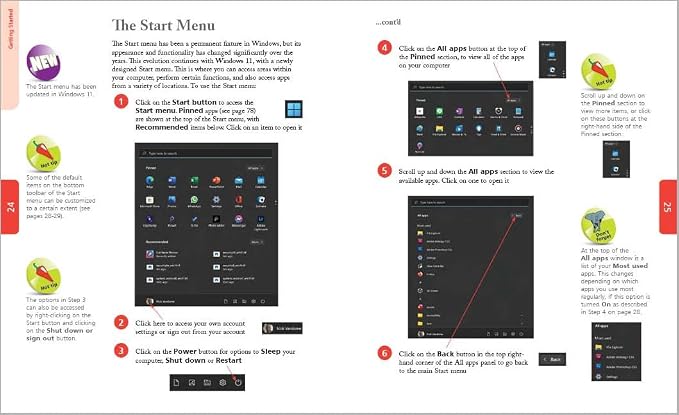
Includes helpful visuals and screenshots throughout the book, enhancing comprehension and retention for easier learning and application of Windows 11 features.
Szczegóły Produktu
- Windows 11 is a major evolution of the Windows operating system, and Windows 11 in easy steps will guide you through discovering the key features and functions. In concise language, this best-selling guide takes you through the essentials, a step at a time. Areas covered include: The new Desktop, Start button and Start menu.Customizable widgets that display real-time information such as newsfeeds and weather. The Microsoft Teams Chat app and Mail to keep in touch for work, and with friends and family. Using Android apps on Windows 11. Snap layouts for displaying and managing multiple apps within a single screen. Keeping your files organized, and keeping Windows running in tip-top condition. Ideal for those who want to grasp the essentials quickly and easily. Suitable for Seniors and Windows newbies as well as those upgrading to the new version. Covers Windows 11 on desktop and laptop computers.
| Publisher | In Easy Steps Limited |
| Publication date | February 1, 2022 |
| Edition | 1st |
| Language | English |
| Print length | 240 pages |
| ISBN-10 | 1840789476 |
| ISBN-13 | 978-1840789478 |
| Item Weight | 1.15 pounds (520 grams) |
| Dimensions | 7.2 x 0.5 x 8.9 inches (18.3 x 1.3 x 22.6 cm) |
| Part of series | In Easy Steps |
Dla kogo jest przeznaczony?

-
Beginners
New users will find easy-to-follow instructions that simplify the Windows 11 experience and enhance learning.
-
Non-Tech Savvy
Individuals with limited technical knowledge will benefit from straightforward explanations and practical tips provided in the book.
-
Upgraders
Users transitioning from previous Windows versions will appreciate step-by-step guidance to adapt to Windows 11 effectively.

-
Experienced Users
Seasoned Windows users may find the content too basic and lacking in advanced features and shortcuts.
OPIS PRODUKTU
Masz pytania? Porozmawiaj z nami
Pytania i odpowiedzi klientów
-
pytanie:
What are the key features of Windows 11 in easy steps 6th Edition?
odpowiedź: Windows 11 in easy steps 6th Edition covers essential features such as a redesigned Start menu, updated taskbar, and improved snap layouts. This edition emphasizes user-friendly navigation and highlights new productivity tools that cater to both beginners and advanced users. With visual guides and simple explanations, readers can efficiently learn how to customize their desktops, access new widgets, and utilize multiple desktops. It’s ideal for anyone looking to maximize their experience with Windows 11. -
pytanie:
How does Windows 11 in easy steps 6th Edition differ from previous editions?
odpowiedź: This edition focuses specifically on the latest Windows 11 updates, differentiating it from previous guides that may cover older versions. It presents new features clearly, ensuring readers can easily grasp how the latest functionalities work, such as virtual desktops and integrated Microsoft Teams. Furthermore, the step-by-step format is tailored for current software, making it a relevant choice for users transitioning from older systems or new adopters wanting to familiarize themselves with the latest tech. -
pytanie:
Who is the target audience for Windows 11 in easy steps 6th Edition?
odpowiedź: This book is designed for users ranging from beginners to intermediate levels who are looking to navigate Windows 11 confidently. It's particularly beneficial for those who may find technology daunting. The simple language and visual aids make it accessible for older adults or anyone who prefers a straightforward approach to learning. Additionally, tech enthusiasts seeking updates on the latest operating system features will find valuable insights within its pages. -
pytanie:
What topics are covered in Windows 11 in easy steps 6th Edition?
odpowiedź: The book offers comprehensive coverage on a variety of topics including system setup, personalization, advanced settings, and new applications available in Windows 11. Sections dedicated to file management, security settings, and troubleshooting common issues equip users with practical knowledge to enhance their experience. It also includes tips for integrating apps and using Microsoft services like OneDrive, ensuring users can make the most of what Windows 11 has to offer. -
pytanie:
Is Windows 11 in easy steps 6th Edition suitable for self-learners?
odpowiedź: Absolutely, the structured layout and clear illustrations in Windows 11 in easy steps 6th Edition make it an excellent resource for self-learners. Readers can go at their own pace, practicing new skills as they progress. The tutorial-style approach means that users can develop their understanding of Windows 11 without needing additional resources. This is particularly effective for people who prefer hands-on learning and want to enhance their technical abilities progressively. -
pytanie:
How can readers benefit from the visual content in Windows 11 in easy steps 6th Edition?
odpowiedź: The visual content in this edition is pivotal in helping readers grasp complex concepts quickly. Screenshots and diagrams illustrate step-by-step processes, enhancing comprehension and retention. This approach is especially helpful for visual learners and ensures that readers can follow along effectively as they refer to their devices. These visuals reduce the likelihood of confusion and allow users to tackle tasks independently, making it a practical guide for mastering Windows 11. -
pytanie:
Can I find troubleshooting tips in Windows 11 in easy steps 6th Edition?
odpowiedź: Yes, troubleshooting tips are included to assist users in resolving common issues encountered in Windows 11. The book outlines step-by-step solutions for various scenarios such as connectivity problems, application errors, and performance lags. These practical insights empower users to address issues without needing technical support immediately. By equipping readers with troubleshooting skills, the guide helps foster confidence and independence in managing their computing environment effectively. -
pytanie:
Does Windows 11 in easy steps 6th Edition include tips for customization?
odpowiedź: Certainly, this edition includes numerous tips and tricks for customizing the Windows 11 interface. Readers will learn to personalize their desktops through themes, backgrounds, and arrangements to fit their productivity style. It also covers how to adjust settings for a better user experience, like modifying notification preferences or optimizing startup applications. This customization guide allows users to create a workspace that’s uniquely theirs, enhancing efficiency and personal satisfaction. -
pytanie:
Where can I buy Windows 11 in easy steps 6th Edition?
odpowiedź: You can conveniently purchase Windows 11 in easy steps 6th Edition on Ubuy. This platform offers a straightforward shopping experience, and you can easily navigate to find the book in just a few clicks. Ubuy provides options for various formats, ensuring you can select the one that best fits your preferences. Simply visit Ubuy, search for the title, and follow the easy steps to complete your purchase. -
pytanie:
Are there any online resources to complement Windows 11 in easy steps 6th Edition?
odpowiedź: Yes, there are various online resources that can complement Windows 11 in easy steps 6th Edition. Websites such as Microsoft’s official support page and community forums offer additional tutorials, FAQs, and discussion boards where users can ask questions and share experiences. Video tutorials on platforms like YouTube can further enhance the learning process by providing visual demonstrations of more advanced features. Combining the book with these resources creates a well-rounded approach to mastering Windows 11.
PCs Editorial Review
** Windows 11 in Easy Steps (6th Edition)** The "Windows 11 in Easy Steps (6th Edition)" has garnered positive feedback from users looking to smoothly navigate the shift from Windows 10 to Windows 11. This book shines particularly for individuals who may find themselves overwhelmed by the new operating system, such as older users or those less tech-savvy. Many reviewers have noted how the straightforward instructions facilitate a clear understanding of Windows 11, making it an excellent resource for beginners. Users appreciate the practical approach taken by the author, with content that is concise and easy to digest. The book addresses key features of Windows 11, guiding readers through necessary adjustments and highlighting time-saving tips. Reviewers expressed satisfaction with the balance of detail—enough to provide clarity without becoming verbose. Many found that it effectively answered lingering questions about the updated interface and functionalities, enhancing their confidence in using the new system. There's a desire for advanced material, signaling that while the current version is great for novices, readers would welcome more in-depth discussions aimed at intermediate users. Overall, this guide is highly recommended for those venturing into Windows 11 for the first time, with users expressing enthusiasm to see continued updates catering to their evolving needs. **
Opinie i oceny klientów
393 oceny klientów
-
5 gwiazdka
59%
-
4 gwiazdka
28%
-
3 gwiazdka
9%
-
2 gwiazdka
2%
-
1 gwiazdka
2%
Zrecenzuj ten produkt
Podziel się opinią z innymi klientami
Zalety
- Clear, easy-to-follow instructions.
- Effective transition help from Windows 10 to 11.
- Concise explanations that avoid unnecessary complexity.
- Provides useful time-saving tips.
- Strong recommendation for beginners.
Wady
- Limited content for intermediate users.
Zaufanie do platformy i bezpieczeństwo kupujących

MA
Mohammad
Zweryfikowany kupujący
“Excellent quality and original too,when ubuy send original things I will appreciate that ,I very satisfied thank you”
23 July 2026 · via Trustpilot
CK
Chitra
Zweryfikowany kupujący
“The order and delivery progress was communicated very well. Package arrived within the estimated time. Products arrived as expected in good condition.”
22-Jul-26 · via Trustpilot
K
kund
Zweryfikowany kupujący
“Good supply of products. Safe payment methods, and shipment worldwide! Genuine products.”
23-Jul-26 · via Trustpilot
OO
Onesi
Zweryfikowany kupujący
“Was my first time buying a product from Ubuy, but I found it so helpful. This is reliable. Gonna place a new order!”
22 July 2026 · via Trustpilot
SJ
SAO JOHN
Zweryfikowany kupujący
“Ubuy is a great online platform to buy stuff. Reliable, fast delivery time and great value for money. I've been using Ubuy online shopping platform for three years now and will continue to do so.”
23 July 2026 · via Trustpilot
Bezpieczna realizacja zamówienia
Dostawa na cały świat
Łatwe zwroty
Oryginalne produkty
Historia ceny produktu
Ważne informacje
- Ograniczenia: W przypadku produktów wysyłanych za granicę należy pamiętać, że wszelkie gwarancje producenta mogą być nieważne; opcje serwisowe producenta mogą być niedostępne; instrukcje obsługi produktów, podręczniki i ostrzeżenia dotyczące bezpieczeństwa mogą nie być dostępne w języku kraju docelowego; produkty (i materiały towarzyszące) mogą nie spełniać norm wykonania, specyfikacji i wymogów dotyczących oznaczeń kraju docelowego; produkty mogą nie spełniać standardów dotyczących napięcia i innych norm elektrycznych kraju docelowego (co w stosownych przypadkach wymaga użycia adaptera lub konwertera). Odbiorca jest odpowiedzialny za sprawdzenie, czy produkt może zostać legalnie zaimportowany do kraju docelowego. W przypadku zamawiania produktów w sklepie Ubuy lub u jego partnerów odbiorca jest oficjalnie zgłoszonym importerem i musi spełniać wszystkie wymogi przepisów oraz regulacji kraju docelowego.
- Nie wszystkie produkty znajdujące się na Ubuy są na sprzedaż, ponieważ Ubuy to globalna wyszukiwarka. Produkty podlegają przepisom eksportowym/handlowym.
PLN 100
Zamów teraz i otrzymaj około Sunday, Sierpień 16
Ten produkt nie jest ograniczony w moim kraju. (Kliknij powyższy link, jeśli ten produkt nie jest ograniczony w Twoim kraju, aby nasz zespół sprawdził i zezwolił na jego sprzedaż).
Ilość:
Bezpieczna transakcja
Zgodność z PCI DSS oraz certyfikat ISO 27001:2022, szyfrowane płatności i pełna ochrona kupującego przy każdym zamówieniu.
Nasi czołowi partnerzy logistyczni
Najszybsza dostawa międzynarodowa
Cechy i zalety
- Discover key features and functions of Windows 11.
- Concise language for easy understanding.
- Covers new Desktop, Start button, and Start menu.
- Learn about customizable widgets and real-time info.
- Includes guidance on using Android apps on Windows 11.
- Perfect for Seniors, newbies, and those upgrading.
Gwarancja Ubuy
Ciesz się bezstresowymi zakupami dzięki 100% oryginalnym produktom, bezpieczeństwu płatności zgodnemu z PCI DSS, ochronie danych z certyfikatem ISO 27001, najszybszej dostawie międzynarodowej, bezpłatnym zwrotom* oraz bezpiecznemu pakowaniu przy każdym zamówieniu.