0 ratings


Nr produktu:
109535
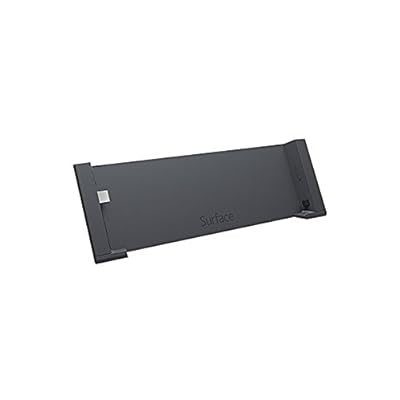
Microsoft Docking Station for Surface Pro and Surface Pro 2 G5Y-00001
Nr produktu:
109535
PLN 452
Price Details
Excluding Shipping & Custom charges ( Shipping and custom charges will be calculated on checkout )
*All items will import from Stany Zjednoczone
0 ratings
Napisz recenzję
w magazynie
 Zaimportowano ze sklepu USA
Zamów teraz i otrzymaj około Piątek, Lipiec 17
Bezpieczna transakcja
Ubuy dokłada wszelkich starań, aby chronić Twoje bezpieczeństwo i prywatność. Nasz zaawansowany system bezpieczeństwa płatności zapewnia poufność poprzez szyfrowanie Twoich danych podczas transmisji przy użyciu protokołów AES (Advanced Encryption Standards) i SSL (Secure Socket Layer). Twoje dane płatności są w 100% bezpieczne, ponieważ nie udostępniamy ich zewnętrznym sprzedawcom.
Nasi czołowi partnerzy logistyczni


Transform your Surface Pro into a powerful workstation with our versatile docking station.

Fast
Shipping

Free
Return*

Bezpieczne pakowanie

100% oryginalne produkty

PCI DSS Compliance

ISO 27001 Certified


Note: Step Down Voltage Transformer required for using electronics products of Stany Zjednoczone store (110-120). Recommended power converters Kup Teraz.


Co wyróżnia ten produkt
Multiple Ports
Equipped with various ports including USB 3.0, HDMI, and Ethernet, this docking station enhances connectivity, allowing seamless integration of peripherals for enhanced productivity.
Designed for Surface
Tailored specifically for Surface Pro and Pro 2, ensuring optimal performance and a perfect fit, without compromising the device's aesthetics or functionality.
Easy Setup
Featuring a plug-and-play design, this docking station allows for quick and hassle-free connection, saving time for users while providing immediate access to essential features.
Szczegóły Produktu
| Item Weight | 1.3 lbs (590 grams) |
Dla kogo jest przeznaczony?

-
Mobile Professionals
Ideal for professionals on the go who need to quickly connect to multiple devices in various locations.
-
Home Office Users
Perfect for individuals working from home who require a convenient hub for peripherals and larger display connections.
-
Creative Users
Great for artists and designers who need to connect multiple devices for enhanced productivity and creativity.

-
Budget-Conscious Users
Not suitable for users seeking cost-effective options, as it may be priced higher than basic docking solutions.
-
Occasional Users
Inappropriate for users who only occasionally connect devices, as a simpler solution suffices for infrequent use.
-
Gaming Enthusiasts
Not designed for gaming setups that require high-performance specifications or multiple high-speed connections.
OPIS PRODUKTU
Microsoft Docking Station for Surface Pro and Surface Pro 2 G5Y-00001
About This Item
Upgrade your Microsoft Surface Pro experience with the Microsoft Docking Station for Surface Pro and Surface Pro 2 G5Y-00001. This versatile docking station provides a seamless way to connect your Surface Pro device to a desktop, giving you a desktop-like experience with enhanced productivity and convenience. Designed specifically for the Surface Pro and Surface Pro 2, this docking station offers a range of connectivity options. It features a USB 3.0 port, a Gigabit Ethernet port, a Mini DisplayPort, an audio output, and a Power Input for power supply.
With these ports, you can easily connect your peripherals, such as a mouse, keyboard, monitor, and speakers, to create a personalized workstation setup. The Microsoft Docking Station for Surface Pro and Surface Pro 2 G5Y-00001 is built with high-quality materials to ensure durability and reliability. Its sleek and compact design seamlessly integrates with your Surface Pro, making it a stylish addition to your workspace. Plus, the docking station is easy to set up and use, allowing you to quickly switch between mobile and desktop modes without any hassle. With this docking station, you can transform your Surface Pro into a full-fledged desktop computer with ease.
Whether you're working on a project, streaming videos, or browsing the web, this docking station enhances your productivity and improves your overall computing experience. Upgrade your Surface Pro setup with the Microsoft Docking Station for Surface Pro and Surface Pro 2 G5Y-00001, and enjoy the benefits of a desktop-like experience while preserving the portability and versatility of your Surface Pro device. Shop now and take your Surface Pro to the next level.
Masz jakieś zapytanie? Porozmawiaj z nami
Pytania i odpowiedzi klientów
-
pytanie:
What devices are compatible with the Microsoft Docking Station for Surface Pro and Surface Pro 2?
odpowiedź: The Microsoft Docking Station for Surface Pro and Surface Pro 2 is specifically designed to work with the Surface Pro and Surface Pro 2 models. This ensures seamless integration and optimal performance, allowing you to connect multiple peripherals like monitors, keyboards, and mice. If you own a Surface Book or Surface Go, the docking station will not be compatible as each device has distinct ports and features. Users appreciate the docking station for its ability to transform their Surface device into a functional desktop replacement, particularly in office environments. -
pytanie:
How do I connect my Surface Pro to the docking station?
odpowiedź: Connecting your Surface Pro to the docking station is straightforward. Simply align the device with the docking station and press down until it is firmly in place. The docking station utilizes the Surface Connect port for a secure connection. This allows you to connect external displays via HDMI or Mini DisplayPort and other USB accessories seamlessly. Setting up your workspace for enhanced productivity becomes effortless, especially for remote work scenarios or professional environments, providing you access to your required tools with a single connection. -
pytanie:
What ports are available on the Microsoft Docking Station?
odpowiedź: The Microsoft Docking Station for Surface Pro and Surface Pro 2 features a variety of ports to enhance connectivity. It includes a Mini DisplayPort for video output, an HDMI port, multiple USB 3.0 ports, an Ethernet port for wired internet access, and a dedicated Surface Connect port. This range of ports allows users to connect to external monitors, printers, and wired networks, making it an excellent solution for multitasking and increased efficiency in work settings, especially where high-speed internet and external display connections are crucial. -
pytanie:
Can I use the docking station while my Surface Pro is charging?
odpowiedź: Yes, you can utilize the Microsoft Docking Station while your Surface Pro is charging. The docking station is designed to provide power to your Surface device through the Surface Connect port while allowing for the connection of peripherals. This dual functionality ensures that your device remains charged during intensive work sessions, which is particularly beneficial for professionals who rely on their devices throughout the day. This makes multitasking more efficient by eliminating the need to constantly check battery levels. -
pytanie:
Is the docking station portable?
odpowiedź: The Microsoft Docking Station is relatively compact, designed for desktop use but can be moved if needed. Its lightweight design makes it easier to transport between locations, such as home and office. Users often find this convenient when they have a hybrid work model, needing quick access to their peripherals without complicated setups. However, for frequent travelers, we recommend the less bulky Surface adapters for mobile use, maintaining flexibility without added weight. -
pytanie:
Can the docking station support dual monitors?
odpowiedź: Yes, the Microsoft Docking Station supports dual-monitor setups. By utilizing the Mini DisplayPort and HDMI outputs, you can connect two separate displays, enhancing your productivity with expanded screen real estate. This feature is particularly useful for tasks requiring multiple windows or applications open simultaneously, such as programming, video editing, or data analysis. Users often report a significant boost in efficiency when working with dual monitors, making it a favored setup for many professionals. -
pytanie:
What is the maximum resolution supported by the docking station?
odpowiedź: The Microsoft Docking Station can support high-definition resolutions up to 4K via the Mini DisplayPort connection and Full HD via HDMI. This capability ensures that external displays render clear, crisp visuals, making it ideal for graphic design, video playback, and detailed presentations. Users often find that this resolution support elevates their viewing experience, especially when engaged in creative tasks or remote presentations where quality matters. -
pytanie:
Does the docking station have built-in audio capabilities?
odpowiedź: Yes, the Microsoft Docking Station has built-in audio capabilities when connected to external monitors that support audio output. By using the HDMI port, audio will transmit through compatible monitors, allowing for a complete multimedia experience. This setup is excellent for conference calls or video presentations, ensuring that sound quality complements visual content. Additionally, users can connect external speakers for enhanced audio, making it suitable for a variety of multimedia tasks. -
pytanie:
What is the primary advantage of using a docking station?
odpowiedź: The primary advantage of using the Microsoft Docking Station is the convenience it offers in connecting multiple devices with a single connection. It enhances productivity by allowing users to transition quickly from a portable device to a full desktop experience. This is particularly beneficial for remote workers or those in need of a comprehensive workspace setup, as it minimizes cable clutter and simplifies the process of engaging with external peripherals. -
pytanie:
Where can I buy the Microsoft Docking Station for Surface Pro and Surface Pro 2 in Poland?
odpowiedź: You can purchase the Microsoft Docking Station for Surface Pro and Surface Pro 2 (G5Y-00001) through Ubuy in Poland. Ubuy offers a variety of electronic products, including accessories for your Surface devices, ensuring you find the right technology to enhance your productivity and workspace setup with ease.
Microsoft Docking Stations Editorial Review
The Microsoft Surface Pro docking station is a well-made product that perfectly fits Surface Pro II. The dock has one USB 3.0 port on the back, and a charger that can use both 110v and 230v, delivering 12v dc. A mini-display port adapter connects the external monitor and touch screen computer. An AC adapter with no additional cables comes with the product. While it has received great reviews praising its quality and functionality, some users have encountered technical difficulties. Some mistakenly received a Surface Pro 3 docking station instead of the one for Pro 1/2. Others found it shut down their Surface Pro while in use.
Opinie i oceny klientów
1 oceny klientów
-
5 gwiazdka
0%
-
4 gwiazdka
100%
-
3 gwiazdka
0%
-
2 gwiazdka
0%
-
1 gwiazdka
0%
Zrecenzuj ten produkt
Podziel się opinią z innymi klientami
Zalety
- Well-made and fits Surface Pro II perfectly
- One USB 3.0 port
- Able to use both 110v and 230v
- Mini-display port adapter connects the external monitor and touch screen computer
- Comes with its own AC adapter
- High quality functional product
Wady
- Some users encountered technical difficulties with the product
Platform Trust & Buyer Confidence

MT
Mohd
Verified buyer
“The product received very good packaging & safe…Thank You”
16 June 2026 · via Trustpilot
SJ
Shawati
Verified buyer
“Accurate delivery timing given”
16 June 2026 · via Trustpilot
YB
Youcef
Verified buyer
“Not madly expensive like I thought, and much quicker than promised.”
15 June 2026 · via Trustpilot
LM
Leila
Verified buyer
“Never dealt with Ubuy before, but everything worked out great. Seamless cross border purchasing and shipping. Thanks!”
6/7/2026 · via Trustpilot
KA
Kwame
Verified buyer
“The process was smooth, with clear communication and timelines. This was my 1st purchase and I am really impressed. I will definitely be coming back.”
12 June 2026 · via Trustpilot
Bezpieczna realizacja zamówienia
Global Delivery
Easy Returns
Genuine Products
Historia ceny produktu
Ważne informacje
- Ograniczenia: W przypadku produktów wysyłanych za granicę należy pamiętać, że wszelkie gwarancje producenta mogą być nieważne; opcje serwisowe producenta mogą być niedostępne; instrukcje obsługi produktów, podręczniki i ostrzeżenia dotyczące bezpieczeństwa mogą nie być dostępne w języku kraju docelowego; produkty (i materiały towarzyszące) mogą nie spełniać norm wykonania, specyfikacji i wymogów dotyczących oznaczeń kraju docelowego; produkty mogą nie spełniać standardów dotyczących napięcia i innych norm elektrycznych kraju docelowego (co w stosownych przypadkach wymaga użycia adaptera lub konwertera). Odbiorca jest odpowiedzialny za sprawdzenie, czy produkt może zostać legalnie zaimportowany do kraju docelowego. W przypadku zamawiania produktów w sklepie Ubuy lub u jego partnerów odbiorca jest oficjalnie zgłoszonym importerem i musi spełniać wszystkie wymogi przepisów oraz regulacji kraju docelowego.
- Nie wszystkie produkty znajdujące się na Ubuy są na sprzedaż, ponieważ Ubuy to globalna wyszukiwarka. Produkty podlegają przepisom eksportowym/handlowym.
PLN 452
Zamów teraz i otrzymaj około Piątek, Lipiec 17
Ten produkt nie jest ograniczony w moim kraju. (Kliknij powyższy link, jeśli ten produkt nie jest ograniczony w Twoim kraju, aby nasz zespół sprawdził i zezwolił na jego sprzedaż).
QTY:
Bezpieczna transakcja
Ubuy dokłada wszelkich starań, aby chronić Twoje bezpieczeństwo i prywatność. Nasz zaawansowany system bezpieczeństwa płatności zapewnia poufność poprzez szyfrowanie Twoich danych podczas transmisji przy użyciu protokołów AES (Advanced Encryption Standards) i SSL (Secure Socket Layer). Twoje dane płatności są w 100% bezpieczne, ponieważ nie udostępniamy ich zewnętrznym sprzedawcom.
Nasi czołowi partnerzy logistyczni
Fastest cross-border delivery
Cechy i zalety
- Compatible with Surface Pro and Surface Pro 2.
- Offers 1 x USB 3.0 port and 3 x USB 2.0 ports for extensive connectivity.
- Includes 1 x RJ-45 Ethernet port for a reliable internet connection.
- Features 1 x Mini DisplayPort for additional display capabilities.
- Comes with 3.5 mm headphone and mic inputs for audio needs.
- Power adapter included for immediate setup.