Computer Shortcuts QuickStudy Laminated Reference Guide Quick Study Computer
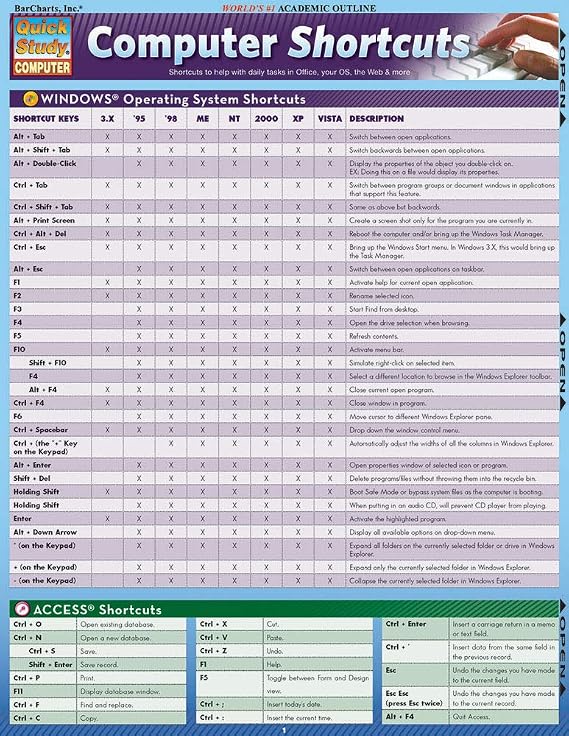
This 2-panel (4-page) guide points out helpful shortcuts that can be found within the most popular Windows PC and Apple Macintosh software.
Computer Shortcuts QuickStudy Laminated Reference Guide Quick Study Computer
Nr produktu: 57413616

Computer Shortcuts QuickStudy Laminated Reference Guide Quick Study Computer

Nr produktu: 57413616

PLN 49

Price Details

Excluding Shipping & Custom charges ( Shipping and custom charges will be calculated on checkout )

*All items will import from Stany Zjednoczone

w magazynie
Stany Zjednoczone Zaimportowano ze sklepu USA

QTY:

Zamów teraz i otrzymaj około Sobota, Czerwiec 27
Nasi czołowi partnerzy logistyczni
  • fedex
  • dhl
This 2-panel (4-page) guide points out helpful shortcuts that can be found within the most popular Windows PC and Apple Macintosh software.
Gwarancja U-Care:
Nic
Wybierz plan
fast shipping

Fast
Shipping

free return

Free
Return*

Bezpieczne pakowanie

Bezpieczne pakowanie

100% oryginalne produkty

100% oryginalne produkty

pci-dss

PCI DSS Compliance

iso certified

ISO 27001 Certified


paypal payment
visa payment
mastercard payment
bank transfer payment
przelewy24 payment
blik payment
Note: Step Down Voltage Transformer required for using electronics products of Stany Zjednoczone store (110-120). Recommended power converters Kup Teraz.

Co wyróżnia ten produkt

Comprehensive Coverage
This guide includes an extensive list of computer shortcuts across various software, making it an essential tool for improving productivity and efficiency in both personal and professional settings.
Durable Material
Made from high-quality laminated material, this reference guide is resistant to wear and tear, ensuring longevity and protection against spills and stains for repeated use in busy environments.
Portable Design
The compact pamphlet format allows for easy transportation, making it convenient to reference while working on-the-go, ideal for students, professionals, or anyone looking to boost their computer skills.

Szczegóły Produktu

Find the best Computer Shortcuts Quick Study at Ubuy Poland. Get quick access to essential computer shortcuts. Shop now and improve your productivity!
  • 2-panel (4-page) guide for saving time while using Windows PC and Apple Macintosh software
  • Points out helpful shortcuts for Windows Operating System, Access, FrontPage, PowerPoint, Publisher, QuarkXPress, InDesign, Quicken, UNIX/Linux, Internet Explorer, Mozilla Firefox, Opera, Apple Macintosh
  • Includes special character shortcuts for word processing
  • Useful for surfing the Web and balancing virtual checkbooks
  • Published in September 2008
  • Part of the Quick Study Computer Misc. Supplies series
Item Weight0.5 lbs (230 grams)

Dla kogo jest przeznaczony?

Suitable For
  • Students

    Helpful for students learning computer software, providing quick reference to essential shortcuts for efficient study.

  • Office Workers

    Ideal for office professionals needing quick access to keyboard shortcuts to enhance productivity and streamline tasks.

  • Beginner Users

    Great for newcomers to computers, helping them quickly learn and memorize essential shortcut keys for various applications.

Not Suitable For
  • Advanced Users

    Not suitable for advanced users who already know shortcuts, may find it too basic and lacking in depth.

  • Graphical Designers

    Limited utility for graphic designers who require specialized shortcuts for design software beyond basic functionalities.

  • Casual Users

    Casual users may not benefit significantly; shortcuts could be overwhelming and not frequently needed for basic tasks.

OPIS PRODUKTU

Computer Shortcuts QuickStudy Laminated Reference Guide Quick Study Computer

Masz jakieś zapytanie? Porozmawiaj z nami

Pytania i odpowiedzi klientów

  • pytanie: What are the benefits of using computer shortcuts?

    odpowiedź: Utilizing computer shortcuts significantly enhances your efficiency and productivity while working. Instead of navigating through multiple menus, you can execute commands with a simple keyboard combination, saving you time and effort. For instance, using 'Ctrl+C' to copy and 'Ctrl+V' to paste can streamline your workflow drastically. This is particularly useful for professionals who work with large datasets or need to manage numerous documents simultaneously.
  • pytanie: How can I learn computer shortcuts quickly?

    odpowiedź: Learning computer shortcuts can be done effectively through repeated practice and utilizing cheat sheets. A Quick Study guide can provide you with a comprehensive list of the most essential shortcuts tailored to your operating system. Regularly referencing these shortcuts while you work will help commit them to memory. For example, practicing the shortcuts for document formatting in word processors can vastly improve your document creation speed.
  • pytanie: Are computer shortcuts the same across different platforms?

    odpowiedź: No, computer shortcuts can vary significantly between operating systems and applications. For instance, 'Ctrl+Z' undoes an action on Windows, while 'Command+Z' does the same on macOS. Familiarizing yourself with the shortcuts specific to your frequently used software will enhance your effectiveness. This can have a major impact on your productivity, especially if you work in a mixed-platform environment.
  • pytanie: Which computer shortcuts are most useful for office work?

    odpowiedź: Some of the most useful shortcuts for office work include 'Ctrl+S' for saving documents, 'Alt+Tab' for switching between open applications, and 'Ctrl+A' to select all text. Knowing these shortcuts can accelerate your workflow and reduce the time spent on repetitive tasks. For instance, if your job involves frequent file management, mastering these shortcuts will make navigating between documents more efficient.
  • pytanie: How do I customize keyboard shortcuts on my computer?

    odpowiedź: Customizing keyboard shortcuts can usually be done through the settings or preferences menu of most software applications. This feature allows you to set your own combinations for specific tasks. For example, if you use certain commands frequently, personalizing shortcuts can enhance your workflow. A graphic designer might customize shortcuts in design software to speed up their creative process.
  • pytanie: Can computer shortcuts help with accessibility?

    odpowiedź: Absolutely, computer shortcuts can greatly improve accessibility for users with disabilities. Many shortcuts are designed to reduce reliance on a mouse, enabling users to navigate and interact with software more easily. For individuals with mobility restrictions, utilizing keyboard shortcuts can facilitate smoother operation of their devices, making technology more inclusive and user-friendly.
  • pytanie: How do I remember computer shortcuts longer-term?

    odpowiedź: To retain computer shortcuts long-term, consistent usage is key. Incorporating these shortcuts into your daily workflow will help embed them in your memory. Using mnemonic devices can also aid memorization. For instance, you might associate 'Ctrl+P' with 'Print' because both words start with 'P'. Regular practice in relevant contexts, like document creation, will reinforce your memory effectively.
  • pytanie: Where can I find a comprehensive list of computer shortcuts?

    odpowiedź: A Quick Study guide is an excellent resource for finding a comprehensive list of computer shortcuts. It condenses essential information into an easy-to-reference format, making it a perfect learning tool for users of all skill levels. Utilizing such a guide can help you quickly identify the most relevant shortcuts for your needs, enhancing your productivity during tasks.
  • pytanie: How do different software applications utilize shortcuts?

    odpowiedź: Different software applications have unique sets of shortcuts tailored to their functionalities. For example, word processors have shortcuts geared towards text formatting, while spreadsheet programs focus on data manipulation. Familiarizing yourself with these specialized shortcuts can help maximize your efficiency. In a data analysis role, knowing the shortcuts for navigating and manipulating data in spreadsheets can significantly speed up your analysis tasks.
  • pytanie: Where can I buy Computer Shortcuts Quick Study Computer Misc. Supplies?

    odpowiedź: You can purchase the Computer Shortcuts Quick Study guide from Ubuy in Poland. Ubuy offers a variety of educational resources, including this guide, which is designed to help you enhance your computer skills by providing a concise summary of essential shortcuts.

QuickStudy Templates Editorial Review

Customer reviews for the Computer Shortcuts Quick Study Computer Misc. Supplies are mixed. While some customers find it to be a very useful and affordable product with good information, others find it to be outdated and not helpful at all. It is worth noting that some reviews mention that the product was last updated for windows VISTA 2007, which makes it quite old. However, others appreciate the convenient shortcut collection and find it handy to keep nearby. Overall, if you have an older Windows operating system and are looking for a quick reference guide to computer shortcuts, this product may be worth checking out. However, if you have a more recent operating system, it is probably best to find a more up-to-date resource.

Opinie i oceny klientów

5.0
1 oceny klientów
  • 5 gwiazdka
    100%
  • 4 gwiazdka
    0%
  • 3 gwiazdka
    0%
  • 2 gwiazdka
    0%
  • 1 gwiazdka
    0%

Zrecenzuj ten produkt

Podziel się opinią z innymi klientami

Zalety

  • Very affordable
  • Convenient shortcut collection
  • Handy to keep nearby
  • Good information for study

Wady

  • Outdated for newer Windows operating systems

Historia ceny produktu

Ważne informacje

  • Ograniczenia: W przypadku produktów wysyłanych za granicę należy pamiętać, że wszelkie gwarancje producenta mogą być nieważne; opcje serwisowe producenta mogą być niedostępne; instrukcje obsługi produktów, podręczniki i ostrzeżenia dotyczące bezpieczeństwa mogą nie być dostępne w języku kraju docelowego; produkty (i materiały towarzyszące) mogą nie spełniać norm wykonania, specyfikacji i wymogów dotyczących oznaczeń kraju docelowego; produkty mogą nie spełniać standardów dotyczących napięcia i innych norm elektrycznych kraju docelowego (co w stosownych przypadkach wymaga użycia adaptera lub konwertera). Odbiorca jest odpowiedzialny za sprawdzenie, czy produkt może zostać legalnie zaimportowany do kraju docelowego. W przypadku zamawiania produktów w sklepie Ubuy lub u jego partnerów odbiorca jest oficjalnie zgłoszonym importerem i musi spełniać wszystkie wymogi przepisów oraz regulacji kraju docelowego.
  • Nie wszystkie produkty znajdujące się na Ubuy są na sprzedaż, ponieważ Ubuy to globalna wyszukiwarka. Produkty podlegają przepisom eksportowym/handlowym.